JnK Plugins
How to Auto-Delete Old Form Entries in WordPress
Someone on the CFDB7 support forum asked it about as plainly as it can be asked: “Is it possible to have all emails deleted that are X number of days old.” The answer they got pointed to a paid add-on, which they didn’t want to buy for one setting.
Fair enough. Old form entries pile up quietly. A contact form that gets five messages a day holds close to two thousand names, emails and phone numbers after a year, most of them from conversations that finished long ago. That’s clutter, and it’s also personal data you’re keeping with no reason to.
So here’s how to make WordPress forget old entries on a schedule. We’ll start with what your form plugin may already do, then the manual and code options, and the limits of each.
Why bother deleting old entries at all
The usual reason is privacy law. GDPR and similar rules lean on an idea called data minimisation: keep personal data only as long as you need it for the purpose you collected it for. A sales enquiry from three years ago that went nowhere is hard to justify keeping.
We’re not lawyers and this isn’t legal advice. How long you should keep entries depends on what the form is for (a job application is not a newsletter signup) and where you and your visitors are. Check with whoever advises you, pick a number, and write it in your privacy policy. Our notes on GDPR and WordPress forms cover the rest of the form side, like consent checkboxes and IP storage.
Once you have a number, the job is making sure it actually happens. A retention period that relies on you remembering to clean up every month won’t happen. Ask us how we know.
Check your form plugin first
Some form plugins have a retention setting built in. Here’s what we could confirm:
| Plugin | Built-in auto-delete? | Where |
|---|---|---|
| Gravity Forms | Yes | Form Settings, Personal Data: keep entries, trash them, or delete them after a number of days |
| WPForms | Paid plans only (Lite doesn’t store entries) | Form Settings, General, Advanced: “Purge Entries Automatically” |
| Fluent Forms | Yes, in the free plugin | The form’s Settings & Integrations: “Enable auto delete old entries” |
| Forminator | Yes | Forminator Settings, Privacy (submissions), with a per-form override |
| Flamingo (for Contact Form 7) | No, for normal messages | Only spam is moved to Trash after 30 days |
| CFDB7 (for Contact Form 7) | Not in the free plugin | A paid add-on |
A few details worth knowing. Gravity Forms runs its cleanup in the daily cron task, so the number of days is a minimum and entries can hang around up to a day longer. Its policy also covers “Save and Continue” drafts. WPForms says plainly that its purge deletes for good, and suggests exporting first. Forminator lets you set the age in days, weeks, months or years, and if a form is set to “Use default” it follows the global setting, which has surprised a few people who found older submissions missing.
If your plugin has the setting, use it. That’s the cleanest fix because it deletes at the source.
Contact Form 7 is the awkward one. CF7 itself stores nothing, so the entries live in whatever storage plugin you added. If you’re not sure where yours end up, we wrote that up here. We read the Flamingo source (2.6.4) to check: its hourly cron only moves spam older than FLAMINGO_MOVE_TRASH_DAYS (30 by default) to the Trash. Real messages stay forever.
Option 1: delete by hand on a schedule
The zero-code way. Put a recurring reminder in your calendar, open your entries screen, filter by date, select everything older than your cut-off, and bulk delete. Most plugins let you do this from the list screen; we walk through it per plugin in how to bulk delete form entries.
It works. It’s also the first thing to slip when you’re busy, and if a regulator or a customer asks how you enforce your retention period, “I try to remember” is a weak answer. Fine for a small site with one form. Shaky beyond that.
Option 2: a WP-Cron snippet
If your storage has no setting, a few lines of code can do it. Here’s one for Flamingo, which saves Contact Form 7 messages as posts of type flamingo_inbound. It runs once a day and permanently deletes messages older than 90 days, including ones in spam and the Trash.
// Delete Flamingo messages older than 90 days, once a day.
add_action( 'init', function () {
    if ( ! wp_next_scheduled( 'my_purge_old_flamingo' ) ) {
        wp_schedule_event( time(), 'daily', 'my_purge_old_flamingo' );
    }
} );

add_action( 'my_purge_old_flamingo', function () {
    $ids = get_posts( array(
        'post_type'      => 'flamingo_inbound',
        'post_status'    => array( 'publish', 'flamingo-spam', 'trash' ),
        'date_query'     => array( array( 'before' => '90 days ago' ) ),
        'fields'         => 'ids',
        'posts_per_page' => 200,
    ) );
    foreach ( $ids as $id ) {
        wp_delete_post( $id, true );
    }
} );
Some notes before you paste that anywhere:
- Put it in a small custom plugin or a code snippets plugin, not your theme’s
functions.php. Switch themes and the cleanup silently stops. - Change
90 days agoto your own period. Take a backup or an export first, becausewp_delete_post( $id, true )skips the Trash. - It handles 200 per run, so a big backlog clears over a few days. That’s deliberate, to keep each run light.
- WP-Cron only fires when someone visits the site. On a quiet site, set up a real server cron that hits
wp-cron.php. - Flamingo also keeps an address book (
flamingo_contact) with names and emails. This snippet doesn’t touch it. Clean that separately if you need to.
The same pattern works for any plugin that stores entries as posts. For plugins with their own database tables, you’d need that plugin’s API or a direct query, and we’d rather not guess at someone else’s table layout in a blog post.
Option 3: erase one person on request
Not a retention policy, but it comes up in the same breath. When one person asks you to delete their data, WordPress has Tools > Erase Personal Data. You enter their email address, they confirm, and WordPress runs every eraser that plugins have registered. Tools > Export Personal Data works the same way for access requests.
The catch: it only reaches plugins that hook into it. Check that your form plugin does before you rely on it.
If your entries go through EntryVault
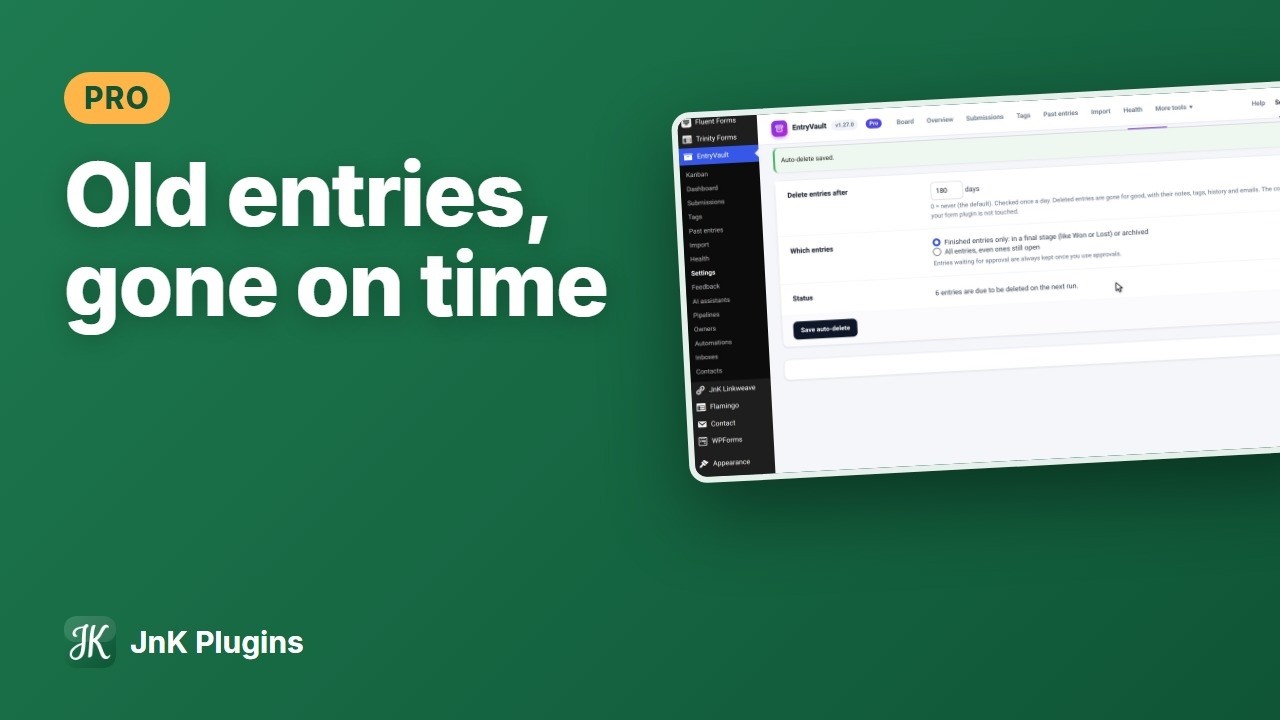
Full disclosure: EntryVault is ours. It’s an entry manager that collects submissions from many form plugins into one board, and the Pro version has an Auto-delete tab under EntryVault > Settings.
You set “Delete entries after N days” (0 means never, which is the default) and it checks once a day. You choose which entries count: “Finished entries only”, meaning ones in a final stage like Won or Lost or archived, which is the default, or “All entries, even ones still open”. Spam counts as finished, so the Spam folder gets emptied too. Entries waiting for approval are always kept once you use approvals. A status line shows how many entries are due on the next run, so you’re not guessing. Deleted entries are gone for good, along with their notes, tags, history and emails. And if your Pro licence lapses, a policy you already set keeps running, so data doesn’t quietly stay longer than you promised. Changing the policy needs Pro.
Now the important limit. The copy in your form plugin is not touched. Auto-delete removes EntryVault’s copy only. If Flamingo, CFDB7, Gravity Forms or another plugin also keeps the entries, they still need their own cleanup using one of the options above. Where EntryVault’s copy is the only one (Contact Form 7 without Flamingo, or WPForms Lite), that limit doesn’t bite.
On the free tier, WordPress’s Export Personal Data and Erase Personal Data tools include EntryVault entries, found by email address. EntryVault is a free download from our site; Auto-delete is in Pro.
Which one should you use
Roughly in this order:
- If your form plugin has a retention setting (Gravity Forms, paid WPForms, Fluent Forms, Forminator), turn it on. Done.
- If it doesn’t, and you’re comfortable with code, use a cron snippet against wherever the entries live.
- If you can’t do either, bulk delete by hand on a fixed date each month, and actually put it in your calendar.
Whatever you pick, count your copies. Entries often live in two or three places at once: the form plugin, a storage add-on, an entry manager, plus the notification email sitting in someone’s inbox. A retention policy that only cleans one of them is a partial policy. Then check back after the first scheduled run and make sure the old entries are really gone.
Frequently asked questions
Does Contact Form 7 delete old messages automatically?
No. Contact Form 7 doesn’t store messages at all. If you use Flamingo to save them, Flamingo only moves spam to the Trash after 30 days and keeps normal messages forever, so you need a cron snippet or manual cleanup.
Is deleting entries after a set number of days enough for GDPR?
It helps with data minimisation, but how long to keep entries depends on what the form is for and where you operate. We can’t give legal advice, so check the period with whoever advises you and state it in your privacy policy.
Will WP-Cron run my cleanup if nobody visits the site?
No. WP-Cron runs when a page is loaded. On a low-traffic site, add a real server cron job that calls wp-cron.php so the cleanup runs on time.