EntryVault keeps a copy of every message sent through Contact Form 7, WPForms Lite, Elementor Pro, Kadence and 15 more form plugins, in one list inside WordPress. Search it, export it to Excel, and mark who you've answered. Free.
Also works with Gravity Forms, Fluent Forms, Elementor Pro forms, SureForms, Formidable Forms, WS Form, Everest Forms, Jetpack Forms, MetForm, Otter Forms, Spectra Forms, JetFormBuilder, MW WP Form and our own Trinity Forms.
What you can do
Six things, all in the free version.
1
Keep a copy of every entry
Even when your form plugin keeps none. Unlimited entries, in your own database.
2
Find any entry
Search, and filter by form plugin, date, stage, tag or owner. New ones stay marked unread until someone opens them.
3
Export to Excel or CSV
Every field, from one form or all of them, with the columns you pick. JSON too.
4
Bring in your old entries
From Flamingo, CFDB7, Gravity Forms, Fluent Forms and 10 more sources, with their original dates.
5
Keep track of who you answered
A simple board with columns like New, Contacted and Qualified. Add a note, give an entry to a teammate, reply by email from the entry.
6
Show entries on a page
A table with search, showing only the columns you choose. Add it with a block or the [entryvault_table] shortcode.
Pro, when you need more
Several boards, with each form sent to its own. Automations (send an email, call a webhook, add to Mailchimp or MailerLite when something happens). Replies to your emails filed under the right entry. Follow-up reminders. Delete old entries after a number of days. All features
How it works
Three steps.
1
Install the free plugin
Download the zip, then in WordPress go to Plugins, Add New, Upload Plugin. No licence key to type.
2
New entries are saved
EntryVault finds the form plugins you have and starts keeping every new entry. Nothing to set up on your forms.
3
Bring in the old ones
Open Past entries. It shows what your form plugin already holds, like "Flamingo: 30 entries", and brings them in with one click.
Watch it work
A narrated walkthrough of the free and Pro features, on real screens, with chapters.
The problem: Some form plugins keep no copy of what people send, and the rest keep it in separate places.
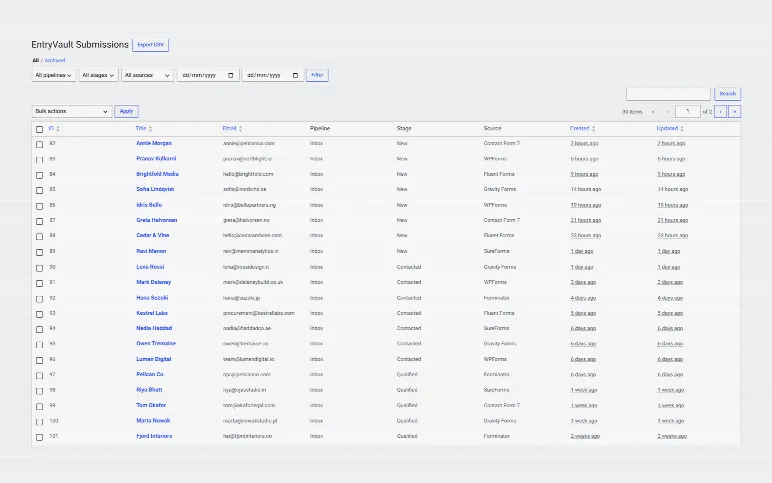
Every entry from every form plugin, in one list
Filter it, change entries in bulk, or export it to a spreadsheet.
Unlimited entries, in your own database
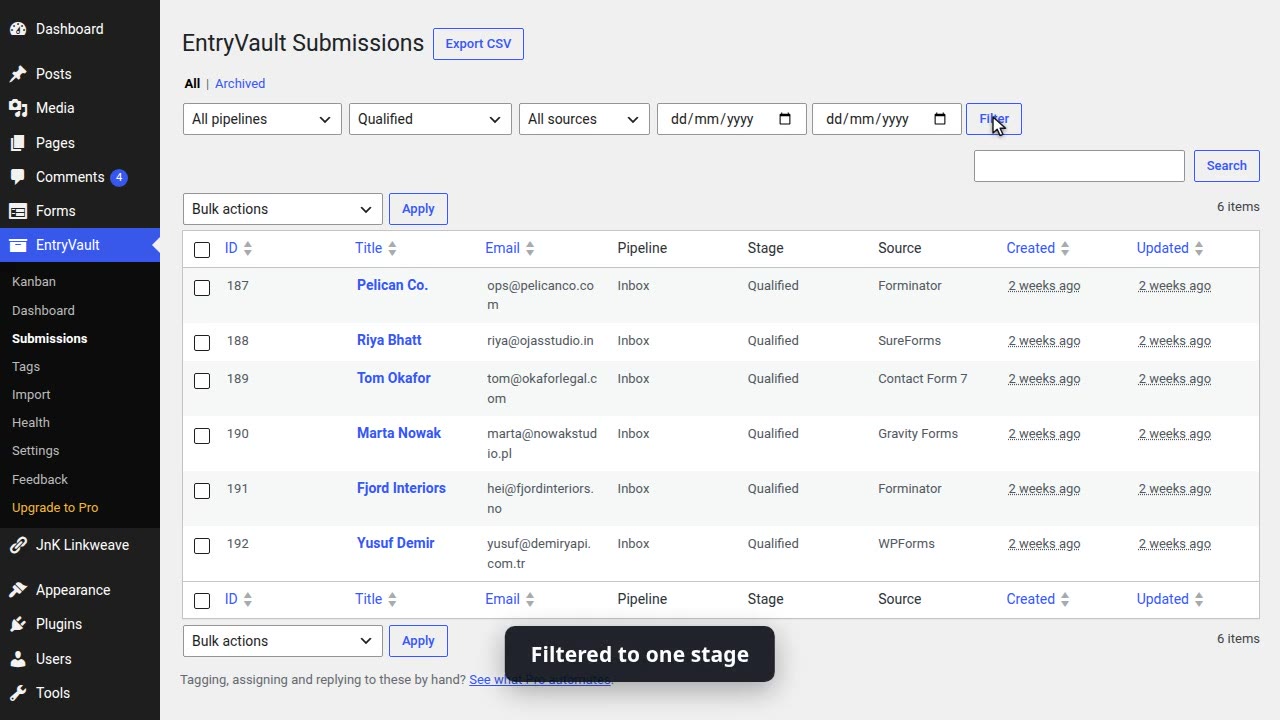
Filter by form plugin, date, stage, tag or owner
New ones stay unread until someone opens them
wp-admin › EntryVault › SubmissionsPro
Submissions: every entry in one list you can filter, change in bulk or export to a spreadsheet.
The problem: Entries come in and nobody knows who answered which.
Keep track of who you answered
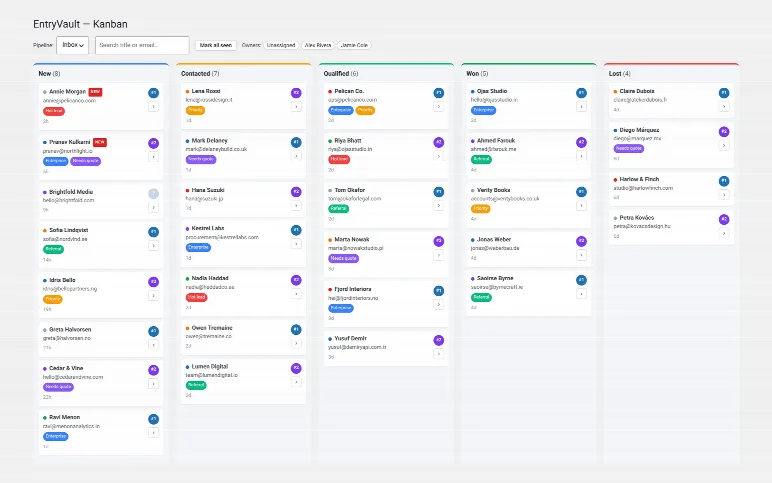
Entries from every form plugin as cards, in columns like New, Contacted and Qualified. Drag a card to move it.
Tags and owners on every card
Give an entry to a teammate
Several boards in Pro
wp-admin › EntryVault › BoardPro
The board: entries from every form plugin you use, as cards you drag from stage to stage, with tags and owners.
The problem: The story of one enquiry ends up spread across your inbox.
One entry, and everything that happened to it
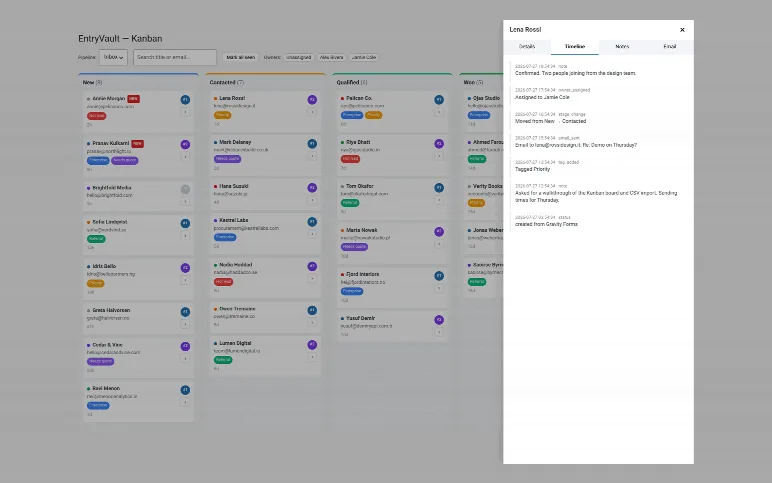
Its stage, owner and tags, what the person sent, and a timeline of every change.
Add a note
Reply by email from the entry
A timeline of every change
wp-admin › EntryVault › One entryPro
One entry: its stage, owner and tags, what the person sent, and a timeline of everything that happened.
The problem: You open WordPress and can't tell what needs you today.
What came in, and what is waiting on you
What came in this week, what is waiting on you, and what changed lately.
This week's entries
What is waiting on you
What changed lately
wp-admin › EntryVault › OverviewPro
Overview: what came in this week, what is waiting on you, and what changed lately.
The problem: Getting entries into a spreadsheet means copying them out one by one.
Export to Excel, CSV or JSON
Tick the columns you want and put them in order. The file holds what the list shows.
Every field, from one form or all of them
Pick the columns and their order
The file matches the list you filtered
wp-admin › EntryVault › ExportPro
Export: pick CSV, Excel or JSON, tick the columns you want and put them in order. The file holds what the list shows.
The problem: Your old entries sit in a spreadsheet or in another plugin.
Bring in your old entries
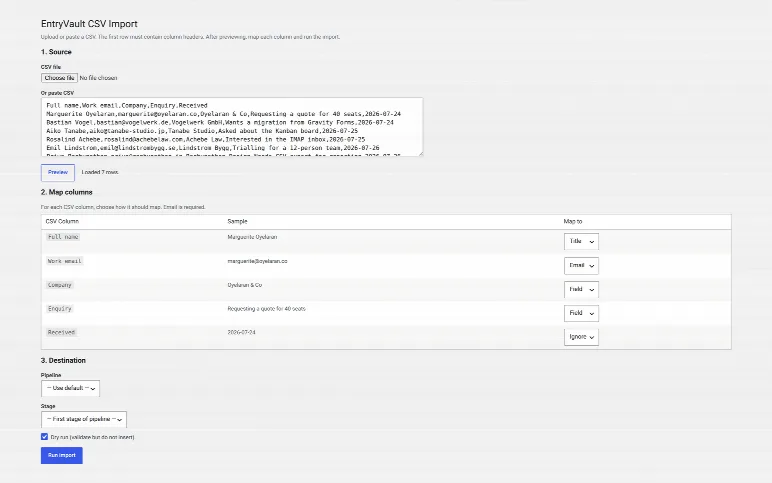
Import a spreadsheet and match each column before anything is saved.
Match each column before anything is saved
Past entries from Flamingo, CFDB7, Gravity Forms, Fluent Forms and 10 more
Those keep their original dates
wp-admin › EntryVault › ImportPro
Import: bring in entries from a spreadsheet and match each column before anything is saved.
The problem: Spam fills your list and ends up in your exports.
Spam waits in its own folder
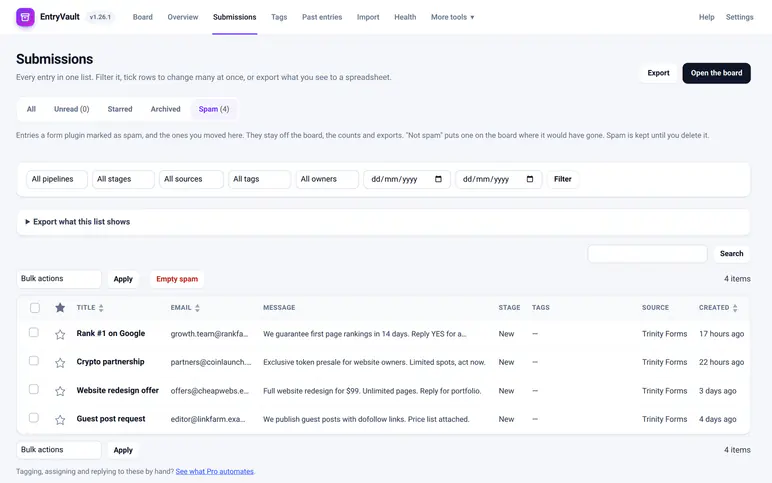
Entries your form plugin flags as spam wait here until you check them.
Off the board
Out of exports
Waits until you check it
wp-admin › EntryVault › Spam folderPro
Spam folder: entries your form plugin flags as spam wait here, off the board and out of exports, until you check them.
The problem: Showing submissions on a page usually needs custom code.
Show entries on a page
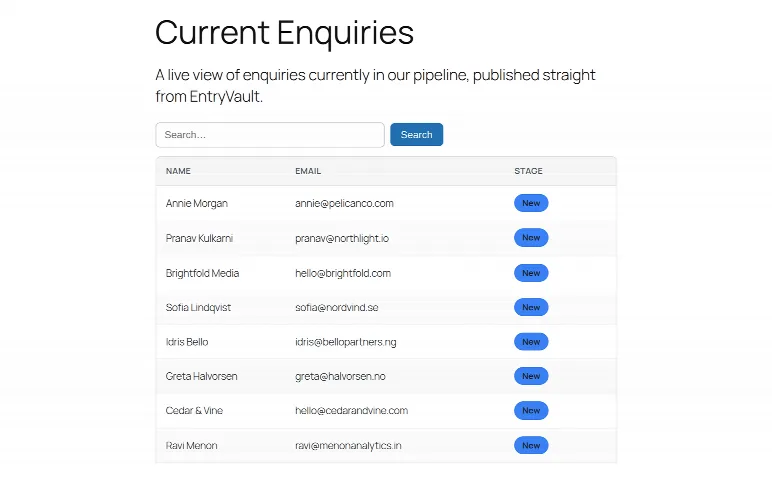
A table with search, showing only the columns you choose.
Add it with a block
Or the [entryvault_table] shortcode
Only the columns you pick
wp-admin › EntryVault › On your sitePro
Show entries on your site as a table, with a shortcode or a block.
The problem: Doing the same steps by hand for every new entry.
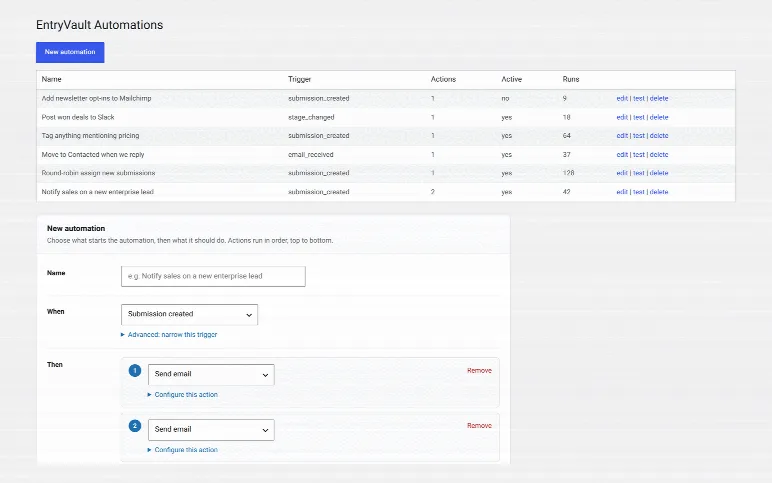
Let new entries sort themselves Pro
When an entry arrives or changes, tag it, assign it, move it or send an email, automatically.
Tag, assign or move entries
Send an email or call a webhook
Add to Mailchimp or MailerLite
wp-admin › EntryVault › AutomationsPro
Automations: when an entry arrives or changes, tag it, assign it, move it or send an email, automatically.
Free vs Pro
Free does the job. Pro saves you time.
What you get
Free
Pro
Keep every entry from 19 form plugins, unlimited
✓
✓
Search, filter, export to CSV, Excel or JSON
✓
✓
Bring in past entries, original dates kept
✓
✓
One board, notes, owners, reply by email
✓
✓
Show entries on a page as a table
✓
✓
Several boards, each form to its own
—
✓
Automations, Mailchimp, MailerLite, webhooks
—
✓
Replies filed under the entry, follow-up reminders
—
✓
Upgrading installs Pro over the free plugin. Your entries and settings stay. Compare every feature
Questions people ask first
Do I have to replace my form plugin?▾
No. Keep the forms you have. EntryVault saves what they send, without changing them.
Does it work with Contact Form 7 without Flamingo?▾
Yes. It saves each message just before Contact Form 7 sends the email, so you keep it even if the email fails. If you already use Flamingo, you can bring those messages in too.
What about entries from before I installed it?▾
Open Past entries. It brings in what your form plugin or Flamingo already stored, with the original dates. If your form plugin stored nothing, there is nothing to bring back, which is why it helps to install it early.
Where are my entries stored?▾
In your own WordPress database. Nothing is sent to us or to another service.
Is it a CRM?▾
It is an inbox for your form entries first. If you want, it also does the simple CRM part: a board for who you answered, notes and an owner on each entry.
Suresh K Meena, builds JnK Plugins
I built EntryVault so form entries stay where they were sent, inside WordPress, ready to use. When you email support, I read it and I usually fix it. Email me a question
Start keeping every entry today.
Free direct from us: every entry saved, searchable and exportable, plus a board for follow-ups. It only keeps entries sent after you install it, so sooner is better. No card, no account.
Occasional posts on WordPress internal linking, forms and entry management — plus release notes. No sequences, no upsell drip, unsubscribe in one click. We send one email to confirm it is really you.
We store your address ourselves and never sell or share it. Privacy.
We use Google Analytics (which sets cookies) to see what's useful and improve the site. It only loads if you accept. Privacy.