The WordPress internal linking plugin that never charges per link.
Linkweave reads your posts on your own server, suggests the links worth adding while you write, and shows you the pages nothing links to. The free version works on every site you own.
Link suggestions in the editor, one click to insert
Your older posts stop getting links the day you publish newer ones.
Internal links are how readers and search engines find their way around your site. WordPress gives you no view of them at all, so the gaps pile up quietly.
Orphan pages you can't see
A post with no internal links pointing at it is hard for anyone to reach. Nothing in WordPress tells you which posts those are.
Linking by hand doesn't scale
Every new post means digging through old ones for places to link. It's fine at 20 posts. By 200, most people quietly stop doing it.
Many tools meter it
Credit allowances look cheap at first. Then you catch yourself deciding whether a link on your own site is worth a credit.
How it works
Three steps, and the first two take a minute.
01
Install the free zip
Plugins › Add New › Upload. It updates itself from your dashboard after that, like any other plugin.
02
Let it read your posts
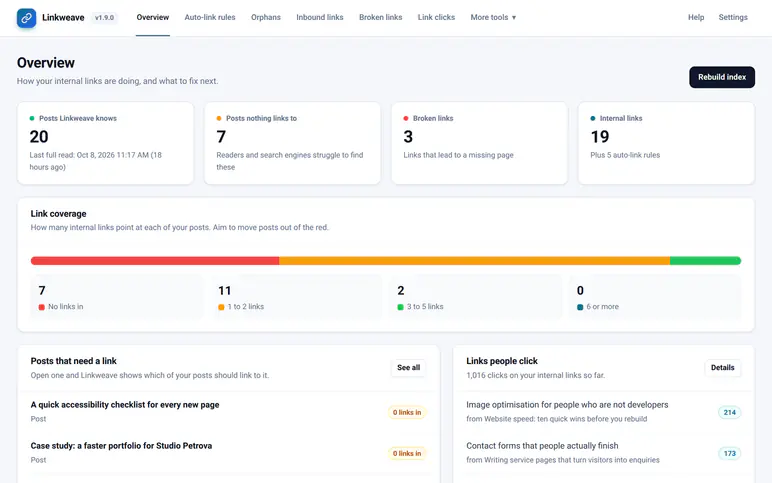
The first index starts by itself when you activate, and runs in the background, about 3 seconds per 1,000 posts in our tests. The orphan and broken-link reports fill in as it goes.
03
Write, and accept what fits
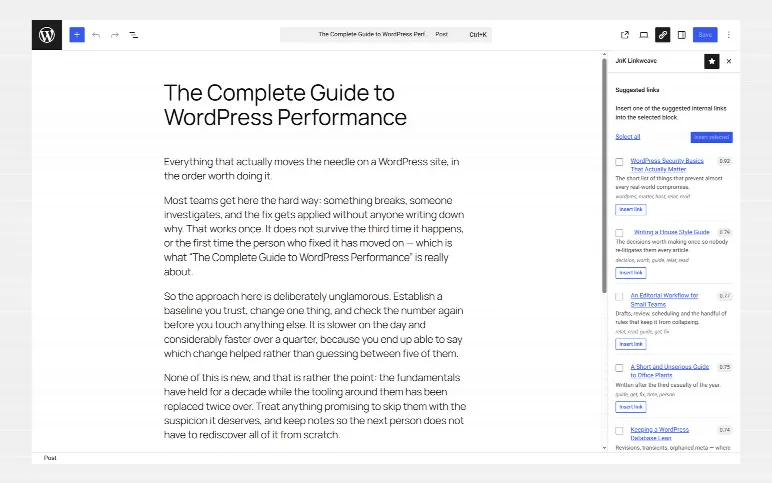
Open any post. Related posts show up in the sidebar, ranked, with the matching words shown. Click one to insert the link. You approve every link yourself.
The sidebar ranks your other posts by how closely they match the one you are writing, and shows the words they share so you can see why.
Works in Gutenberg and the Classic Editor
One click inserts the link into the selected text
Worked out on your own server, nothing sent anywhere
Drafts get suggestions too, from their saved text
wp-admin › Linkweave › Editor suggestionsPro
Suggested links in the editor: your other posts on the same topic, the words they share, and one-click insertion.
Keyword rules, as many as you like
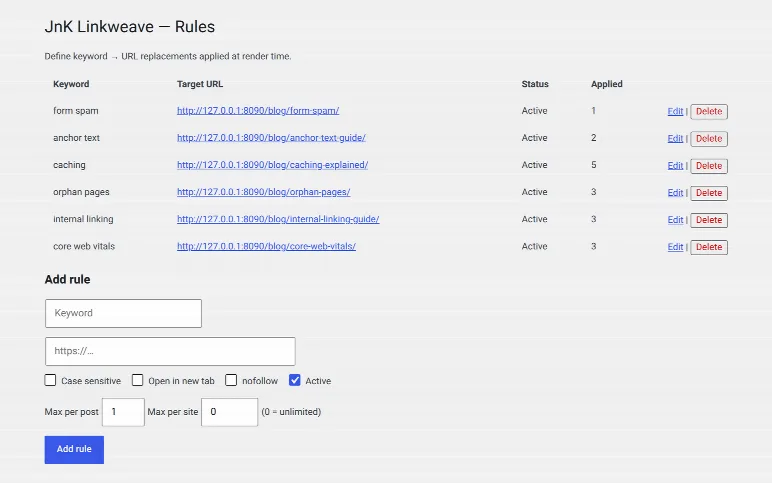
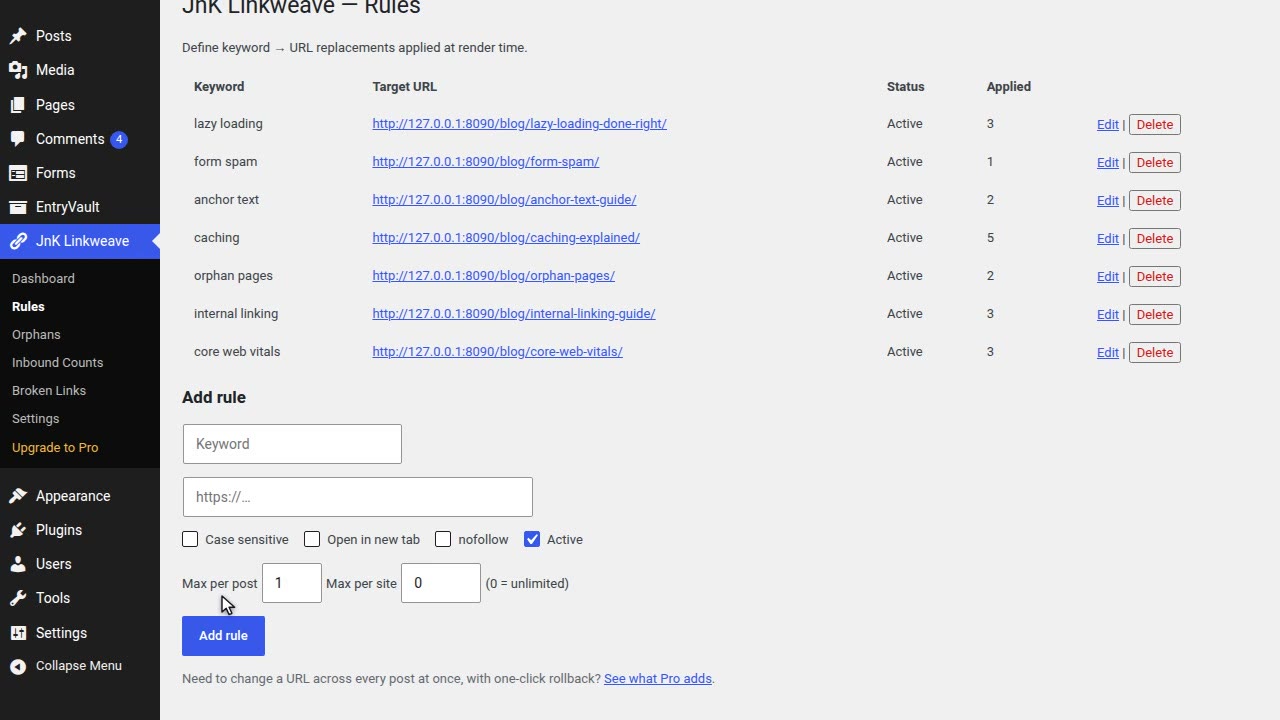
Map a phrase to a URL once and it links across the site. Unlimited rules, free.
Per-post and per-site caps so pages never look spammy
Skips existing links, code, headings and shortcodes
Case sensitivity, new tab and nofollow per rule
wp-admin › Linkweave › Auto-link rulesPro
Auto-link rules: pick a phrase and the page it links to, with limits per post and per site.
Every post nothing links to
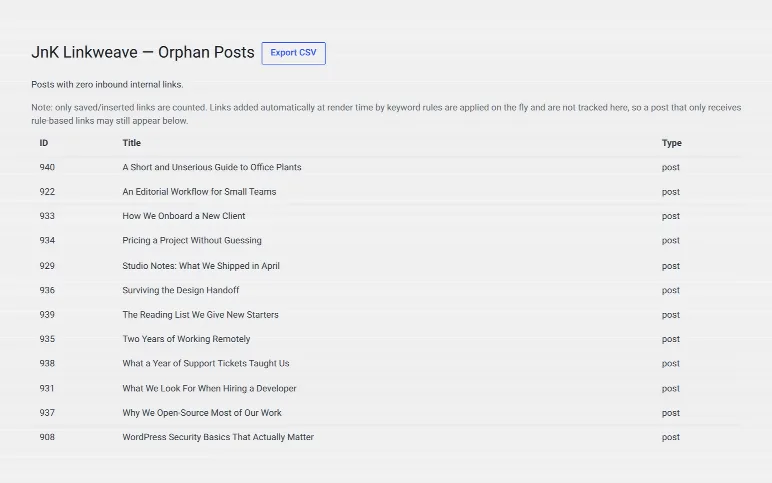
The orphan report lists published posts with zero internal links pointing at them. Those are the ones readers and crawlers never reach.
Free, on every site
Click through to fix each one
CSV export in Pro
wp-admin › Linkweave › Orphan pagesPro
Posts nothing links to, each with a button to find the posts that should link there.
Where your internal links actually go
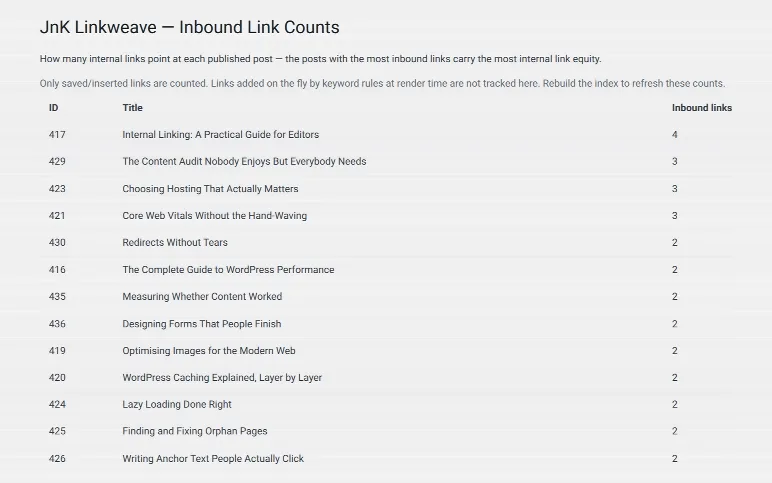
A map of every post, grouped by topic and coloured by how many of your posts link to it, plus a "posts that should link here" list for any page you want to push.
Spot your most and least linked posts
Find posts that should link to a page
Apply those inbound links in bulk with Pro
wp-admin › Linkweave › Inbound linksPro
Inbound links: every post as a square, grouped by topic and coloured by how many posts link to it.
Dead links, caught on a schedule
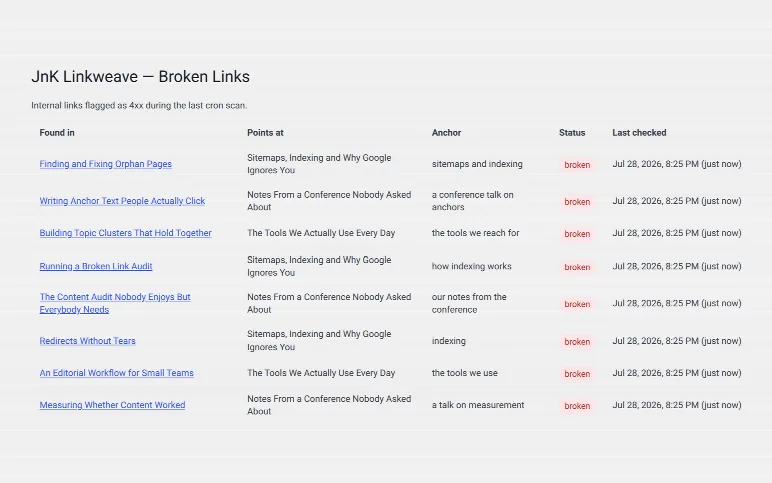
A daily scan checks the links in your posts and lists every one that fails, with the post it sits in and its anchor text.
The report is free
One-click unlink or replace in Pro
No external crawler, it runs on your site
wp-admin › Linkweave › Broken linksPro
Broken links: links that lead to a missing page, where they are, and a one-click fix.
Which internal links people click Pro
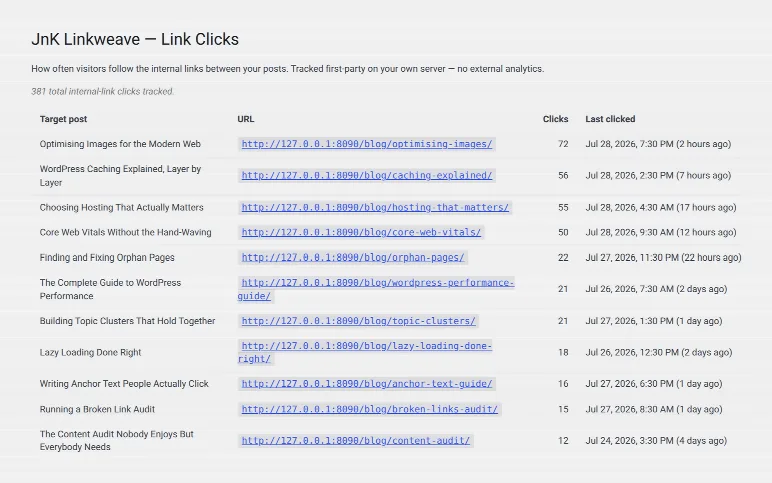
First-party click counts for the links you placed, so you can see which ones do any work.
Stored on your own server
No third-party analytics script
Pair with Search Console data to pick targets
wp-admin › Linkweave › Click analyticsPro
Link clicks: which internal links visitors actually follow, counted on your own server.
Bulk URL changer Pro
Preview a site-wide URL rewrite, apply it, and roll back any batch.
Search Console targeting Pro
Import your GSC data to find posts close to ranking that need links.
Anchor-text report Pro
See which anchors you overuse, and export the lot to CSV.
Optional AI re-ranking Pro
Bring your own OpenAI or Anthropic key. Off by default, no credits.
Link check before you publish Pro
The publish panel counts the post's internal links and offers up to three good matches, one click each.
Links per post, dead ends Pro
Links in and out for every post, the posts that link to none of yours, and a CSV export.
Smarter rules Pro
Other words for the same link, post type or category limits, rel="sponsored", a per-post off switch, CSV import.
Reports for AI tools Pro
AI tools that use the WordPress Abilities API can read your link reports. WordPress 6.9+, read only, off until you turn it on.
You know there are old posts nobody reaches. The free version finds them and suggests links as you write. Plenty of people never need more.
Free, or Solo (3 sites) at $29$21.75/yr
The niche-site owner
A handful of affiliate or content sites
Your money pages need links from the posts that rank. Inbound bulk-apply, Search Console targeting and click analytics are built for that.
Studio, 10 sites at $49$36.75/yr
The agency
Client sites you look after
Run the orphan and broken-link reports on a new client on day one. Client sites are fine on every licence, and nothing is metered per site.
Agency, unlimited sites at $99$74.25/yr
How we compare
You've probably looked at the others. Here's the honest difference.
Every one of these is a decent product. Each tab says when you should pick them instead of us.
Link Whisper
JnK Linkweave
Cheapest plan, per year
1 site, $97
3 sites, $29 list, $21.75 with WELCOME25
Next plan up, per year
3 sites, $197
10 sites, $49 list, $36.75 with WELCOME25
AI
Built in, with an AI credit allowance per tier
Optional, with your own key, no credits
Lifetime licence
Not offered on their pricing
From $89
Pick Link Whisper if
You want AI suggestions working out of the box without your own API key, or you want the best-known tool in the category, with years of fixes behind it.
Pick Linkweave if
You would rather not count credits, want a free version on all your sites, run several sites, or prefer paying once.
Their figures from their own pages, checked 5 October 2026. Prices change; tell us if this is out of date. Full comparison →
LinkBoss
JnK Linkweave
Cheapest plan, per year
1 site, $132 list, $99 sale
3 sites, $29 list, $21.75 with WELCOME25
How links are billed
Credits that expire
Flat, unmetered
Where content is analysed
Their cloud
Your server
Page cap
1,000 pages on "Unlimited" plans
None
Pick LinkBoss if
You want a detailed free audit, add links in big batches, run Shopify or a page builder, or write in a language other than English.
Pick Linkweave if
You link as you publish, your site is over 1,000 pages, or you want your content to stay on your own server.
Their figures from their own pages, checked 17 September 2026. Prices change; tell us if this is out of date. Full comparison →
Internal Link Juicer
JnK Linkweave
Cheapest plan, per year
1 site, $69.99
3 sites, $29 list, $21.75 with WELCOME25
Unlimited sites, per year
$1,299
$99 list, $74.25 with WELCOME25
Free version
1 site
Any number of sites
How links are chosen
Keywords you assign per post
Relevance suggestions, plus keyword rules
Pick Internal Link Juicer if
You work from a keyword map, need links inside page builders, ACF or taxonomy pages, or want WP-CLI.
Pick Linkweave if
You would rather be shown the links than list keywords for every post, or want orphan and broken-link reports free on all your sites.
Their figures from their own pages, checked 17 September 2026. Prices change; tell us if this is out of date. Full comparison →
Linkilo
JnK Linkweave
Cheapest plan, per year
1 site, $149 list, $59 launch
3 sites, $29 list, $21.75 with WELCOME25
Multi-site plan, per year
5 sites, $298 list, $149 launch
10 sites, $49 list, $36.75 with WELCOME25
Free version
None
Yes
Refund window
30 days
14 days
Pick Linkilo if
You want one purchase that also covers redirects, crawl logs and keyword conflicts, or you build with a page builder.
Pick Linkweave if
Internal linking is the job, you already have tools for the rest, and you want to start free.
Their figures from their own pages, checked 17 September 2026. Prices change; tell us if this is out of date. Full comparison →
Rank Math PRO
JnK Linkweave
Price
€7.99/mo billed yearly, whole SEO suite
$29 list, $21.75 with WELCOME25, linking only
Orphan detection
PRO only
Free
Client sites
Not on PRO (Business plan and up)
Every licence
Works with Yoast / AIOSEO
Replaces them
Runs alongside
Pick Rank Math PRO if
You want an SEO suite and linking in one plugin and you own the sites. If you already pay for PRO, try AI Link Genius first.
Pick Linkweave if
You are happy with your SEO plugin, build client sites, or want orphan and broken-link reports free.
Their figures from their own pages, checked 17 September 2026. Prices change; tell us if this is out of date. Full comparison →
One thing that counts against us: Linkweave is not in the WordPress plugin directory right now. The free version is a direct download from us, and it updates itself from your dashboard. All six side by side →
Who's behind it
A small shop, and a real person on the other end.
Suresh K Meena
Builds JnK Plugins
I started Linkweave because I didn't want to pay per link to link my own posts. Ranking related posts is a solved problem, and it runs fine on an ordinary web server.
JnK Plugins is small. When you email support, I read it, and I'm usually the one who fixes it. If something is missing or broken, telling me is the fastest way to get it fixed.
Our own blog runs Linkweave Pro across its posts, updated through the same dashboard updater you get. Read any post there and you're looking at it working.
Not right now. The listing is temporarily closed pending a review, so the free version is a direct download from this site. Once installed it updates itself from your WordPress dashboard like any other plugin.
Does it send my content to an AI service?▾
No. Linkweave finds related posts on your own server, and nothing leaves your site. The optional AI second opinion in Pro only runs if you switch it on and add your own OpenAI or Anthropic key.
Will it slow my site down?▾
In our tests the auto-link pass adds about 0.09ms to a typical post, and indexing runs in the background, never while a visitor waits. Suggestions are cached until the post changes.
Do the links stay if I turn the plugin off?▾
Links you insert from the editor suggestions are saved in the post, so they stay. Links added by keyword auto-link rules are applied when the page renders, so those stop if the plugin is deactivated.
What happens when a Pro licence expires?▾
Pro keeps working for 30 days. After that the Pro tools in your dashboard lock, but related posts, link preview cards and click tracking keep running on your site, and auto-link rules (a free feature) keep running too. Your index, rules and reports are kept. Renew any time to unlock Pro straight away.
Can I get a refund?▾
Yes. Every paid plan has a 14-day money-back guarantee. Email us within two weeks of buying and you get the full amount back.
Occasional posts on WordPress internal linking, forms and entry management — plus release notes. No sequences, no upsell drip, unsubscribe in one click. We send one email to confirm it is really you.
We store your address ourselves and never sell or share it. Privacy.
We use Google Analytics (which sets cookies) to see what's useful and improve the site. It only loads if you accept. Privacy.
 Built and supported by Suresh K Meena. You email, I answer.