JnK Plugins
The Best WordPress Internal Linking Plugins (2026)
Internal links are the quiet workhorses of on-page SEO. They spread ranking signals between your pages, help Google understand which posts are most important, and keep readers moving deeper into your site instead of bouncing. The problem is that doing internal linking well by hand — across hundreds of posts — is tedious, and it’s the first thing that slips when you’re busy publishing. That’s exactly the gap the plugins below are built to fill.
This roundup ranks the best WordPress internal linking plugins for 2026 on three things that actually matter when you’re the one using the tool every week: features, pricing, and ease of use. We are deliberately not ranking on download counts, star ratings, or brand popularity. A plugin with a million installs isn’t automatically the right fit for a three-person content team, and a newer tool can quietly do the job better for less money. So we judged what each one does, what it costs, and how much friction stands between you and a finished set of internal links.
One thing to call out up front: not everything here is a dedicated internal linking plugin. Some tools (Yoast, Rank Math) bundle linking suggestions inside a broader SEO suite, and one (LinkStorm) is really a SaaS platform with a WordPress connector. We’ve flagged that where it matters, because “it’s included in the SEO plugin I already run” is a genuinely different value proposition from “it’s a focused tool that does one job deeply.”
How we evaluated: everything with a free build got installed and run, not just read about. In July 2026 we set up Link Whisper Free 0.9.6, Internal Link Juicer 2.26.0 and JnK Linkweave 1.3.0 side by side on a WordPress 7.0 / PHP 8.4 test site with a ~50-post corpus, ran each plugin’s scan or index, and generated real suggestions — the screenshots below come from that install. Paid-only tools and tiers (Interlinks Manager, Rank Math’s Link Genius, the premium features of Link Whisper) are assessed from vendor documentation and pricing pages, and we say so where it matters. Pricing reflects what each vendor listed as of July 2026 and may have changed — confirm on the vendor’s checkout page before buying; several of these tools restructure plans (and AI credits) fairly often.
Quick comparison
| Plugin | Free tier? | Starting paid price | Approach | Standout |
|---|---|---|---|---|
| Link Whisper | Limited free plugin | ~$97/yr (1 site) | Keyword + optional AI | Most mature, best-in-class suggestion workflow |
| JnK Linkweave (formerly Automatic Linker) | Yes — genuinely useful core | $59/yr or $239 lifetime | Transparent BM25 / TF-IDF, optional BYOK AI | Real free tier, lifetime option, no SaaS lock-in |
| Rank Math (AI Link Genius) | Free SEO plugin; linking suite is Pro | ~$8/mo billed annually (Pro) | AI-powered, bundled in SEO suite | Free if you already run Rank Math Pro |
| Internal Link Juicer | Yes — free auto-linker | ~$210 one-time (1 site) | Keyword-driven automation | Set-and-forget auto-linking, lifetime pricing |
| Interlinks Manager | Lite version on WordPress.org | ~$39 (1 license) | Algorithmic + analytics dashboard | Cheapest paid entry; link-juice analytics |
1. Link Whisper — best overall dedicated tool
Best at: Turning “I should really add internal links” into a five-minute task. Link Whisper is the most polished, most mature dedicated internal linking plugin on the market, and it earns the top spot. As you write, it surfaces relevant target posts based on your content; you tick the ones you want and it inserts them in a single click. Its reporting is a genuine strength too — inbound/outbound link counts per post, orphaned-content detection, broken internal links, and a bulk find-and-replace for URL changes. Newer versions layer in AI-powered semantic suggestions via an AI-credit system (or your own OpenAI key).
Pricing: Annual only, starting around $97/year for one site, scaling to $197 (3 sites), $297 (10 sites), and $497 (50 sites). Plans now bundle AI credits (roughly 2,000–10,000 depending on tier). There’s a limited free plugin and a 60-day money-back guarantee.
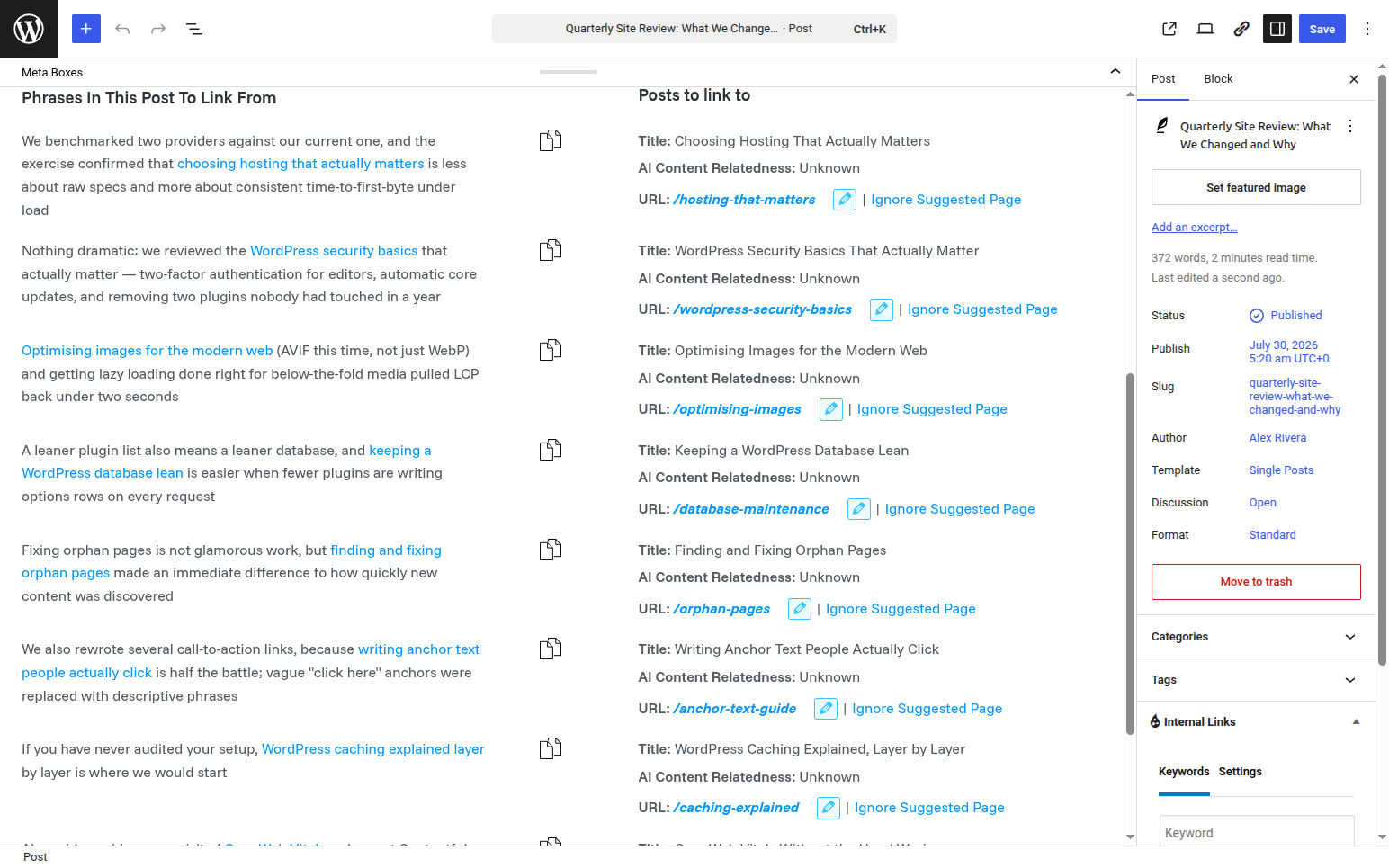
Ease of use: Excellent. The in-editor suggestion box and one-click insertion are the smoothest in this list, and the reporting dashboard is easy to read.
The downside: It’s annual-subscription-only with no lifetime option, and the shift to AI credits means the more you lean on the smartest suggestions, the more you can end up rationing (or topping up) credits. For a large, actively growing site the total cost adds up year over year. We’ve gone deeper on both fronts in our full Link Whisper review and a dedicated Link Whisper pricing and lifetime-deal breakdown.
2. JnK Linkweave — best value and transparency
Best at: Giving you a legitimately useful free tool and a fair upgrade path, without renting you your own internal links forever. (Full disclosure: this is our plugin, so weigh our praise accordingly — but the facts below are verifiable on our site.) The free core — free to download on WordPress.org — is not a crippled demo: you get editor-sidebar link suggestions, unlimited auto-linking rules, and read-only orphan-content and broken-link reports. For a lot of bloggers, the free tier alone covers the job.
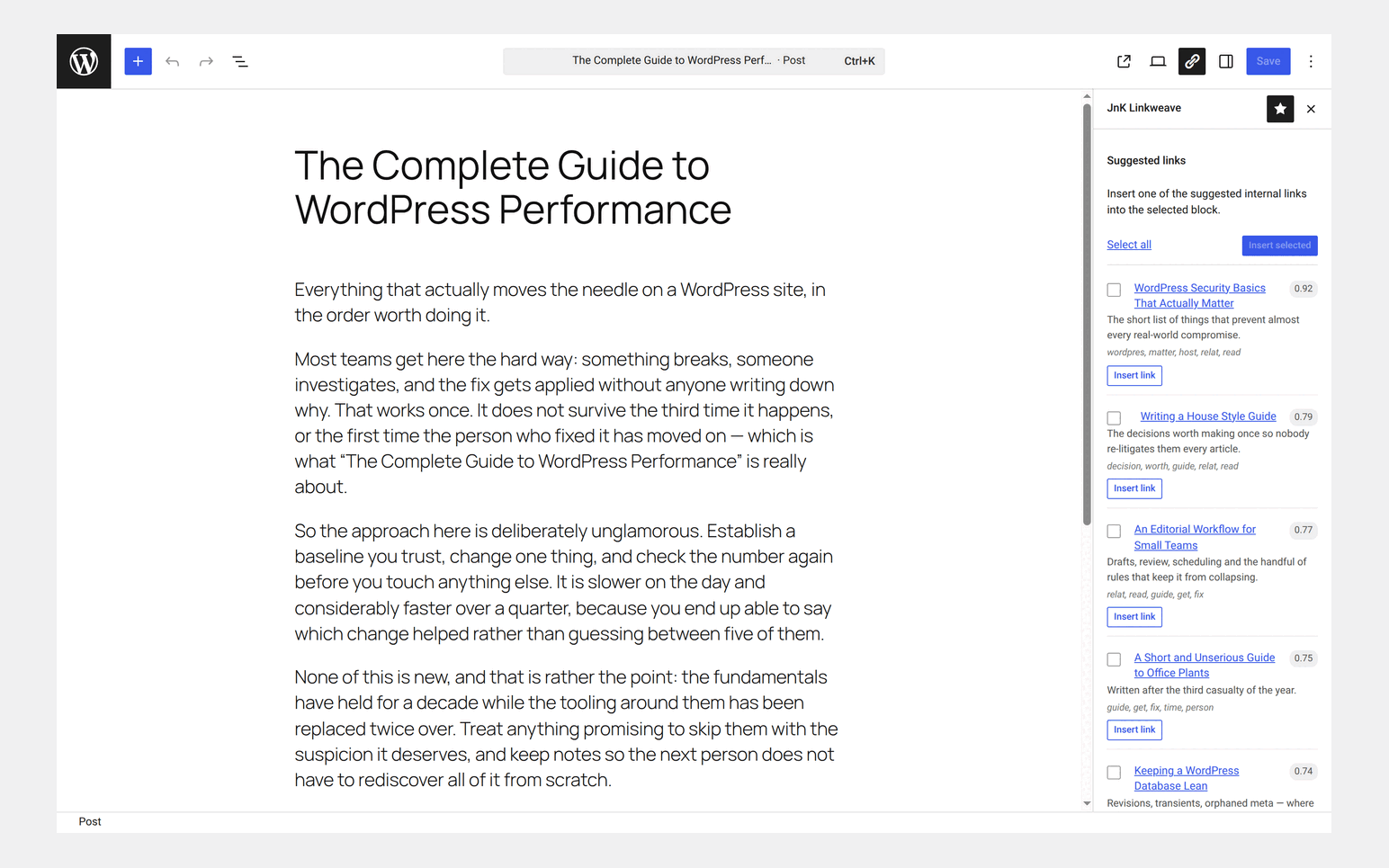
The suggestion engine is deliberately transparent — a BM25 / TF-IDF cosine model running on your own server rather than a black-box cloud service. If you want AI re-ranking, Pro supports BYOK (bring-your-own-key): you connect your own OpenAI or Anthropic key and pay that provider directly, so there are no per-suggestion markups or credit meters. Pro also adds bulk URL changes, one-click broken-link repair, and CSV export of reports.
Recent Pro releases have closed a lot of the reporting and workflow gap with the market leader: a first-party internal-link click-analytics dashboard (which links people actually click, tracked on your own site — no third party), Google Search Console targeting (import your GSC query CSV and it boosts links toward the posts you’re already ranking for), a focus-keyword boost that reads your Yoast or Rank Math keyphrase, bulk review-and-approve of suggestions, a one-click topical-cluster auto-map that builds link rules for a content cluster in one pass, and — on the Agency tier — cross-site linking across a portfolio of sites under one license.
Pricing: Pro from $59/year or a $239 lifetime license (Freelancer $99 and Agency $199 tiers cover more sites). The lifetime option and flat pricing are the headline — you’re not on a credit meter, and there’s no SaaS subscription that stops working when you cancel.
Ease of use: Straightforward. Suggestions appear in the editor sidebar, rules are simple to define, and because everything runs locally there’s no account or external service to wire up (unless you opt into BYOK AI). If you want to see the whole workflow end to end, our step-by-step automatic internal linking setup guide walks through it with screenshots.
The downside: It’s newer than Link Whisper, so the ecosystem and third-party tutorials are smaller. And its default BM25 / TF-IDF engine, while transparent and fast, is more mechanical than the heavier AI-first suggestion engines — if you specifically want AI-generated anchors out of the box without touching an API key, you’ll want the BYOK setup or a different tool.
3. Rank Math (AI Link Genius) — best if you already run the suite
Best at: Serving people who don’t want a separate plugin at all. Rank Math’s AI Link Genius is an internal-linking suite built directly into Rank Math Pro: a link-audit dashboard, AI-powered suggestions, keyword-to-URL mapping with automatic insertion, orphan-page detection, nofollow management, and bulk link updates. If Rank Math is already your SEO plugin, this is a lot of linking capability with zero extra tools to manage.
Pricing: AI Link Genius is included in Rank Math Pro at no additional charge. Pro starts around $8/month billed annually (roughly the high-$90s per year) for the entry tier, scaling up for agencies. Note that some AI features can draw on Rank Math’s AI credits.
Ease of use: Good, with the caveat that you’re inside Rank Math’s larger interface. If you already know Rank Math, the linking tools feel native; if you don’t, there’s a broader SEO suite to learn around them.
The downside: It’s not a standalone purchase — you’re buying (and maintaining) a whole SEO suite to get the linking features. If you’re happy with a different SEO plugin, adopting Rank Math just for internal links is overkill, and AI credit consumption is something to watch.
4. Internal Link Juicer — best hands-off automation
Best at: “Set it and forget it” auto-linking. You define target keywords for each post, and Internal Link Juicer automatically links matching phrases across your site, keeping the links in a dynamic index so they update as your content changes. Its intelligent placeholder/gap features help diversify anchor text and avoid over-linking. There’s a capable free version, which is why it stays relevant for budget-conscious sites.
Pricing: Notably, it’s sold as a one-time payment — roughly $210 for one site, ~$350 for five, and ~$550 for ten, with an unlimited-sites subscription tier at the top for agencies. Pay once, own it. That’s a genuinely different model from the annual subscriptions elsewhere here.
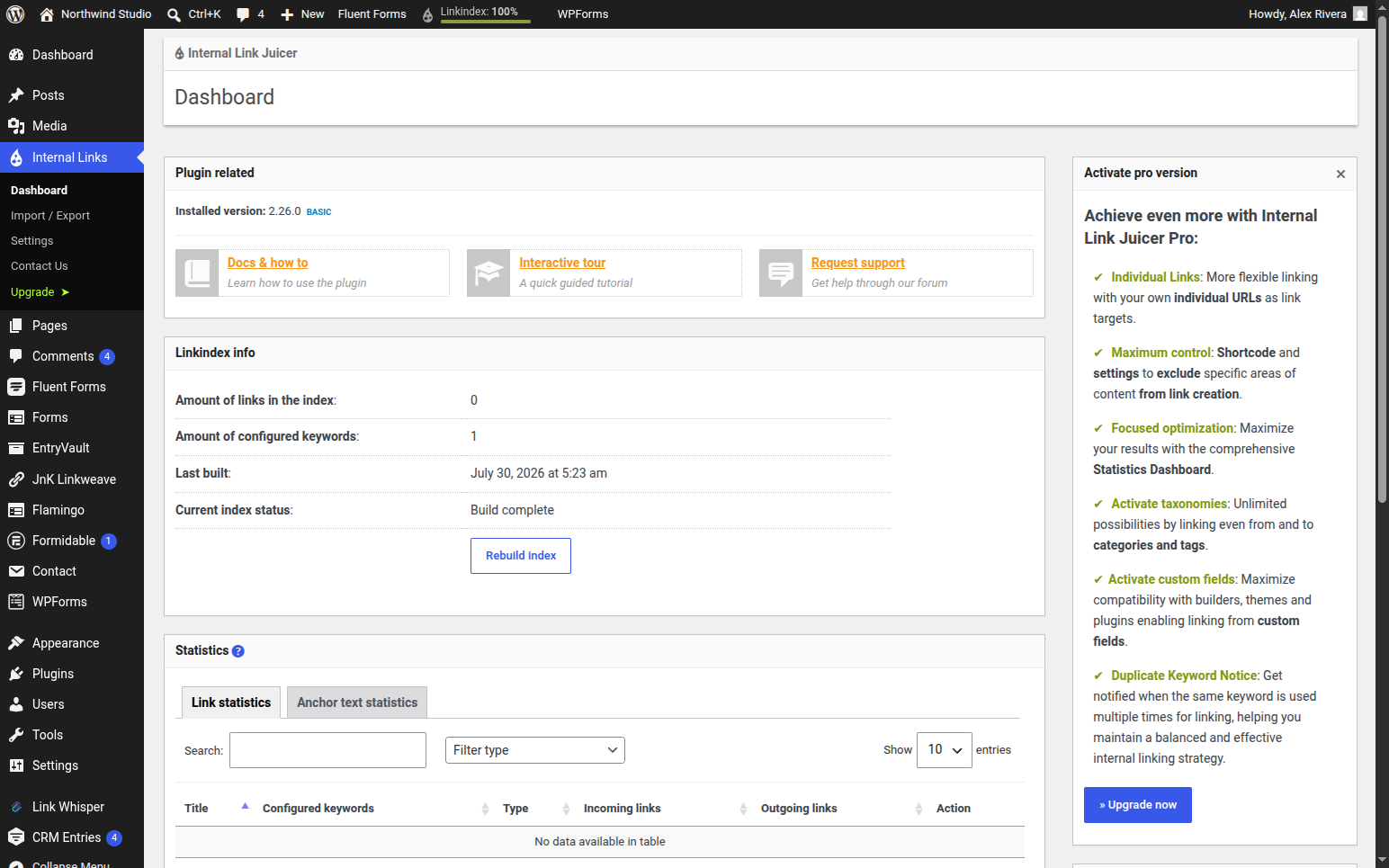
Ease of use: Moderate. Once your keyword configuration is in place it’s beautifully hands-off, but the keyword-driven setup requires more upfront thinking than a click-to-insert suggestion box, and it rewards people who plan their anchor strategy deliberately.
The downside: The automation is keyword-match-based rather than content-similarity-based, so it’s less “smart” about surfacing genuinely related posts you didn’t think to target. Fully automatic linking also needs monitoring to avoid awkward or excessive links.
5. Interlinks Manager — best budget entry with analytics
Best at: Getting analytics-minded users into internal linking cheaply. Interlinks Manager (by DAEXT) pairs automatic link suggestions and keyword-based auto-linking with a dashboard that scores your posts, estimates internal “link juice” distribution, and reports on clicks generated by internal links. There’s a Lite version on WordPress.org to try first.
Pricing: The cheapest paid entry in this list — around $39 for a regular license (with a slightly pricier tier for longer support, and an extended license near $195). An annual subscription is created at checkout, with a 30-day refund window.
Ease of use: Moderate. The core workflow is approachable, but the analytics-heavy dashboard has more dials than some competitors, which is a plus if you love data and a mild learning curve if you just want links inserted fast.
The downside: The interface feels more utilitarian than Link Whisper’s, and the “unlimited updates but time-limited support” licensing can be confusing. It’s a strong value pick rather than the most polished experience.
Worth a look, but not in the top 5
- Yoast SEO (internal linking suggestions): Yoast Premium (~$129/year per site) includes solid internal-linking suggestions powered by its content-analysis “Insights.” It’s a fine reason to justify Premium if you already use Yoast — but like Rank Math, it’s a feature of an SEO suite, not a dedicated linking tool, and it lacks the automation and bulk-repair depth of the specialists above.
- LinkStorm: A powerful SaaS internal-linking platform (from ~$30/month) that works across any CMS and added a WordPress plugin in 2025. It’s excellent for large or multi-site operations that want cross-CMS automation, but it’s a monthly SaaS subscription rather than a WordPress-native, own-it plugin — a different category for a different buyer.
How to choose the best WordPress internal linking plugin for you
There’s no single winner for everyone — the right pick depends on how you work and what you’re optimizing for:
- Want the smoothest, most mature experience and don’t mind an annual subscription? Link Whisper.
- Want a genuinely useful free tool, flat or lifetime pricing, a transparent algorithm, and no credit meters? JnK Linkweave.
- Already committed to Rank Math (or Yoast)? Use the linking features you’re already paying for before buying anything else.
- Want fully automatic, hands-off linking you pay for once? Internal Link Juicer.
- On a tight budget but want analytics? Interlinks Manager.
- Running a large multi-site or non-WordPress operation? Look at LinkStorm’s SaaS model.
A practical tip: almost all of these have a free version or a refund window. Install one or two free tiers, run them against your real content for a week, and see whose suggestions you actually accept. The best plugin is the one whose recommendations you trust enough to click.
If flat pricing, a transparent suggestion engine, and a free core you can actually ship with sound like your priorities, take a closer look at JnK Linkweave — and if you’re specifically weighing it against the market leader, our deeper Link Whisper alternative comparison breaks down where each one wins.
Frequently asked questions
What is the best WordPress internal linking plugin?
For a polished, mature all-in-one experience, Link Whisper is the strongest dedicated tool. For a genuinely useful free tier, a transparent algorithm and flat or lifetime pricing, JnK Linkweave is the best value. The best pick depends on whether you optimize for maturity or for price and transparency.
Is there a free WordPress internal linking plugin?
Yes. JnK Linkweave and Internal Link Juicer both have capable free versions, and Interlinks Manager offers a Lite build on WordPress.org. JnK Linkweave’s free core includes editor-sidebar suggestions, unlimited auto-link rules, and orphan/broken-link reports.
Do internal linking plugins actually help SEO?
Yes, indirectly but meaningfully. Good internal links spread ranking signals between your pages, help search engines discover and prioritize content, and clear orphaned posts back into your link graph. A plugin mainly saves the manual labor of finding and inserting those links consistently.
Related reading
- How to find and fix orphaned pages — putting the orphan report to work
- Internal linking for WooCommerce — what changes when your pages are products
- Interlinks Manager alternatives — if you are switching away from Interlinks Manager specifically