JnK Plugins
Where WordPress Stores Your AI API Key (and How to Keep It Out of the Database)
Last updated 18 November 2026: the core Secrets API was pulled from WordPress 7.2, so the section on what’s coming has changed. Tested on WordPress 7.1.4 with the AI plugin 1.4.0 and AI Provider for Anthropic 1.0.5, and checked against the WordPress 7.2 Beta 3 and RC1 source.
Since WordPress 7.0 there’s a screen called Settings > Connectors. You paste an OpenAI, Anthropic or Google API key into it, it says “Connected”, and any plugin that uses WordPress’ built-in AI Client can start making requests with it.
The screen also says this, right at the top: “All of your API keys and credentials are stored here and shared across plugins.” We wanted to know what “stored here” means in practice. So we read the core code, set a real Claude key on a test site, and tried to get it back out the way another plugin would.
The short answer
By default the key is saved as a normal WordPress option called connectors_ai_anthropic_api_key (or _openai_, _google_). It sits in your wp_options table in plain text, it’s loaded on every page request, and any plugin on your site can read it with one line of PHP: get_option( 'connectors_ai_anthropic_api_key' ).
That’s not a bug. Sharing the key is the whole point of the screen. But it does mean the key ends up in every database backup and every SQL export, and that every plugin you install can see it.
You can keep it out of the database. You can’t hide it from other plugins, and nothing in WordPress claims you can.
What we tested
We set the same Claude key four ways and checked three things each time: is it readable in the raw database, can an unrelated plugin read it, and what does the REST API show an administrator.
| How the key is set | In the database (and your backups) | Another plugin can read it | REST API shows |
|---|---|---|---|
| Connectors screen, default | Yes, plain text | Yes | Last 4 characters only |
| Connectors screen + AI plugin “Key Encryption” | Encrypted | Yes, decrypted for it | Last 4 characters only |
ANTHROPIC_API_KEY constant in wp-config.php |
No | Yes, constants are global | “configured as a constant” |
| Environment variable | No | Yes, via getenv() |
Same as constant |
The environment variable row comes from reading the code, not from a separate test. Core checks the same names (ANTHROPIC_API_KEY, OPENAI_API_KEY, GOOGLE_API_KEY) as environment variables first, then as PHP constants, then in the database. The first one it finds wins.
The REST masking is real, by the way. We called /wp-json/wp/v2/settings as an administrator over HTTP and got 16 dots plus the last four characters. One trap if you test this yourself: calling the endpoint from PHP with rest_do_request() skips the filter that does the masking, so you’ll see the full key and think it leaks. Over real HTTP it doesn’t.
Option 1: put the key in wp-config.php
This is the simplest fix and works on any WordPress 7.0+ site. Add a line above the “That’s all, stop editing!” comment:
define( 'ANTHROPIC_API_KEY', 'sk-ant-your-key-here' );Use OPENAI_API_KEY or GOOGLE_API_KEY for the other two providers. Then, if you’d already pasted the key into Connectors, remove it there (more on why in a minute). The screen will now show the key as connected and say it’s configured as a constant, with the field locked:
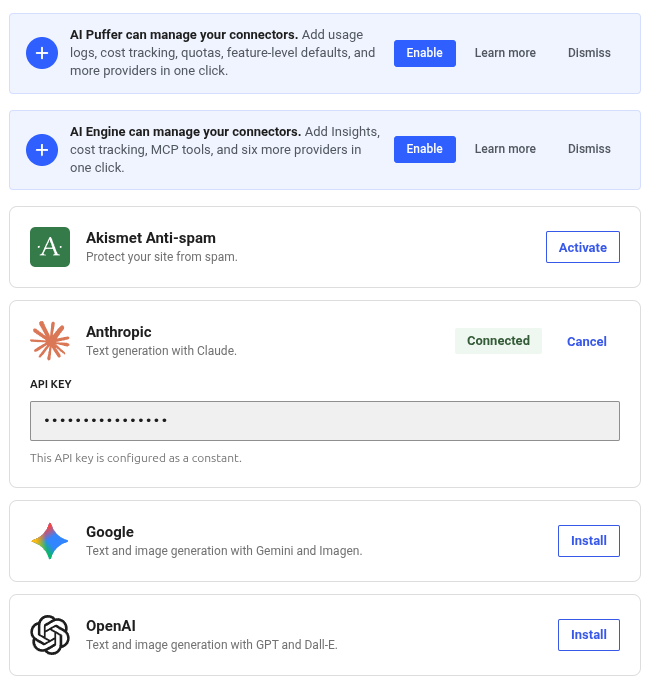
What this gets you: the key is no longer in the database, so it isn’t in your backups, a database export you send to a developer, or a staging copy. What it doesn’t get you: any plugin can still read ANTHROPIC_API_KEY. Our throwaway test plugin did exactly that, in one line.
Many hosts also let you set environment variables in the control panel. That’s even better than wp-config.php if you keep that file in git.
Option 2: turn on Key Encryption in the AI plugin
WordPress’ official AI plugin has an experiment called Key Encryption (Settings > AI). Turn it on and the key moves out of the plain option into an encrypted record using libsodium. The encryption key for that comes from your LOGGED_IN_KEY and LOGGED_IN_SALT in wp-config.php, or from a WP_SECRETS_KEY constant if you define one.
We checked the database after switching it on. The original option was empty, and two new rows had appeared: _secret_ai/anthropic_api_key and _secrets_master_key, both ciphertext, neither autoloaded. So a stolen SQL dump on its own no longer gives away the key. Someone would also need your wp-config.php.
But get_option() still returned the full key to our test plugin. The plugin’s own description says it plainly: keys are “transparently decrypted on read”. It protects the key at rest. It doesn’t hide it from code running on your site.
One gotcha we hit. With encryption on, the connectors_ai_anthropic_api_key row is empty or missing altogether. The key lives only in the encrypted _secret_ai/ row. So when we tried to remove the key with wp option delete, WP-CLI said the option didn’t exist, and WordPress kept using the key: get_option() still returned it, and core still reported the key source as “database”. Removing the key from the Connectors screen itself (or through the REST API, which is what the screen uses) deleted the encrypted copy properly. So remove keys through the screen, not with WP-CLI or SQL.
What about stopping other plugins from using it?
The same AI plugin has a second experiment called Connector Approval. With it on, a plugin has to be approved by an administrator before it can use a connector. Unapproved attempts show up under Tools > Connector Approvals:
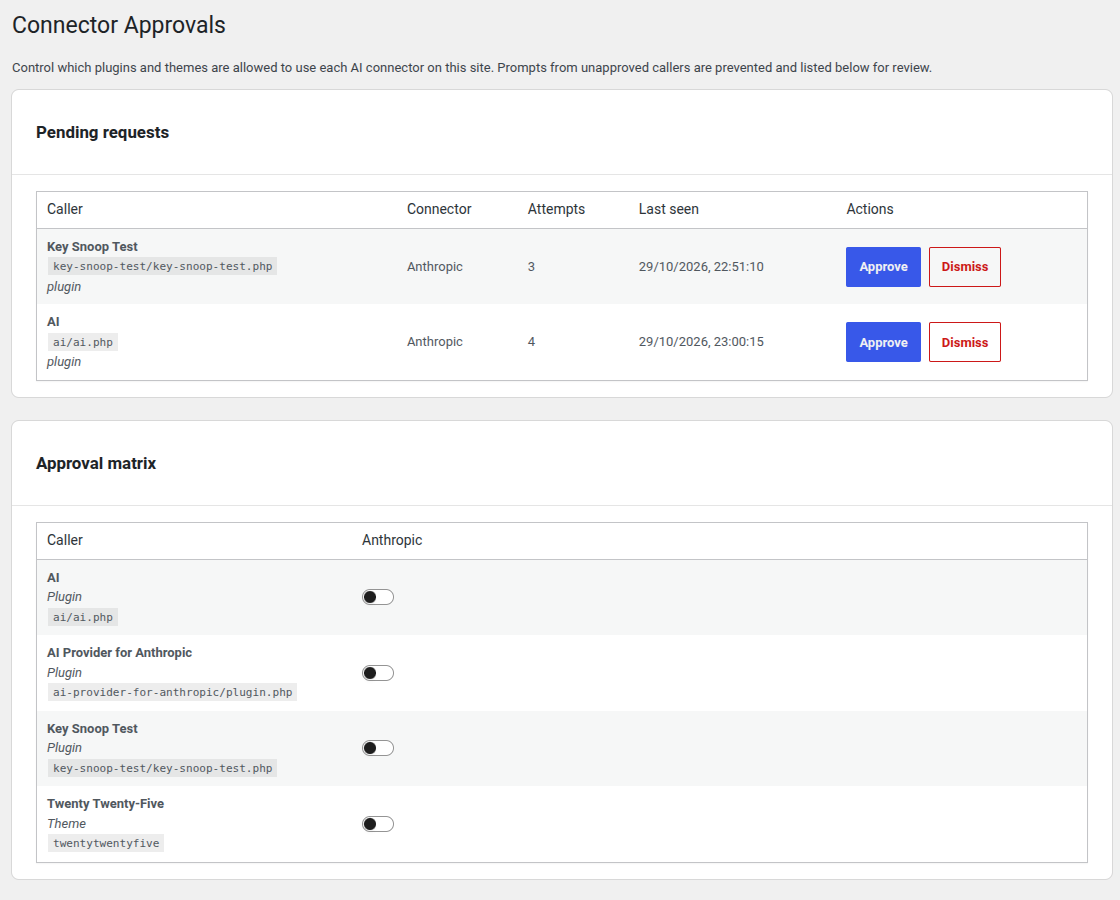
It works, and it’s stricter than you might expect. It even blocked the AI plugin itself until we approved it. It also blocked AI Engine, which keeps its own separate copy of the key, because the guard matches the key’s value in outgoing requests, not where the plugin got it from.
Here’s what our test plugin could still do with Connector Approval on:
- Read the key with
get_option()or the constant: yes. - Call the Anthropic API with it: blocked (“connector has not been approved”).
- Send the key in a POST body to a different server: not blocked.
That last one isn’t a hole anyone hid. The code’s own documentation says it looks for the key in request headers and URLs, and that it can’t catch a plugin that changes the key before sending it. It also only sees requests made through WordPress’ HTTP functions.
And a plugin can switch the guard off. AI Puffer, for example, removes the approval filter around its own provider calls. Its code comments explain why: it uses its own stored key, and a match with the same key in Connectors would be a “false attribution”. That’s a reasonable choice for their plugin. It also shows what the guard is: a filter, which any code on the site can remove.
The honest bottom line
A WordPress plugin is PHP running with the same access as WordPress itself. Anything WordPress can decrypt, a plugin can decrypt. So these features protect against two real things, a leaked database and a well-meaning plugin quietly spending your credit. They don’t protect against a plugin that’s out to get you. That one you stop by not installing it.
So in practice:
- Set a spend limit at the provider. Anthropic and OpenAI both let you cap monthly spend in their consoles; check what your provider offers. It’s the only control that works no matter what a plugin does.
- Use a separate key for each site. If one leaks, you revoke one key and nothing else breaks.
- Move the key to wp-config.php or an environment variable so it’s out of your backups.
- Rotate the key when you remove an AI plugin you no longer trust, or when a developer has had access to the site.
- Keep the plugin list short. The same advice as always, it just has a price tag attached now. We wrote about how busy WordPress security has been this year.
What’s coming in WordPress 7.2 and 7.3
When we first wrote this, WordPress 7.2 was set to add a Secrets API to core: functions like wp_set_secret() and wp_get_secret() that store values encrypted, keyed by a WP_SECRETS_KEY constant. It was in the Beta 3 code.
That’s off for 7.2. On 17 November the Secrets API dev note was updated to say it “will no longer be shipping with WordPress 7.2”, after Ryan McCue and Matt Mullenweg objected to the design and the timing. Its lead, Eric Mann, asked for it to aim at 7.3 instead. We grepped the 7.2 RC1 download on 18 November: none of the wp_*_secret() functions are in it, and the Connectors screen still saves your key as the plain connectors_ai_<provider>_api_key option. So everything above still applies after you update to 7.2. The wp-config.php constant is still the simplest way to keep a key out of the database, and the AI plugin’s Key Encryption experiment is still the only built-in-ish way to encrypt it. Our WordPress 7.2 post has the rest of the release.
The AI team’s “WordPress for the Agentic Web” post (28 October) also pointed at the Secrets API for handling OAuth tokens, as part of letting AI agents connect to sites in 7.3 without Application Passwords. If you’re curious how agents connect today, see our MCP Adapter explainer. And if you’re picking an AI plugin, our tested roundup lists where each one keeps your key.
How we tested
Fresh WordPress 7.1.4 on PHP 8.4 with the AI plugin 1.4.0 and AI Provider for Anthropic 1.0.5. We set a real Claude API key as an option, with the Key Encryption experiment off and on, and as a wp-config.php constant. For each setup we read the raw wp_options rows directly, called get_option() from a separate test plugin, and fetched /wp-json/wp/v2/settings over HTTP with an administrator’s Application Password. For Connector Approval we had the test plugin call Anthropic’s free model-list endpoint, and post the key to a local address, with approval on and off. The Secrets API and Connectors code were checked in the 7.2-beta3-64990 nightly from WordPress.org on 29 October. Nothing was tested on a live site.
Frequently asked questions
Is it safe to put my OpenAI or Claude API key in WordPress?
It’s as safe as the plugins you run. In the Connectors screen the key is stored in plain text in the database and every plugin can read it. Put it in wp-config.php to keep it out of backups, set a spend limit at the provider, and use a separate key for each site.
Where does WordPress store the Connectors API key?
In the wp_options table, as connectors_ai_anthropic_api_key, connectors_ai_openai_api_key or connectors_ai_google_api_key. If an environment variable or PHP constant with the provider’s name (for example ANTHROPIC_API_KEY) exists, WordPress uses that instead and nothing is saved in the database.
Does the AI plugin’s Key Encryption stop other plugins reading my key?
No. It encrypts the key in the database, which protects backups and database dumps, but it decrypts the key automatically whenever any code calls get_option(). It protects the key at rest, not from plugins running on your site.