JnK Plugins
The Best WordPress Form Entry Management Plugins (2026)

Here’s a problem almost every WordPress site owner runs into eventually: you have form submissions scattered everywhere. A quote request came in through Contact Form 7, a support message through WPForms, an event signup through Gravity Forms — and now you’re hunting through three admin screens and an email inbox to figure out who you still owe a reply. Worse, Contact Form 7 (still one of the most-installed form plugins on the planet) stores nothing at all by default. It fires an email and forgets. If that email bounces, gets filtered to spam, or you simply miss it, the lead is gone forever.
That’s the gap this category fills. WordPress form entry management plugins are not form builders — they’re the database, inbox, and follow-up layer that sits underneath your builders. They capture every submission, keep it in one searchable place, let you tag or annotate it, and export it when you need to. Think of them as a lightweight form-CRM.
This roundup ranks the best options for 2026 on three things that actually matter day to day: features (how much you can do with your entries), pricing (what it really costs, renewals included), and ease of use (how fast you can go from install to “I can finally see all my leads”). We are deliberately not ranking on download counts or “most popular” badges. Popularity tells you what people installed years ago; it doesn’t tell you what’s the best fit for the job today.
What we looked for
A good entry-management plugin should, at minimum:
- Capture reliably — save every submission to the database, independent of whether the notification email is delivered.
- Show entries in one place — a single, searchable list rather than a screen per form.
- Let you act on entries — mark read/unread, tag, star, add notes, or assign to a teammate.
- Export — CSV at a minimum, so your data is never trapped.
- Ideally, work across form builders — because most real sites run more than one.
That last point is the big dividing line. Most tools in this space are single-builder: they only manage entries from one form plugin (usually the one they ship with, or Contact Form 7). A smaller number are cross-builder and unify entries from many form plugins into one view. If you only ever use one form plugin, single-builder is fine. If you run a real-world mix, cross-builder is where the pain actually goes away.
How we tested: capture reliability is criterion #1, so we tested it rather than assumed it. In July 2026 we set up a WordPress 7.0 / PHP 8.4 site running Contact Form 7 6.1.6, installed Flamingo 2.6.3 and Contact Form Entries 1.5.5 (CRM Perks) alongside our own EntryVault, sent the same batch of real test submissions through the form, and checked what each tool captured and how it displayed them — the screenshots below are from that run. Formidable’s entry system was exercised in its free build; Gravity Forms (no free build) is assessed from its documentation.
Comparison at a glance
Pricing checked on each vendor’s own website on 16 September 2026. Always confirm on the vendor’s own page before you buy.
| Plugin | Free tier | Starting paid price | Scope | Standout |
|---|---|---|---|---|
| EntryVault (ours) | Yes, unlimited entries, 17 builders | $79/yr or $319 lifetime (Pro) | Cross-builder (17) | One unified Kanban across every builder |
| Contact Form Entries (CRM Perks) | Yes | $59/yr (1 site, paid package) | Cross-builder (~4) | Free multi-builder capture |
| Formidable Forms | Yes (Lite) | $79/yr list, $39.50 first year (Basic) | Single-builder | Entries + on-site Views/displays |
| Gravity Forms | No | $59/yr (Basic) | Single-builder | Rock-solid native entry system |
| Flamingo | Yes (fully free) | Free | Single-builder (CF7) | Zero-cost CF7 message backup |
Feature by feature, with sources
The table above compares scope and price. This one compares what you can actually do with an entry, with a source behind every cell. Paid screens we did not buy are marked as not tested hands-on. Vendor pages checked 17 September 2026. Flamingo is now a column, tested hands-on. Contact Form Entries is not, because we have not built its table yet.
✓ included✓ Pro+ only from that tier up~ partly (catch noted)✗ not availablenot tested hands-on paid screen we did not buy
5 products: scroll sideways to see them all.
Where entries come from2 rows
| Feature | EntryVault | GravityView | Formidable Views | WPForms entries | Flamingo |
|---|---|---|---|---|---|
| Form plugins it works with | 17 builders | Gravity Forms | Formidable only | WPForms | Contact Form 7 |
| Free version | ✓ Yes | ✗ No | ✗ No | Lite stores no entries | ✓ Yes |
Working entries in wp-admin6 rows
| Feature | EntryVault | GravityView | Formidable Views | WPForms entries | Flamingo |
|---|---|---|---|---|---|
| Kanban board with stages | Free | ✗ No | ✗ No | ✗ No | ✗ No |
| Owner assignment | Free | ✗ No | ✗ No | ✗ No | ✗ No |
| Email the person from the entry | Free | ✗ No | ✗ No | not tested hands-on | ✗ No |
| Approval of entries | Pro | ✓ Yes | not tested hands-on | not tested hands-on | ✗ No |
| Automations | Pro | ✗ No | Form actions; automation on Elite | Plus | ✗ No |
| Export entries | CSV free; scheduled CSV or Excel on Pro | ✓ Yes | Basic (Formidable core) | Basic: CSV, Excel, PDF | CSV |
Showing entries to visitors3 rows
| Feature | EntryVault | GravityView | Formidable Views | WPForms entries | Flamingo |
|---|---|---|---|---|---|
| Front-end table of entries | Free: sortable table, no visitor search | ✓ Yes | Plus | not tested hands-on | ✗ No |
| Visitor search and filters | ✗ No | ✓ Yes | Plus | not tested hands-on | ✗ No |
| Submitters edit their own entry | ✗ No | ✓ Yes | Plus | not tested hands-on | ✗ No |
Price3 rows
| Feature | EntryVault | GravityView | Formidable Views | WPForms entries | Flamingo |
|---|---|---|---|---|---|
| Cheapest licence, 1 site | $0; Pro $79/yr or $319 once | $119/yr | Plus (3 sites): $99.50, then $199 | Basic: $49.50, then $99 | Free, no paid tier |
| Needs another paid plugin first | ✗ No | Gravity Forms | No, it is Formidable | No, it is WPForms | Needs Contact Form 7, which is free |
| Money-back guarantee | 14 days | 30 days | 14 days | 14 days | n/a |
Sources (10)
- GravityView: https://www.gravitykit.com/products/gravityview/
- Formidable Views: https://formidableforms.com/features/display-form-data-views/
- WPForms: https://wpforms.com/pricing/
- Flamingo: https://wordpress.org/plugins/flamingo/
- EntryVault: https://jnkplugins.com/entryvault/pricing.php
- Formidable Views: https://formidableforms.com/pricing/
- WPForms: https://wpforms.com/docs/how-to-use-lite-connect-for-wpforms/
- GravityView: https://www.gravitykit.com/products/gravityboard/
- GravityView: https://www.gravityforms.com/pricing/
- Flamingo: https://contactform7.com/save-submitted-messages-with-flamingo/
1. EntryVault — best for managing entries across multiple builders
Full disclosure: EntryVault is our own plugin. We’ve put it at the top because it’s the only tool on this list built specifically for the cross-builder problem — but you should weigh that bias and judge it on the facts below, which are all verifiable on the EntryVault page.
Best at: unifying submissions from many form plugins into one place. EntryVault auto-detects your active form builders (zero configuration) and captures entries from 17 builders into a single unified Kanban board: Contact Form 7, WPForms, Gravity Forms, Fluent Forms, Forminator, SureForms, Ninja Forms, Formidable, WS Form, Everest Forms, Trinity Forms, Jetpack Forms, MetForm, Kadence Forms, Otter Forms, Spectra Forms and Elementor Pro forms. Every entry gets tags, notes, an owner, and a submission-detail view with a full timeline, so “form entry management” actually becomes lead management: you can see what stage each submission is at and who’s handling it.
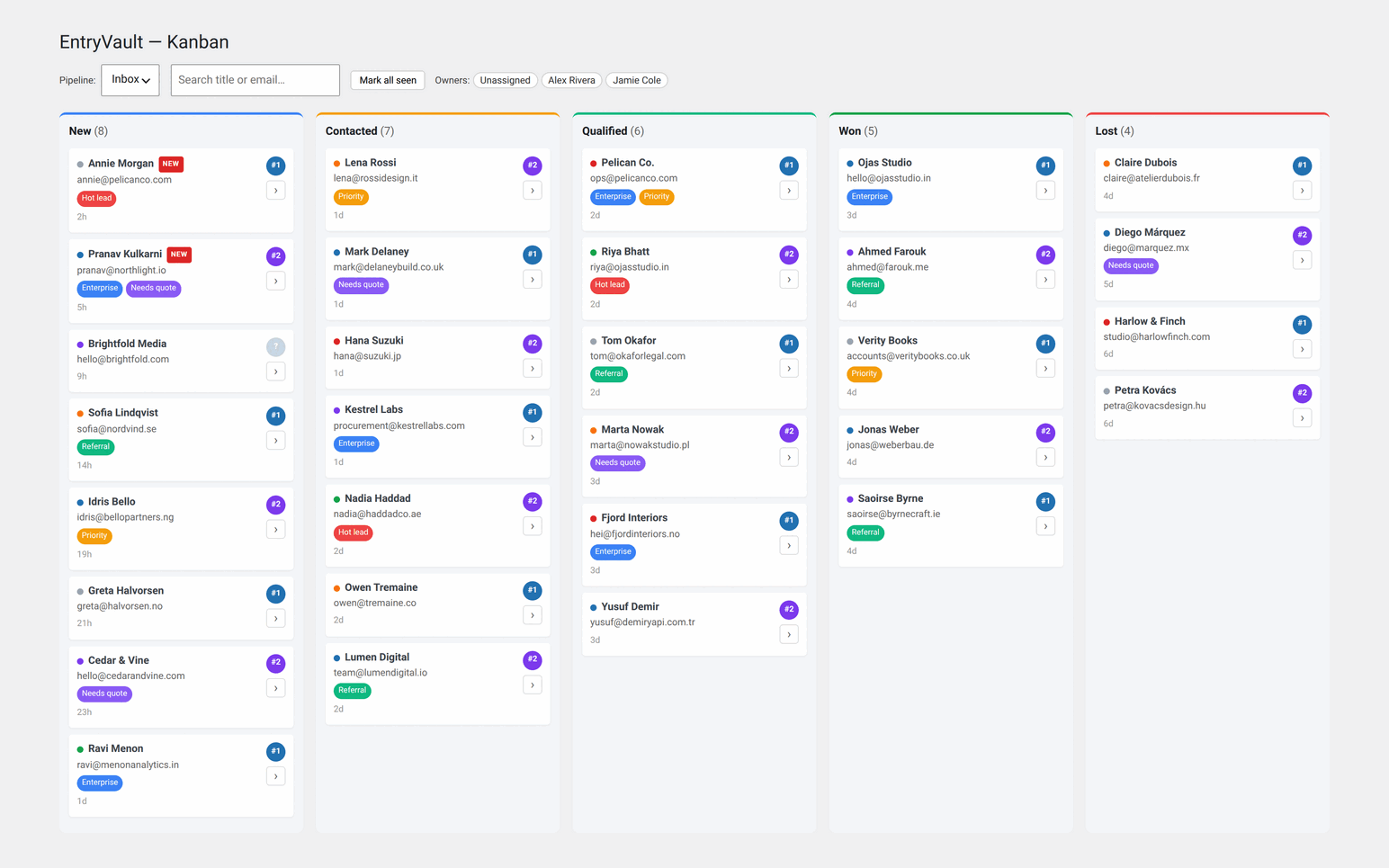
Pricing: the core plugin is free forever and — unusually for this category — stores unlimited entries with no cap. CSV import and export are in the free tier too, and so is a genuinely useful analytics dashboard: submissions by stage and by source, daily volume, a conversion funnel, time-in-stage, and per-owner breakdowns — reporting most rivals reserve for paid tiers, if they offer it at all. Pro is $79/year or $319 lifetime and adds an automation engine, IMAP email-reply sync (so replies thread back onto the entry), multiple pipelines, round-robin owner assignment, and historical backfill of past submissions (for the most popular builders). Version 1.4 added an approval workflow (pending, approved, rejected), inline quick-edit of captured values and scheduled CSV or Excel exports, and 1.5 lets you rename stages, colours and WIP limits per pipeline.
Ease of use: because it auto-detects builders, the setup is essentially “install and open the board.” The Kanban metaphor is familiar to anyone who’s used a task board, which lowers the learning curve for non-technical team members.
Downside: it’s a younger plugin than the incumbents here, so it has a smaller install base and community. And if you genuinely only use one form builder that already has strong native entries (Gravity Forms, say), a dedicated cross-builder tool is more than you need.
2. Contact Form Entries (CRM Perks) — best free multi-builder option
Best at: capturing entries from a handful of popular builders without paying anything. The free version saves submissions from Contact Form 7, WPForms, Elementor Forms, and CRM Perks’ own form builder into the WordPress admin, where you get a familiar table view with search and date filters, read/unread status, starring, per-entry notes, printing, and CSV export. It’s the closest free alternative to a cross-builder tool, covering around four builders.
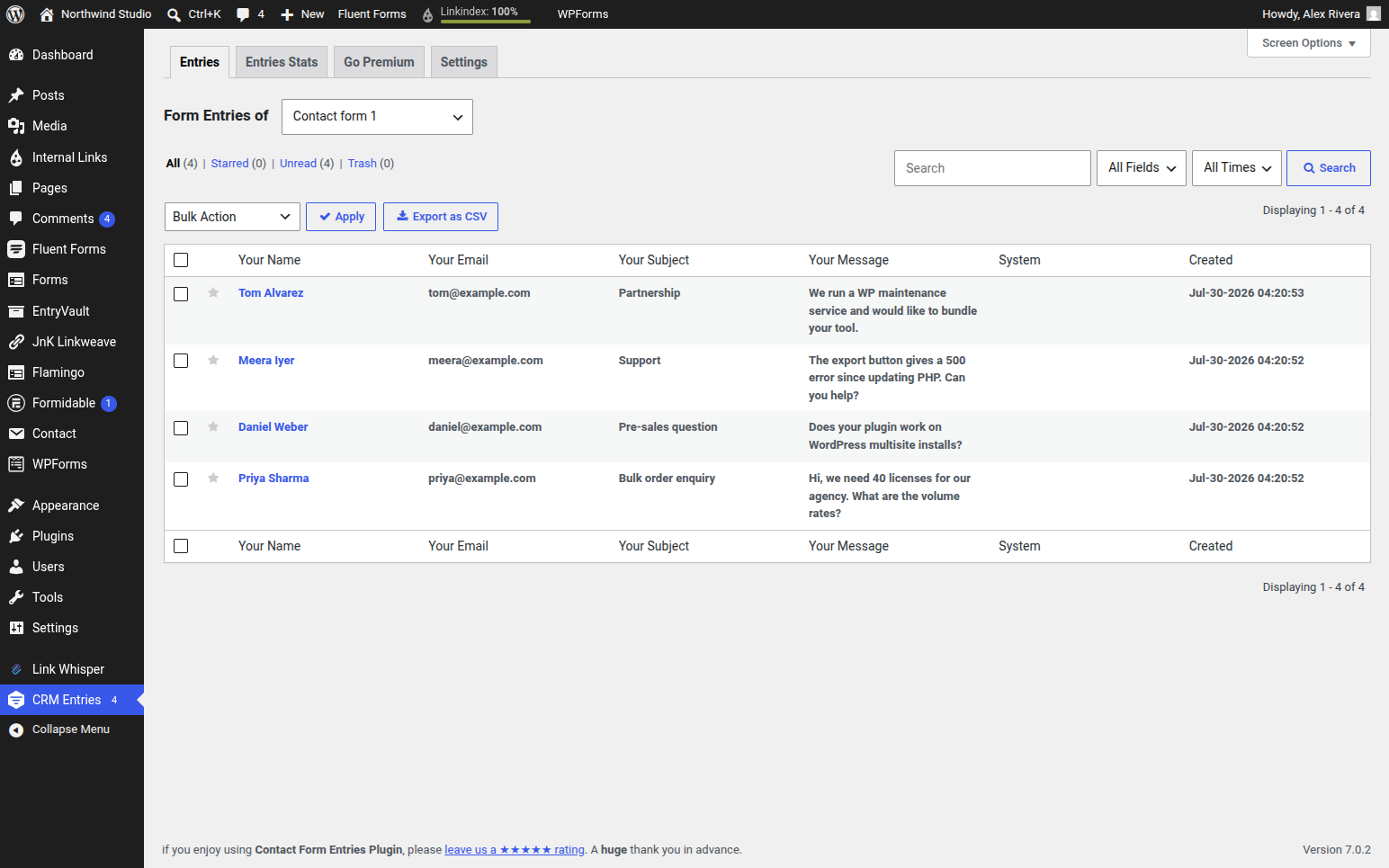
Pricing: free core. The paid version comes as a CRM Perks Forms package: $59/year for one site with no add-ons, $99/year for five sites and $149/year for twenty-five, both with 15+ premium add-ons (checked on crmperks.com, 16 September 2026).
Ease of use: if you’ve used the default WordPress list-table UI, you already know how to drive this. Nothing exotic.
Downside: the entry view is a fairly plain table — no board, no pipeline stages, no owner assignment in the way a form-CRM offers. And its builder coverage, while broader than the CF7-only tools, is still a fraction of the 17 EntryVault handles, and notably leans on CRM Perks’ own ecosystem for the richer features.
3. Formidable Forms — best if you want entries and to display them
Best at: managing entries for its own forms and then doing something with the data on the front end. Formidable stores every submission natively, and its signature “Views” feature lets you build directory listings, tables, calendars, and reports from entry data — genuinely powerful if you’re building an application, not just collecting leads.
Pricing: the free tier is generous (unlimited forms and submissions, no branding). Paid plans list at $79/year (Basic), $199 Plus, $399 Business and $599 Elite, shown at 50% off for the first year with renewals at full price. Views starts at the Plus tier (checked 16 September 2026).
Ease of use: moderate. The form builder and entry system are polished, but Views has a real learning curve — it’s closer to a data-display tool than a point-and-click inbox.
Downside: it only manages Formidable’s own entries. If your submissions come from Contact Form 7 or WPForms, Formidable won’t see them. It’s a builder-with-great-entries, not a cross-builder manager.
4. Gravity Forms — best native entry system in a single ecosystem
Best at: reliable, developer-grade entry handling for sites already committed to Gravity Forms. Its entries screen is mature and dependable: unlimited entries even on the Basic license, filtering, bulk actions, notes, and a huge add-on ecosystem for pushing data onward.
Pricing: no free tier. The Basic license is $59/year for a single site with unlimited forms and entries; Pro is $159 (3 sites) and Elite $259 (unlimited). Its FAQ says there’s no trial, but you can sign up for a hosted demo (checked 16 September 2026). If you want Kanban boards for Gravity entries, GravityKit sells GravityBoard separately.
Ease of use: straightforward once you’re in the Gravity ecosystem, with excellent documentation. Non-developers manage entries comfortably.
Downside: like Formidable, it’s single-builder — it manages Gravity Forms entries only. And there’s no free version to install, so it’s the wrong pick if you just want to add an entry backup to an existing free form plugin.
5. Flamingo — best zero-cost backup for Contact Form 7
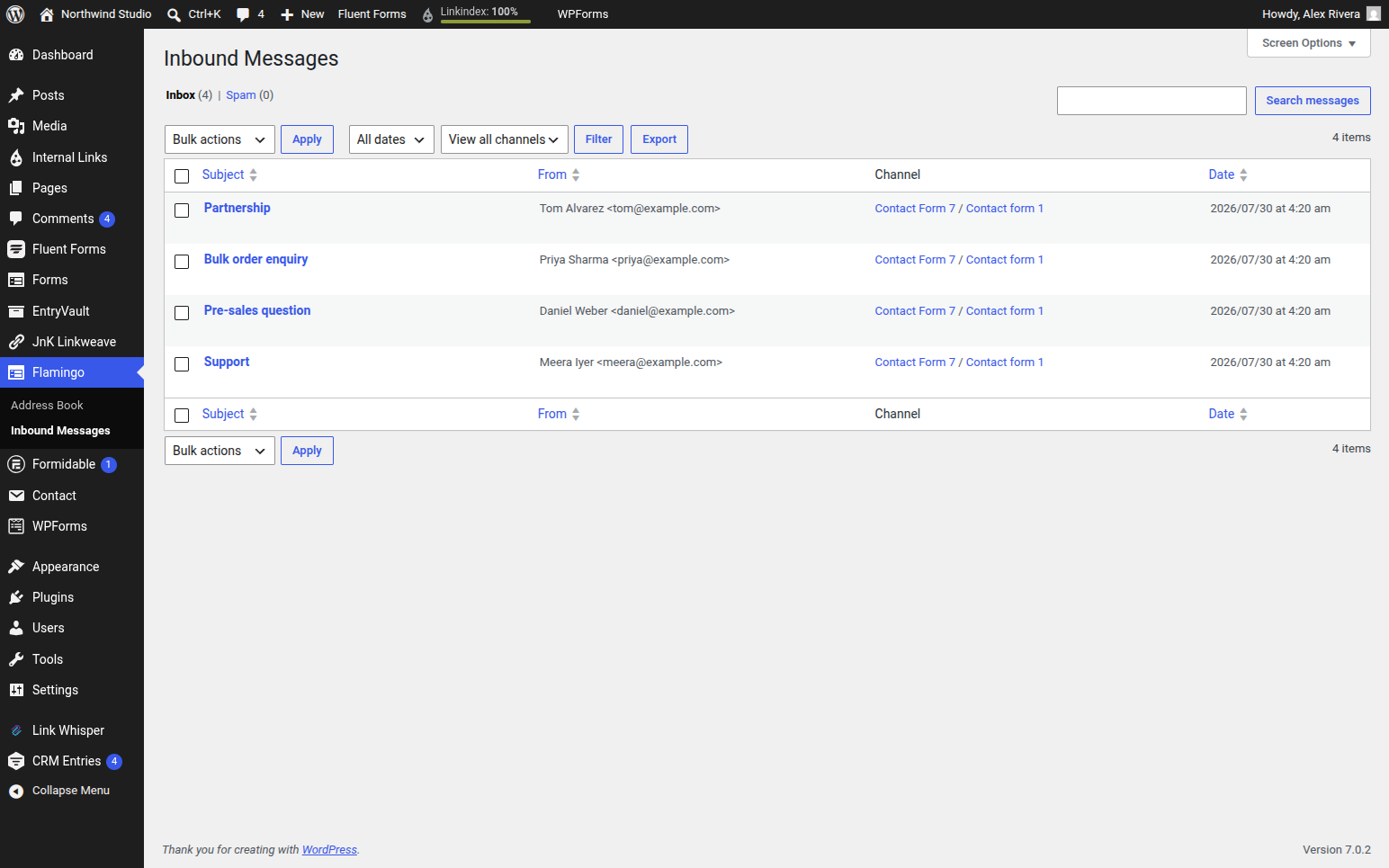
Best at: solving the “CF7 stores nothing” problem for free. Flamingo is made by Contact Form 7’s own author, so it’s the natural companion: install it and every CF7 submission is quietly saved to an “Inbound Messages” screen, with a basic address book of contacts. It’s the lowest-friction way to stop losing leads to failed emails.
Pricing: completely free.
Ease of use: nearly automatic if your CF7 forms use the default field names (your-name, your-email, your-subject). Custom field names may need a little mapping.
Downside: it’s a basic archive, not a management tool. There’s no tagging, no pipeline, no owners, limited search, and it’s CF7-only. Great as a safety net; not a place to actually work your leads.
Honorable mention: CFDB7
The Contact Form 7 Database Addon (CFDB7) deserves a nod as the simplest possible free option: install it, and it auto-saves every CF7 submission to the database with one-click CSV export — no configuration, very lightweight. It just misses the top five because, like Flamingo, it’s a bare storage layer (CF7-only, no tagging, notes, or workflow). It’s still actively maintained on wordpress.org, with 600,000+ active installs as of 16 September 2026. If all you want is “don’t lose my CF7 messages, let me export them,” it does exactly that and nothing more. One caveat from our July 2026 testing round: CFDB7’s WordPress.org download wasn’t available when we tried to install it, so check that the listing is alive and maintained before relying on it — abandoned storage plugins are exactly the kind of dependency to avoid for data you can’t afford to lose.
A note on “CRMs” — a different category
You’ll sometimes see FluentCRM or Jetpack CRM recommended in the same breath. They’re excellent, but they solve a different problem: they’re full email-marketing and contact-relationship platforms — sequences, deals, campaigns. They can ingest form data, but they’re heavier and pricier than an entry manager, and they’re overkill if your actual need is “see and follow up on all my form submissions in one place.” Reach for them when you’re doing genuine marketing automation, not entry housekeeping.
How to choose
Match the tool to the shape of your problem:
- One form builder, and you just don’t want to lose messages? Flamingo or CFDB7 (free) if you’re on Contact Form 7; the native entries in Gravity Forms or Formidable if you already own those.
- One builder, but you want to display or report on the data? Formidable Forms and its Views.
- A mix of builders, and you want everything in one inbox — for free? Start with Contact Form Entries by CRM Perks.
- A mix of builders, and you want to actually work leads — tag, assign, follow up, automate across all of them? That’s the specific job EntryVault was built for, and its free tier is a low-risk way to try it.
If you’re wrestling with the Contact Form 7 problem specifically, our deeper guides go further: how to store and export WordPress form entries walks through the mechanics, and the Contact Form 7 alternative guide covers what to do when CF7’s no-storage default finally bites. And if a single unified board across 17 builders sounds like your situation, you can try EntryVault free: unlimited entries, no card required.
Still deciding which kind of tool you need? Our buyer’s guide to form entry managers separates the three different problems that all get called “entry management” — storing submissions, publishing them to visitors, and moving them through a workflow — with head-to-head pages for GravityView, Formidable Views, WPForms entries and Flamingo.
Disclosure: EntryVault is our own plugin, and it’s ranked first in this article. We’ve tried to keep the comparison honest — every rival here is a genuinely good pick for the right site, and we’ve called out EntryVault’s own downsides (newer, smaller community). Judge it on the features and pricing, verify current prices on each vendor’s site, and pick what fits your workflow, not our byline.
Related reading
- Bulk deleting form entries — clearing years of spam and test submissions without wrecking the database
- Displaying form entries on the front end — when publishing entries to visitors is the actual job
Frequently asked questions
What is a form entry management plugin?
It’s the database, inbox and follow-up layer that sits underneath your form builders. Rather than building forms, it captures every submission, keeps it in one searchable place, lets you tag or annotate it, and exports it — essentially a lightweight form-CRM.
Can one plugin manage entries from multiple form builders?
Most tools are single-builder, but a few are cross-builder. EntryVault unifies entries from 17 builders into one board; Contact Form Entries by CRM Perks covers around four for free. If you run a mix of form plugins, a cross-builder tool is where the pain goes away.
Is there a free form entry management plugin?
Yes. EntryVault’s free core stores unlimited entries across 17 builders with CSV import/export; Flamingo and CFDB7 are free for Contact Form 7 specifically; and Contact Form Entries offers free multi-builder capture.
Does Flamingo let me tag or assign Contact Form 7 entries?
Not the messages themselves. Flamingo tags contacts in its address book, but an inbound message carries only a channel — one per CF7 form — which is a filter rather than a label you apply. There are no pipeline stages and no owner assignment. It is a safety net that stops you losing leads, with a genuinely useful filtered CSV export; it is not somewhere to work them.
Is a CRM like FluentCRM the same as an entry manager?
No, and reaching for one is usually overkill. FluentCRM and Jetpack CRM are email-marketing and contact-relationship platforms — sequences, deals, campaigns — and they are heavier and pricier. They can ingest form data, but if the actual need is “see and follow up on all my form submissions in one place”, an entry manager is the right size of tool.
Can an entry manager recover submissions from before I installed it?
Not by itself, and no plugin can. Nothing can retroactively create entries that were never written to the database, so submissions that only ever existed as notification emails stay in your inbox. Some tools offer a historical backfill for builders that did store entries natively, and CSV import lets you bring across anything you already exported.