JnK Plugins
The Best Contact Form 7 Alternative for WordPress (2026)
Comparison
Contact Form 7 is one of the most successful plugins in WordPress history — over ten million active installs, a decade and a half of steady maintenance by Takayuki Miyoshi, and no vendor trying to upsell you. If your form just needs to email you, it is still the right answer and nothing here will change that. This page is about the specific point where it stops being enough.
The one that actually costs you money: nothing is stored
Out of the box, Contact Form 7 emails a submission and keeps nothing. There is no record in your database, no list to search, nothing to export. The enquiry exists as one email in one inbox.
Consider what that means on an ordinary bad day. The notification is filtered as spam. Or it goes to an address nobody checks any more. Or someone reads it on their phone, means to reply, and does not. In every case the lead is not delayed, it is gone, and you will never know it existed. Every other problem on this page is an inconvenience. This one has a price.
The fix within the Contact Form 7 world is Flamingo, by the same author, or a third-party add-on such as CFDB7. Both work. Both are another plugin to install, update and hope does not break on the next WordPress release. Trinity Forms records submissions natively, which is why the free tier includes an entries screen and a CSV export rather than treating them as upsells.
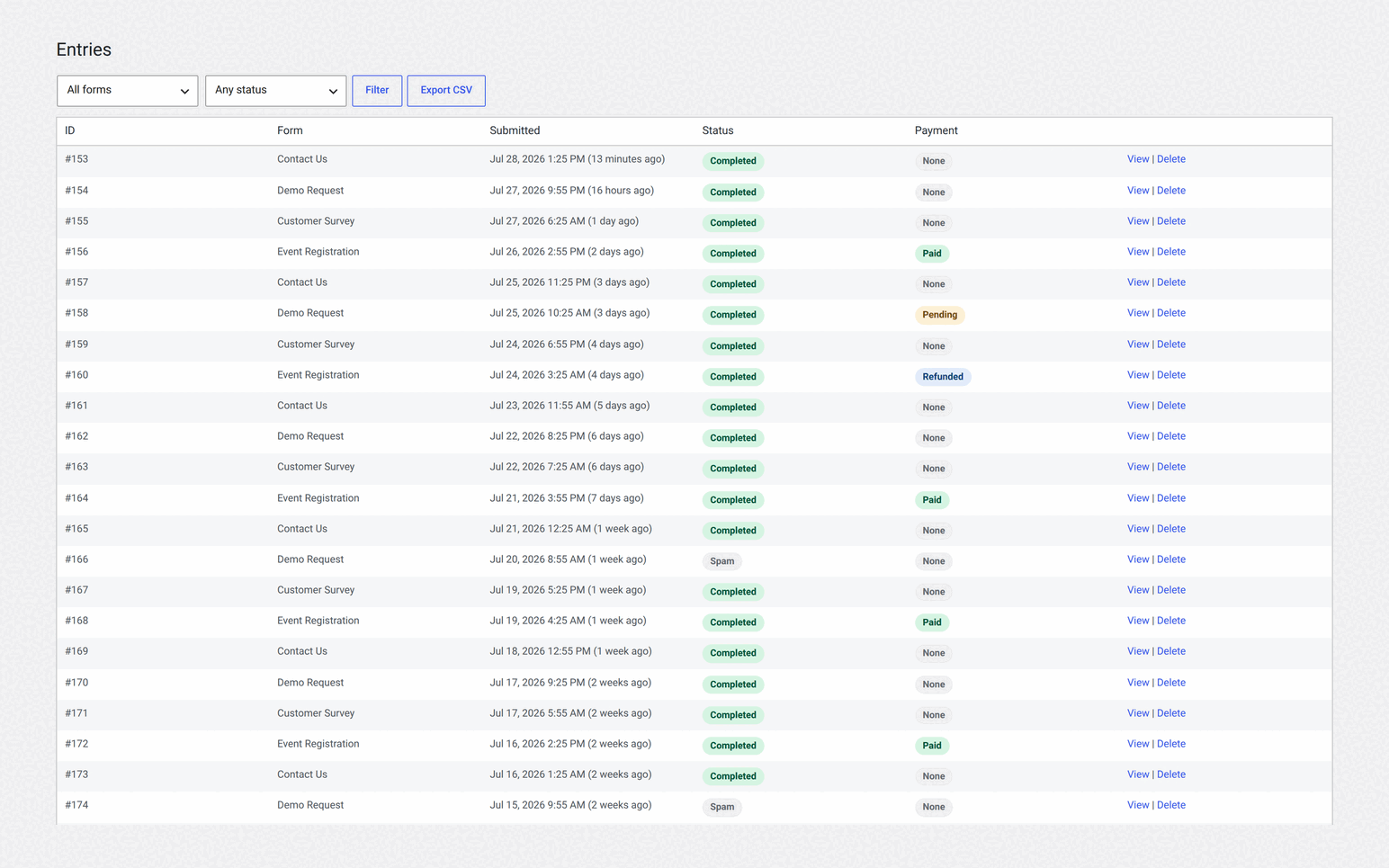
If you already store Contact Form 7 entries and want something closer to a CRM — pipelines, owners, tags, email replies — that is a different tool again: EntryVault turns submissions from Contact Form 7, Trinity Forms and other builders into a unified Kanban board.
The builder is a textarea of bracket tags
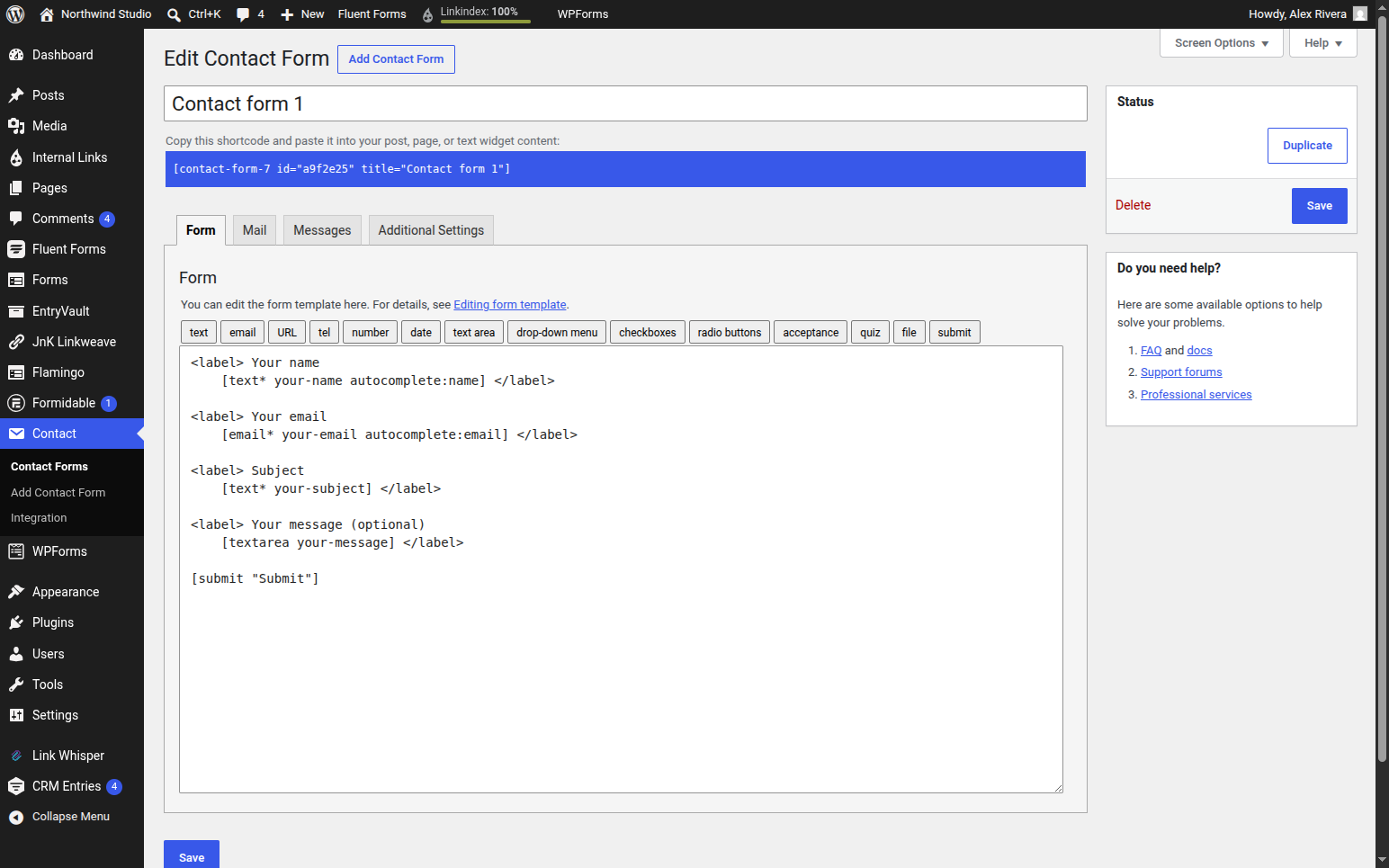
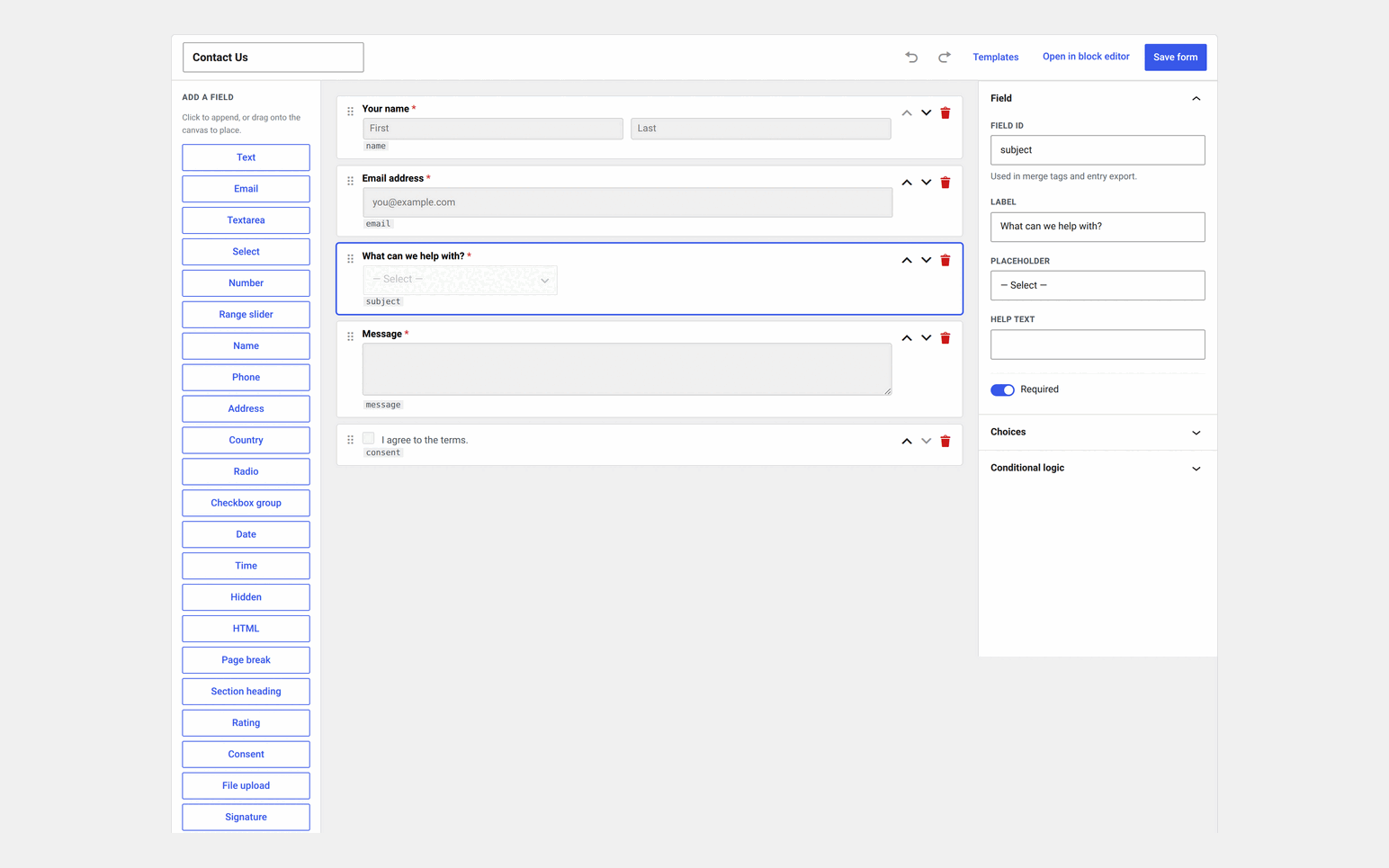
Contact Form 7 forms are configured by typing template tags into a text area — [text* your-name], [email* your-email] — with separate tabs for mail and messages. There is no canvas, no live preview, and layout is entirely your problem.
For a developer who version-controls their forms this is a feature, not a bug, and we will say so again in the verdict. For everyone else it is a wall. You cannot see what you are building, and a mistyped tag fails quietly.
Everything else is an add-on, and add-ons compound
Conditional fields: add-on. Multi-step forms: add-on. Spam control: configure Akismet, or Google reCAPTCHA with API keys, or both. Payments: a built-in Stripe module adds a credit-card widget, with no extra fee from Contact Form 7, but PayPal and anything beyond a card payment means another plugin.
None of these is difficult on its own. The cost is cumulative. Four add-ons is four update streams, four changelogs, four things that might not survive the next PHP version, and four maintainers whose plans you do not know. On a site you will still be responsible for in three years, that is the part that wears you down — not any single missing feature.
Spam deserves a specific mention because it is where the setup cost is highest. Contact Form 7 leans on Akismet and reCAPTCHA: one has its own commercial licensing, the other adds a Google dependency and API keys. Trinity Forms ships a honeypot and a time-trap that work the moment you publish, with no external account, and offers Cloudflare Turnstile, reCAPTCHA v2 or hCaptcha if you want a visible challenge.
Contact Form 7 vs Trinity Forms, feature by feature
Contact Form 7 has one edition, so it gets one column. Its cells come from its wordpress.org listing and its own documentation, read 18 September 2026; ours are checked against the Trinity Forms 2.5.0 builds you can download. Contact Form 7 is free software with no paid tier, so nothing here is a tier gate on their side.
✓ included✓ Pro+ only from that tier up~ partly (catch noted)✗ not availablenot tested hands-on paid screen we did not buy
Building the form7 rows
| Feature | Contact Form 7 | Trinity Forms Free | Trinity Forms Pro |
|---|---|---|---|
| How you build a formContact Form 7: "HTML and Contact Form 7's form-tags can be used in a form template." You write the markup. | Form-tags and HTML in a textarea | Drag and drop, or blocks | Drag and drop, or blocks |
| Starter templates | One default contact form | 12 | 12 |
| Conditional logic | ✗ No | ✓ Yes | + nested groups |
| Multi-page forms | ✗ No | ✓ Yes | ✓ Yes |
| Schedule a form or require login | ✗ No | ✓ Yes | ✓ Yes |
| File uploads | ✓ Yes | ✓ Yes | ✓ Yes |
| Calculations | ✗ No | Pricing fields with a running total | ✓ Yes |
What happens to a submission8 rows
| Feature | Contact Form 7 | Trinity Forms Free | Trinity Forms Pro |
|---|---|---|---|
| Submissions stored on your siteContact Form 7: "Contact Form 7 doesn't store submitted messages anywhere … you may lose important messages forever if your mail server has issues." | No; the free Flamingo plugin adds storage | ✓ Yes | ✓ Yes |
| Email notifications | ✓ Yes | ✓ Yes | ✓ Yes |
| CSV export of submissions | ✗ No | ✓ Yes | ✓ Yes |
| Private notes on a submission | ✗ No | ✓ Yes | ✓ Yes |
| Delete old submissions on a schedule | n/a, nothing is stored | Per-form retention | Per-form retention |
| Partial entries (form abandonment) | ✗ No | ✗ No | ✓ Yes |
| Surveys, polls and quizzes with scoring | ✗ No | ✓ Yes | ✓ Yes |
| Form views and conversion rate | ✗ No | ✓ Yes | ✓ Yes |
Payments, spam and privacy5 rows
| Feature | Contact Form 7 | Trinity Forms Free | Trinity Forms Pro |
|---|---|---|---|
| Stripe card paymentsContact Form 7: "No additional fee is required to use this module." Neither of us takes a cut. | Built-in module, no fee | ✗ No | No fee |
| PayPal and Mollie | ✗ No | ✗ No | ✓ Yes |
| reCAPTCHA, Turnstile and Akismet | ✓ Yes | ✓ Yes | ✓ Yes |
| Nothing leaves your site by defaultContact Form 7's privacy notice: with the default configuration it does not write personal data to the database or send data to external servers. | ✓ Yes | Entries are stored on your site; nothing is sent out | Same, unless you enable an integration |
| Hooks into WordPress personal-data export and erase | not tested hands-on | ✓ Yes | ✓ Yes |
Integrations and beyond4 rows
| Feature | Contact Form 7 | Trinity Forms Free | Trinity Forms Pro |
|---|---|---|---|
| Email marketing (Brevo, Constant Contact, Mailchimp) | Brevo and Constant Contact modules | ✗ No | Mailchimp, MailerLite, Brevo, Kit |
| Zapier, Google Sheets and outgoing webhooks | ✗ No | ✗ No | Webhooks are HMAC-signed |
| Create WordPress posts or users from a submission | ✗ No | ✗ No | ✓ Yes |
| Front-end views of submissions | ✗ No | ✗ No | Table, list and cards |
Cost and scale4 rows
| Feature | Contact Form 7 | Trinity Forms Free | Trinity Forms Pro |
|---|---|---|---|
| Price | Free, no paid tier | $0 | $29/yr, or from $89 once |
| Site limit on the free build | Any number | Any number | By tier, from 3 sites |
| Active installs | 10+ million | Direct download; the wp.org listing is closed pending a review | n/a |
| Languages | 69 | Translation-ready, English shipped | Translation-ready, English shipped |
Sources (5)
- Contact Form 7: https://contactform7.com/editing-form-template/
- Contact Form 7: https://wordpress.org/plugins/contact-form-7/
- Contact Form 7: https://contactform7.com/save-submitted-messages-with-flamingo/
- Contact Form 7: https://contactform7.com/stripe-integration/
- Trinity Forms: https://jnkplugins.com/trinity-forms/pricing.php
Only in Contact Form 7
- Nineteen years of maintenance, 10+ million installs, 69 languages and no vendor relationship to manage.
- A privacy default that stores nothing and sends nothing, which some organisations genuinely need.
- A free Stripe module with no platform fee, and no upsell anywhere in the plugin.
Only in Trinity Forms
- Submissions stored on your site, with notes, CSV export, retention rules and view-to-submission rates, in the free build.
- A drag-and-drop builder with conditional logic and multi-page forms instead of form-tag markup.
- Payments, integrations, front-end views and partial entries on one Pro licence, with a lifetime option.
Pricing, and what happens if you stop paying
Contact Form 7 is free and Trinity Forms keeps a genuinely free core, so replacing a basic contact form costs nothing either way. Pro is flat: $29 a year for three sites, $49 for ten, $99 for unlimited. There is no introductory rate, so no renewal jump. Every tier has a lifetime licence at about three times the yearly price, from $89 one-time.
That matters more than it sounds in this category. Three of the four big commercial form plugins display a 50%-off price with a footnote saying renewals are at full price, and two of them take a percentage of payments your forms collect. The buyer’s guide lays out whose is whose, with the quotes.
One behaviour worth knowing before you commit to anything: if a Trinity Forms Pro licence lapses, Pro keeps working for 30 days. After that only adding new Pro features locks: existing forms keep their Pro fields, Stripe and PayPal forms keep taking payments, notifications still send and entries still store. On a client site you no longer maintain, that is the difference between a quiet lapse and a dead contact page.
Migrating, without turning anything off
- Install alongside Contact Form 7. Nothing needs removing yet, and both can run at once.
- Rebuild the form in the visual builder. Most contact forms are five or six fields and take a couple of minutes.
- Match the notification — point the email at the same address Contact Form 7 was using.
- Swap the shortcode on your contact page and submit a real test entry.
- Confirm both halves: the entry is stored and the email arrived. Only then retire the old form.
From the first submission onward you have a stored record of everything that comes in — which is the thing Contact Form 7 only ever offered through an add-on.
Stay with Contact Form 7 if
You are comfortable configuring forms in markup and want them version-controlled, you depend on a specific add-on with no equivalent elsewhere, you want the smallest possible footprint and will handle storage and spam yourself, or your form genuinely is just “email this to me”. It is free, it is stable, and it has outlasted most of its competitors for good reasons.
Move to Trinity Forms if
A lost email means a lost customer, you would rather see and drag your fields than type tags, you are tired of maintaining four add-ons to get one working form, you want spam handled without API keys, or you will eventually need payments beyond a basic Stripe card field.
The thing that counts against us, said plainly. Trinity Forms’ free build is not currently installable from the WordPress plugin directory — our listing is closed while an account matter is resolved, and we do not control that timeline. The free version is a direct download from us in the meantime. Contact Form 7 installs in one click and always will. On a page arguing you should try our free tier, that is the honest caveat.
Where to go next
Contact Form 7 is rarely the only thing someone is comparing. Our buyer’s guide to WordPress form plugins covers the two things the feature grids leave out: what each licence renews at, and which plugins take a percentage of your payments.
For the specific head-to-heads: vs WPForms, the biggest name in the category and the one whose free build charges 3% on transactions; vs Gravity Forms, the professional incumbent with honest pricing and no free tier at all; vs Fluent Forms, the closest match to how we sell and the page where we concede the most ground; and vs Formidable Forms if your submissions need publishing on the front end.
Found something wrong on this page? Contact Form 7 and its add-on ecosystem both change, and so does everyone’s pricing. Tell us at [email protected] and we will fix it.
Explore Trinity Forms
Pricing and tiers
Contact Form 7 questions
Is Contact Form 7 free?
Yes, completely. Contact Form 7 is GPL, has no paid tier and no vendor selling upgrades, which is a genuine advantage and the main reason it has over ten million active installs. Its costs are indirect: storing entries, adding conditional logic or handling spam properly all mean additional plugins to install and maintain.
Does Contact Form 7 store submissions?
Not by default. Contact Form 7 emails a submission and keeps nothing, so if the email bounces, is filtered as spam or is simply deleted, the enquiry is gone. Storing entries means adding Flamingo, by the same author, or a third-party database add-on such as CFDB7. Trinity Forms stores every submission in your own WordPress database from the free tier, with CSV export included.
What is the best Contact Form 7 alternative?
It depends on why you are leaving. If you want a visual builder with entry storage, conditional logic and spam protection built in and free, Trinity Forms is the closest match. WPForms and Fluent Forms both have large free builds and much larger integration catalogues. Gravity Forms is the professional incumbent but has no free tier. Formidable Forms is the choice if submissions need to be published on the front end.
How do I migrate from Contact Form 7?
Install the new plugin alongside Contact Form 7 rather than replacing it. Rebuild the form in the visual builder, which for a typical five or six field contact form takes a couple of minutes, point the email notification at the same address Contact Form 7 used, swap the shortcode on your contact page, and send a test entry. Once you have confirmed both the stored entry and the email, retire the old form.
Do I need add-ons with Contact Form 7?
For anything beyond emailing a form, usually yes. Entry storage needs Flamingo or a database add-on, conditional fields need an add-on, multi-step forms need an add-on, and spam control means configuring Akismet or reCAPTCHA with API keys. Each is straightforward on its own; the cost is that each is another plugin to keep updated and another thing that can break on a WordPress or PHP upgrade.
Is Contact Form 7 still worth using in 2026?
For a single contact form that emails one address, yes. It is free, stable, has been maintained for well over a decade and has an enormous add-on ecosystem. It stops being the right answer when you need to look at submissions after the fact, when a lost email means a lost customer, or when you need payments beyond a basic Stripe card field.
Related reading
- Does Contact Form 7 store data? — the storage gap explained
- WPForms vs Contact Form 7 — which one is actually free
- Storing and exporting form entries — the general problem, whichever plugin you use