JnK Plugins
Gravity Forms vs Formidable Forms: An Honest Comparison
Gravity Forms and Formidable Forms get compared constantly, and usually badly — most of what you will find is an affiliate page that picks a winner in the first paragraph and reverse-engineers reasons. We want to do something more useful: explain how these two plugins are built differently, because that difference, not a feature checklist, decides which one you will be happy with two years from now.
Both are mature, well-maintained commercial form builders, and neither is a bad choice. But they have different centres of gravity, and picking the one whose centre is far from your project means a lot of time spent fighting it.
The short answer
Pick Gravity Forms if the form is the point. You are collecting submissions — applications, quotes, registrations, support intake — and you want that data to leave WordPress cleanly for a CRM, a payment processor, or an email platform. Its whole model is “capture reliably, then route somewhere”, and its add-on catalogue is dominated by integrations with other systems.
Pick Formidable Forms if the form is the input to an application. You want submitted data to become something users see and interact with on the front end: a directory, a listing, a calculator, a member-editable profile. Formidable’s defining feature is Views — a templating layer that renders stored entries as front-end pages. That is a genuinely different product category bolted onto a form builder, and nothing in Gravity Forms core matches it.
Still at the “which form plugin at all?” stage? Our roundup of the best WordPress form builder plugins covers the free options. This piece assumes you have decided to pay for something.
Methodology, plainly stated
This comparison is based on hands-on use of both plugins on real client sites, a close read of each vendor’s public documentation and developer reference, and publicly available plugin data. We did not run a controlled lab benchmark, and we are not publishing load times or query counts we cannot reproduce for you. We also avoid quoting prices, version numbers, or licence-tier feature splits — those change often enough that any figure printed here would eventually mislead someone. For current pricing and tier contents, check gravityforms.com and formidableforms.com directly. Everything below is about architecture and philosophy, which is stable.
Form building: the editor experience
Gravity Forms’ editor is deliberately unglamorous. Fields are grouped by type, you add them to a canvas, and each field’s settings live in a tabbed panel. It has been refined rather than reinvented: the vocabulary is consistent, settings are where you expect, and someone who learned it years ago can still work fast in it. The trade-off is that it is not a design tool — what you see while building is a schematic, not a preview, and serious visual customisation means CSS.
Formidable’s builder covers similar ground with a stronger visual bias. It leans harder on drag-and-drop layout, gives more direct control over field widths and rows, and shows you something closer to the finished form while you work. Where the person building forms is not the person writing CSS, that matters more than it sounds.
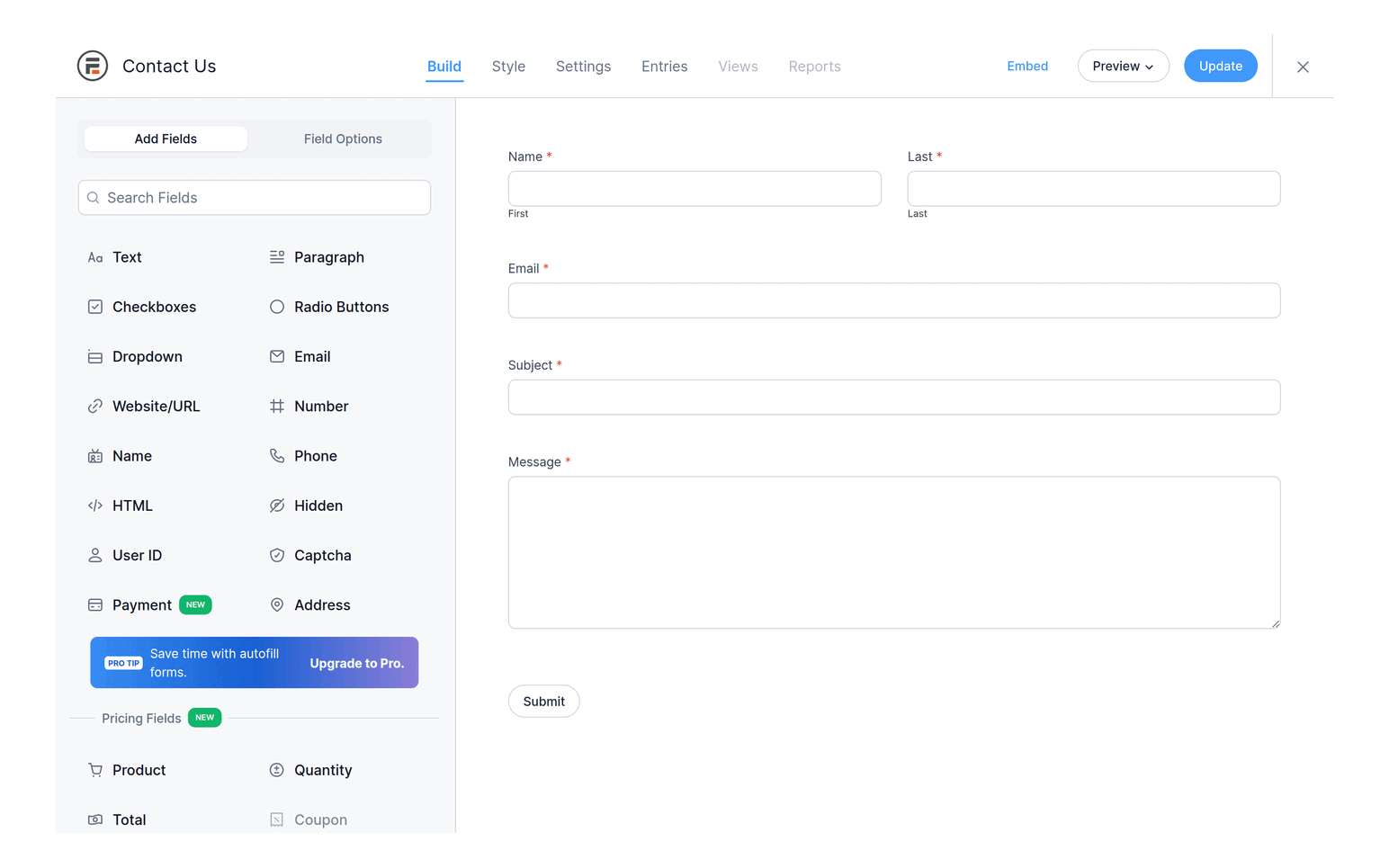
Neither is a page builder, whatever the marketing says. Both inherit theme styles imperfectly and both benefit from a small stylesheet of your own. The honest difference is starting distance: Formidable gets you closer to presentable without touching CSS; Gravity Forms assumes you will touch CSS and gets out of your way.
Conditional logic
Both do per-field show/hide conditions, conditional notifications and confirmations, and in everyday use they feel equivalent. They diverge at the edges — chained conditions across multi-page forms, conditions driven by calculated values. Both handle these; both get fiddly. If your branching is genuinely complex, build the ugliest version of it before you commit rather than trusting a marketing page: in Formidable’s free Lite build or its 14-day refund window, and in Gravity Forms’ hosted demo or its 30-day refund window, since Gravity has no trial version.
Data handling and front-end views
This is the section that should decide most people’s choice.
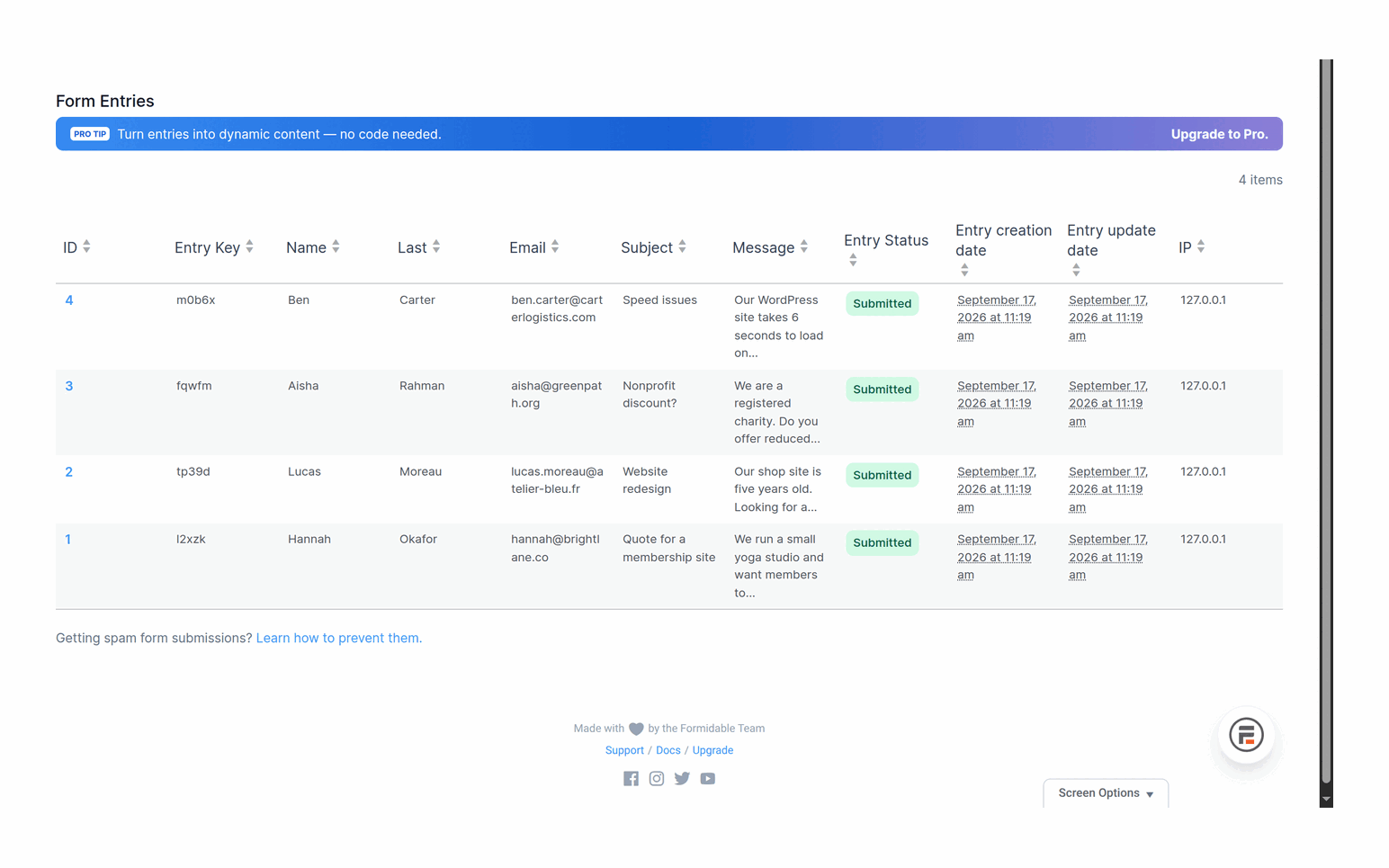
Gravity Forms stores entries in its own tables and gives you a solid admin-side entry browser: filtering, columns, notes, bulk actions, exports. What it does not ship in core is a front-end display layer. Showing entries publicly — a searchable directory, a leaderboard, a photo gallery — is add-on territory, and the best-known solution is third-party. That is a scope decision, not a flaw: Gravity Forms treats the entry database as a staging area on the way to somewhere else.
Formidable treats it as a destination. Views let you template against stored entries, filter and sort them, and drop the result into a page. Add front-end entry editing and user-scoped filtering and you can build a small working application — a job board, a member directory, a project tracker — without leaving the plugin. The cost is conceptual weight: Views are a templating language you have to learn, and debugging a View that renders nothing is a less pleasant afternoon than debugging a form that will not submit.
Whichever you choose, do not treat the plugin’s tables as your only copy of important data. We wrote separately on storing and exporting WordPress form entries safely because this is where we see the most avoidable data loss — years of submissions with no export routine and no backup anyone has tested restoring.
Calculations and logic
Both support calculated fields and both are commonly used for quote builders. The difference is depth versus directness.
Gravity Forms’ calculations are field-referenced formulas with merge tags plus conditional logic on top. They are approachable and cover the common cases — quantity times price, subtotals, tiered options — without ceremony. Beyond that you drop into hooks.
Formidable goes further natively, including calculations that work across entries rather than only the current submission. If your calculator must reference something a user submitted earlier, or aggregate across records, Formidable gets you there with less custom code. If it is “add up this order and charge for it”, the two are close enough that it should not drive your decision.
Extensibility and the add-on ecosystem
Gravity Forms has the larger and older third-party ecosystem. Beyond the official add-ons there is a substantial independent market of extensions — a real, compounding advantage. When you need to connect to some niche service, the odds someone has already built a Gravity Forms bridge for it are good.
Formidable’s ecosystem is more first-party: more capability lives inside the product or its own add-ons, and less depends on outside developers. That means fewer moving vendors and a more coherent whole — but if the vendor has not built the integration you need, you are likelier to be writing it yourself.
There is a maintenance argument here that comparison posts skip. Every add-on is another update cadence, another compatibility surface, another thing that breaks during a PHP version bump. A dozen add-ons from eight vendors is more flexible and more fragile than one install doing the same work in-house. Which risk you prefer is a judgement call, not a right answer.
Developer experience
Both expose extensive hook APIs and both are pleasant to extend if you already write WordPress code.
Gravity Forms’ developer documentation is, in our experience, the stronger of the two: hooks are catalogued thoroughly with parameters and examples, and naming conventions are predictable enough that you can often guess a filter before looking it up. Its add-on framework is a real framework — building a custom integration against a documented base class beats assembling ad-hoc hooks.
Formidable also offers a broad hook surface and REST access, and its data model is approachable. Where we find ourselves slower is Views: customising rendering means working within the templating layer’s assumptions, and when you need something it did not anticipate, the escape hatch is less obvious than “filter this value”.
For agencies the practical question is transferability. Gravity Forms knowledge is more widely held in the WordPress developer market, which matters when someone else inherits the site. That is a statement about hiring, not quality.
Support and documentation
Both sell support with their licences and maintain large documentation libraries. Our experience with each has been fine — competent, ticket-based, not instant. Neither vendor makes a habit of abandoning customers, which is more than can be said for parts of this market. The one durable difference: because Gravity Forms leans on third-party add-ons, support can become triage across vendors when something breaks in the seam between two plugins. Formidable’s first-party structure means fewer conversations of the form “that is the other plugin’s problem”.
Comparison at a glance
Each cell names the cheapest tier that includes the feature, with a source behind it. We installed Formidable Lite 6.35 ourselves. Gravity Forms has no free build and we did not buy a licence, so its column comes from its own pricing pages and anything they do not settle says so. Read 17 and 18 September 2026.
✓ included✓ Pro+ only from that tier up~ partly (catch noted)✗ not availablenot tested hands-on paid screen we did not buy
Building forms8 rows
| Feature | Gravity Forms | Formidable Lite (free) | Formidable paid |
|---|---|---|---|
| Free version you can install | ✗ No | ✓ Yes | n/a |
| Conditional logic | Basic | ✗ No | Basic |
| Multi-page forms | Basic | ✗ No | Basic |
| Save and continue later | Basic | ✗ No | Basic |
| Conversational (one question at a time) | Elite | ✗ No | Business |
| File uploads | Basic | ✗ No | Basic |
| Calculations | Basic | ✗ No | Basic |
| Signatures | Elite | ✗ No | Business |
Entries and data8 rows
| Feature | Gravity Forms | Formidable Lite (free) | Formidable paid |
|---|---|---|---|
| Entries stored, with CSV export | Basic | ✓ Yes | ✓ Yes |
| Front-end views of entriesThe real split in this pair: Formidable treats stored entries as something to publish, Gravity Forms leaves that to add-ons. | ✗ No | ✗ No | Plus |
| Front-end editing of entries | not tested hands-on | ✗ No | Plus |
| Graphs and charts from entries | not tested hands-on | ✗ No | Plus |
| Partial entries (form abandonment) | Elite | ✗ No | Business |
| Surveys, polls and quizzes | Elite | ✗ No | Business |
| Create WordPress posts from entries | Basic; advanced on Elite | ✗ No | Basic |
| User registration forms | Elite | ✗ No | Business |
Payments and integrations6 rows
| Feature | Gravity Forms | Formidable Lite (free) | Formidable paid |
|---|---|---|---|
| StripeFormidable's Basic plan bullet: "Upgrade to Business to remove the 3% transaction fee." Gravity Forms charges no platform fee but puts Stripe on Pro. | Pro | With a transaction fee | Fee until Business |
| PayPal | Pro | ✗ No | Fee until Business |
| Discount coupons | Elite | ✗ No | Business |
| Zapier | Pro | ✗ No | Business |
| Salesforce | Elite | ✗ No | Elite |
| Outgoing webhooks | Elite | ✗ No | Business (API add-on) |
Cost and licence6 rows
| Feature | Gravity Forms | Formidable Lite (free) | Formidable paid |
|---|---|---|---|
| Cheapest paid tier, 1 site | $59/yr (Basic, no Stripe) | $0 | $39.50 first year, $79 after |
| Tier that removes payment fees | No platform fee on any tier | n/a | Business: $199.50, then $399 |
| Everything included | $259/yr, Elite, unlimited sites | n/a | Elite tier |
| Lifetime licence | ✗ No | n/a | ✗ No |
| Forms keep working if the licence expires | not tested hands-on | n/a | Yes, but premium fields can't be edited |
| Refund window | 30 days | n/a | 14 days |
Sources (7)
- Gravity Forms: https://www.gravityforms.com/pricing/
- Formidable Forms: https://wordpress.org/plugins/formidable/
- Formidable Forms: https://formidableforms.com/features/
- Gravity Forms: https://www.gravityforms.com/features/
- Formidable Forms: https://formidableforms.com/pricing/
- trinity-forms: https://jnkplugins.com/trinity-forms/pricing.php
- Gravity Forms: https://www.gravityforms.com/refund-policy/
What neither of them does well
An honest comparison includes what both get wrong.
- Front-end weight. Neither is light. Both load meaningful CSS and JavaScript, and both can end up loading it on pages with no form unless you actively manage that. If you are chasing Core Web Vitals on a content site, that is a cost you are choosing to pay.
- Migration. Moving between them, or off them, is painful. Form structures, conditional logic, and entry data do not port cleanly, and Views work is effectively non-transferable. Switching later is a project, not an afternoon.
- Spam. Both rely on you to bolt on a captcha or anti-spam service. Neither ships a defence that survives a determined bot without configuration.
- Retention. Both happily accumulate submissions forever, including personal data you may have no lawful basis to keep, and neither nudges you toward a retention policy. That is on you.
- Cost at scale. Multi-site licences plus add-ons add up, and the renewal is annual and permanent. For a simple contact form this is overkill — our Gravity Forms vs Contact Form 7 comparison covers the case where the free option is genuinely right.
How we would actually choose
Ask one question: after someone hits submit, where does the data need to live?
“In another system” — a CRM, Stripe, a mailing list, a bespoke webhook — makes Gravity Forms the safer default. “On this site, visible to users” — a directory, an editable profile, a filterable table — points to Formidable, because replicating Views with add-ons is more work than picking the tool built for it. And “in an email inbox, and that is all” means buy neither yet: a free plugin does that, and you can upgrade the day it stops being enough.
Full disclosure: we make a competing form builder, Trinity Forms, so we are not a neutral party here — we compete with both plugins discussed above. We have tried to describe them as we would want ours described, and we would still recommend either over a bad fit with our own. Trial both before committing.
Frequently asked questions
Can Gravity Forms display form entries on the front end like Formidable’s Views?
Not in core. Gravity Forms focuses on capturing entries and routing them to other systems; front-end display is handled through add-ons, most notably third-party ones. Formidable ships Views as a built-in templating layer for rendering stored entries as public pages. If front-end display matters to your project, that is the biggest structural difference between the two.
Which one is better for calculations and quote builders?
Both handle standard per-submission calculations — quantity times price, subtotals, conditional pricing — closely enough that it should not decide your purchase. Formidable goes further natively by allowing calculations that reference stored entries rather than only the current submission, so if your calculator needs historical or aggregated data, it will usually take less custom code.
How much do Gravity Forms and Formidable Forms cost?
We deliberately do not publish prices here, because tiers and their contents change and a stale figure would mislead you. Check gravityforms.com and formidableforms.com directly, and pay attention to which add-ons are bundled at each tier rather than the headline number — that usually matters more than the price itself.