JnK Plugins
The Best WordPress Form Builder Plugins (2026)
Ask ten WordPress site owners which form plugin they use and you’ll get ten confident answers — and at least three regrets. Forms are the plumbing of a website: contact requests, quotes, registrations, payments, surveys. When they work, nobody notices. When they don’t, you lose leads. So picking the right builder matters more than the marketing pages suggest.
This roundup ranks the best WordPress form builder plugins for 2026 on three things that actually affect your day-to-day: features (does it do what you need without ten add-ons), pricing (what it really costs to own, including renewals), and ease of use (how fast a normal human can build and ship a form). Deliberately, we are not ranking on download counts or “most popular” badges. Popularity tells you what people installed years ago; it doesn’t tell you what’s the best fit for your project today.
What makes a good form builder in 2026
The baseline has moved. A form plugin that can’t do these is hard to recommend now:
- A real visual builder — drag-and-drop or block-based, not shortcode-wrangling.
- Entry storage — submissions saved in WordPress, not just fired off in an email you might miss.
- Conditional logic — show, hide, or route fields based on what the user picks.
- Spam protection — honeypots plus a modern CAPTCHA option (reCAPTCHA, hCaptcha, or Cloudflare Turnstile).
- Notifications and exports — email alerts and CSV export at minimum.
- Payments and integrations — Stripe/PayPal and a path to your CRM or email tool, at least on paid tiers.
Everything below clears that bar. Where they differ is how much is free, how the pricing scales, and how much fighting the interface you’ll do to get there.
How we tested: in July 2026 we installed the free builds of WPForms Lite 2.0.0.2, Fluent Forms 6.2.9 and Formidable 6.32.1 — alongside our own Trinity Forms — on a WordPress 7.0 / PHP 8.4 test site, built a contact form in each, and captured the screenshots below from those installs. Gravity Forms has no free build, so its assessment is desk research from its published documentation and pricing. Every price and plan detail was re-checked on the vendor’s own site on 16 September 2026; the screenshots are still from the July installs.
Comparison at a glance
Pricing checked on each vendor’s own website on 16 September 2026. Where a vendor shows a first-year discount, we give the list price that renewals are charged at. Always confirm on the vendor’s pricing page before you buy.
| Plugin | Free tier | Starting paid price | Builder type | Standout strength |
|---|---|---|---|---|
| WPForms | Yes (Lite; no entry storage) | ~$49.50/yr first year, $99 after (Basic) | Drag-and-drop | Easiest for beginners |
| Fluent Forms | Yes (very generous) | ~$79/yr (lifetime ~$279) | Drag-and-drop | Best value / fastest |
| Trinity Forms (ours) | Yes (entry storage, surveys & quizzes in free) | $29/yr or $89 lifetime (Solo, 3 sites) | Drag-and-drop Visual Builder, or blocks | Most features per dollar; flat + lifetime pricing |
| Gravity Forms | No | $59/yr (Basic) | Configurator + fields | Developer power & ecosystem |
| Formidable Forms | Yes (limited) | $79/yr list, $39.50 first year (Basic) | Drag-and-drop | Data, calculations & Views |
| Forminator | Yes (payments in free) | Pro $50/yr (1 site) | Drag-and-drop | Most capable free tier |
Feature by feature, with sources
That table is the price and the shape. This one is the features, with a source behind every cell, and each cell names the cheapest tier that has the feature. We installed the free versions of WPForms, Fluent Forms, Formidable and Contact Form 7 ourselves, on 17 and 18 September 2026. Gravity Forms has no free version and we did not buy one, so its column comes from its own pricing pages.
✓ included✓ Pro+ only from that tier up~ partly (catch noted)✗ not availablenot tested hands-on paid screen we did not buy
6 products: scroll sideways to see them all.
Building forms5 rows
| Feature | Trinity Forms | WPForms | Fluent Forms | Formidable | Gravity Forms | Contact Form 7 |
|---|---|---|---|---|---|---|
| Conditional logic | Free | Basic | Free | Basic | Basic | ✗ No |
| Multi-page forms | Free | Basic | Pro | Basic | Basic | ✗ No |
| File uploads | Free | Basic | Pro | Basic | Basic | ✓ Yes |
| CalculationsTrinity Forms Free has pricing fields with a running total; full calculations are Pro. | Pro | Pro | Pro | Basic | Basic | ✗ No |
| Signatures | Pro | Pro | Pro add-on | Business | Elite | not tested hands-on |
Entries6 rows
| Feature | Trinity Forms | WPForms | Fluent Forms | Formidable | Gravity Forms | Contact Form 7 |
|---|---|---|---|---|---|---|
| Entries stored in your database | Free | Basic | Free | Free | Basic | No; the free Flamingo plugin adds it |
| Surveys, polls and quizzes | Free | Pro | Pro | Business | Elite | ✗ No |
| Partial entries (form abandonment) | Pro | Pro | Pro | Business | Elite | ✗ No |
| Front-end views of entries | Pro | not tested hands-on | Pro | Plus | ✗ No | ✗ No |
| User registration forms | Pro | Pro | Pro | Business | Elite | ✗ No |
| Import from other form pluginsTrinity Forms Free imports from 10 plugins, with entries where the plugin keeps them. Formidable Lite imports from Gravity Forms. | Free, 10 plugins | Basic | Free | Free | not tested hands-on | not tested hands-on |
Payments and integrations4 rows
| Feature | Trinity Forms | WPForms | Fluent Forms | Formidable | Gravity Forms | Contact Form 7 |
|---|---|---|---|---|---|---|
| Stripe | Pro, no fee | Lite and Basic take 3%; no fee from Pro | Free takes 1.9%; no fee on Pro | Fee until Business | Pro | Built-in module, no fee |
| Zapier | Pro | Pro | Pro | Business | Pro | ✗ No |
| Outgoing webhooks | Pro, HMAC-signed | Elite | Pro | Business (API add-on) | Elite | ✗ No |
| Salesforce | ✗ No | Elite | Pro | Elite | Elite | not tested hands-on |
Price4 rows
| Feature | Trinity Forms | WPForms | Fluent Forms | Formidable | Gravity Forms | Contact Form 7 |
|---|---|---|---|---|---|---|
| Free version | ✓ Yes | Lite stores no entries | ✓ Yes | Lite has no conditional logic | ✗ No | ✓ Yes |
| Cheapest paid tierTrinity Forms Solo covers 3 sites; the others are 1-site prices | $29/yr for 3 sites, same at renewal | $49.50 first year, $99 after | $55 first year, $79 list | $39.50 first year, $79 after | $59/yr (Basic, no Stripe) | Free, no paid tier |
| Lifetime licence | From $89 once | ✗ No | $279 now, $349 list | ✗ No | ✗ No | n/a, it is free |
| Money-back guarantee | 14 days | 14 days | 14 days | 14 days | 30 days | n/a |
Sources (18)
- WPForms: https://wordpress.org/plugins/wpforms-lite/
- WPForms: https://wpforms.com/pricing/
- Fluent Forms: https://fluentforms.com/free-vs-pro/
- Formidable Forms: https://wordpress.org/plugins/formidable/
- Formidable Forms: https://formidableforms.com/pricing/
- Gravity Forms: https://www.gravityforms.com/features/
- Contact Form 7: https://wordpress.org/plugins/contact-form-7/
- Fluent Forms: https://wordpress.org/plugins/fluentform/
- Contact Form 7: https://contactform7.com/editing-form-template/
- Fluent Forms: https://fluentforms.com/pricing/
- Gravity Forms: https://www.gravityforms.com/pricing/
- WPForms: https://wpforms.com/docs/how-to-use-lite-connect-for-wpforms/
- Contact Form 7: https://contactform7.com/save-submitted-messages-with-flamingo/
- WPForms: https://wpforms.com/how-to-accept-payments-with-stripe/
- Trinity Forms: https://jnkplugins.com/trinity-forms/pricing.php
- Contact Form 7: https://contactform7.com/stripe-integration/
- Formidable Forms: https://formidableforms.com/features/
- Gravity Forms: https://www.gravityforms.com/refund-policy/
1. WPForms — the easiest on-ramp for non-developers
Best at: getting a good-looking, working form live in minutes with zero technical friction. The builder is the cleanest in this category: pick a template, drag fields, done. If you’ve never built a form before, this is the gentlest place to start.
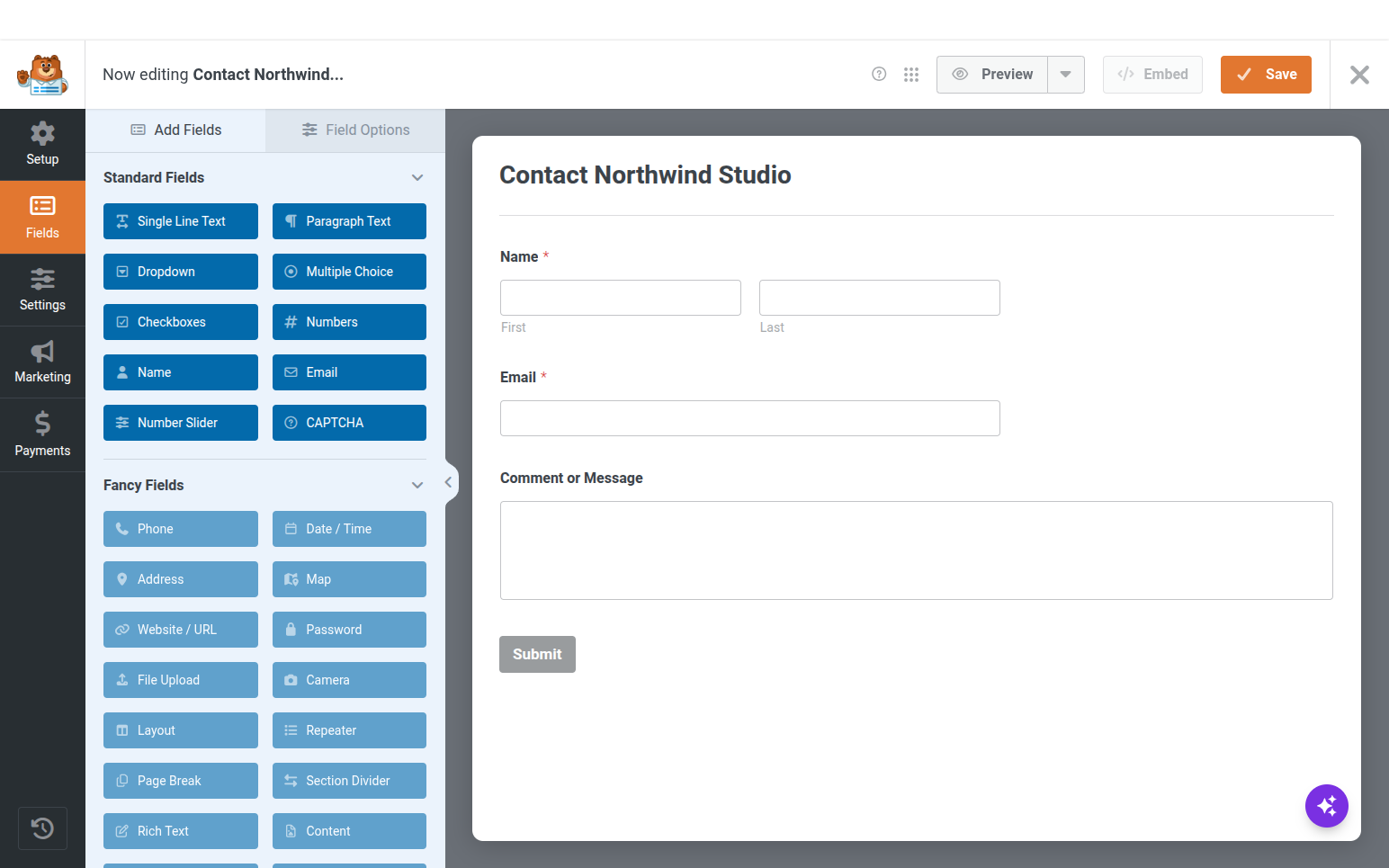
Pricing: a free “Lite” version exists on WordPress.org, and paid plans start at around $49.50/year for the Basic single-site license, scaling up through Plus (~$99.50), Pro, and Elite. Note that Basic renews close to its intro price, but higher tiers advertise a first-year discount and renew substantially higher — read the renewal line before committing.
Ease of use: excellent — arguably the benchmark the others are measured against.
Downside: the free tier is genuinely limited. WPForms Lite does not store entries in your dashboard — you rely on email notifications — and conditional logic, payment fields, and the entry database all require a paid plan. It’s a great product, but you’ll likely be paying to get the essentials, and the mid-to-high tiers get expensive on renewal.
2. Fluent Forms — the value and performance champion
Best at: giving you the most usable functionality for the least money, quickly. Fluent Forms is fast, lightweight, and its free version is unusually complete — drag-and-drop builder, 35+ fields, conditional logic, conversational forms, spam protection, a Gutenberg styler, import/export, and even basic Stripe payments without upgrading.
Pricing: Pro starts at around $79/year per domain, and — importantly — Fluent Forms offers a lifetime license from roughly $279. If you dislike annual renewals, that one-time option is one of the most attractive deals in the category.
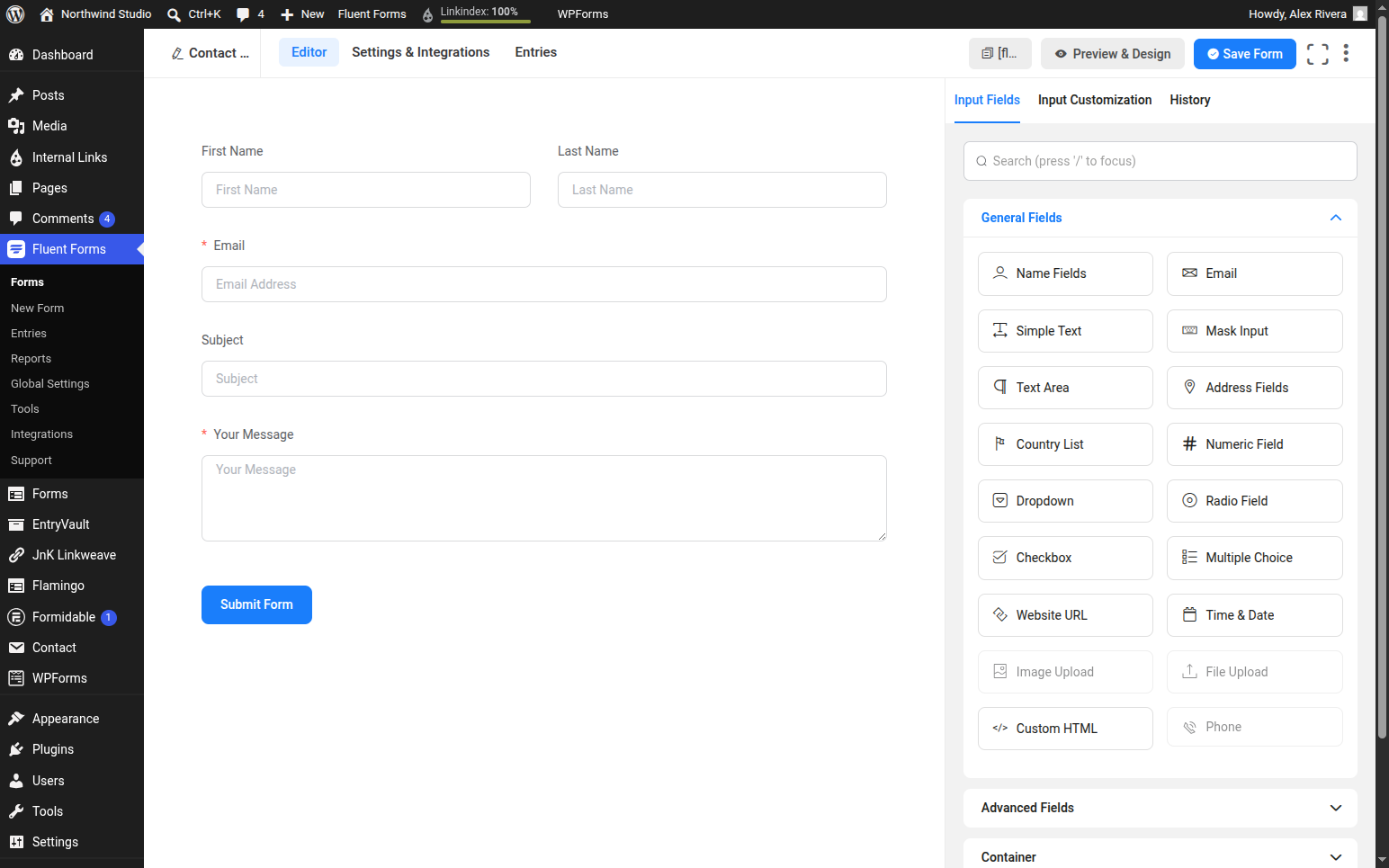
Ease of use: very good. The interface is snappy and logical; power users love how much is exposed without menu-diving.
Downside: because it surfaces so many options, first-timers can feel a half-step more overwhelmed than they would in WPForms. It’s a small gap, and most people cross it within a session — but WPForms still wins the absolute-beginner test.
3. Trinity Forms — the most features per dollar (and it’s ours)
What it does now (the part that changed the ranking):
- A free tier that’s hard to match. The free core includes native entry storage with no cap, 32 field types, file uploads, multi-step forms, conditional logic, CSV export, email notifications, and spam protection with a choice of three CAPTCHA providers — Cloudflare Turnstile, reCAPTCHA v2, and hCaptcha — plus a honeypot and time-trap. It also ships survey/poll results reporting and quiz scoring in the free tier, and a library of 12 starter templates. Since 2.25 any form can run as a poll: voters see the live results bars instead of the form, and that’s free too. That’s more than WPForms Lite (no stored entries) and more than Formidable’s free tier offer, at $0.
- It now owns the “data app” trio. The features that used to be Formidable’s signature — calculations, a front-end Views-style submissions display, and PDF export of entries — are all in Trinity’s Pro tier today. Calculations are recomputed authoritatively on the server (not just client-side), the front-end view is a searchable, paginated table you can drop on any page (2.23 added calendar, timeline and sortable data-table layouts), and any entry can be downloaded as a PDF or attached to notification emails.
- It imports from ten form plugins, free. Gravity Forms forms, fields, conditional logic, notifications and entries come across with their original submission dates, and a dry run reports exactly what would happen first. Since 2.18 the same free importer also reads WPForms, Contact Form 7, Fluent Forms, Ninja Forms, Formidable, Forminator, Everest Forms, SureForms and MetForm, with their entries where the plugin keeps them. Nothing on their side is changed, and anything that could not be brought over is listed. Migration is usually the reason people stay on a plugin they have outgrown, and this is in the free build.
- Entries are a workflow, not a list. Since 2.3.0 the free build has All/Unread/Starred/Spam/Trash tabs with live counts, full-text search, bulk actions that queue in the background, private per-entry notes, an activity log, editable entries and a print view. Spam is quarantined and recoverable rather than refused outright.
- Payments and multi-step without the add-on tax. Multi-step forms with page breaks are free. Pro adds Stripe (one-off or recurring), PayPal and Mollie, and since 2.25 Square and Authorize.Net with the card field right on the form. It also has a save-and-continue-later resume link, a one-question-at-a-time guided mode, and premium fields (e-signature, repeater, and since 2.4 a rich text field). Recent releases also added a full-page landing page for any form (2.4) and a Pending review tab with bulk approve and reject for entries (2.5). 2.23 was a big one: popup forms with scroll, time and exit-intent triggers, a booking field with time slots, NPS, Likert and ranking survey fields, native double opt-in, product stock, and quotes your customer can approve and pay online.
- Five languages, and AI assistants. The admin screens, builder and forms ship in English, Spanish, Korean, Hindi and Arabic, and work right to left. Since 2.21 an AI assistant such as Claude can read your forms and entries for free through the MCP Adapter plugin, with contact details masked. With Pro it can build and edit forms, showing each change first, and the AI form generator works with your own OpenAI or Anthropic key.
- Integrations for the tools most people actually use: Mailchimp, MailerLite, Brevo, ConvertKit, Google Sheets, HubSpot, ActiveCampaign, Slack, Discord, Notion, Airtable, Twilio and Zapier/Make, plus a generic signed webhook — fourteen in all, with no per-integration upcharge. Payments run through Stripe, PayPal, Mollie, Square or Authorize.Net.
Pricing — the crux of the #3 argument. The free core is free forever. Pro is flat: $29/year for Solo (3 sites), $49 for Studio (10 sites) and $99 for Agency (unlimited sites). Monthly plans start at $3. Every tier also has a lifetime license: a one-time payment of about 3× the yearly price ($89 for Solo), with updates and support included and no renewals. There are no per-entry, per-submission, or transaction fees, and pricing doesn’t balloon on renewal. Put that next to Formidable, whose calculations-and-Views features live in tiers that run to $399–$599/year, and the value gap is the whole reason Trinity sits above it here.
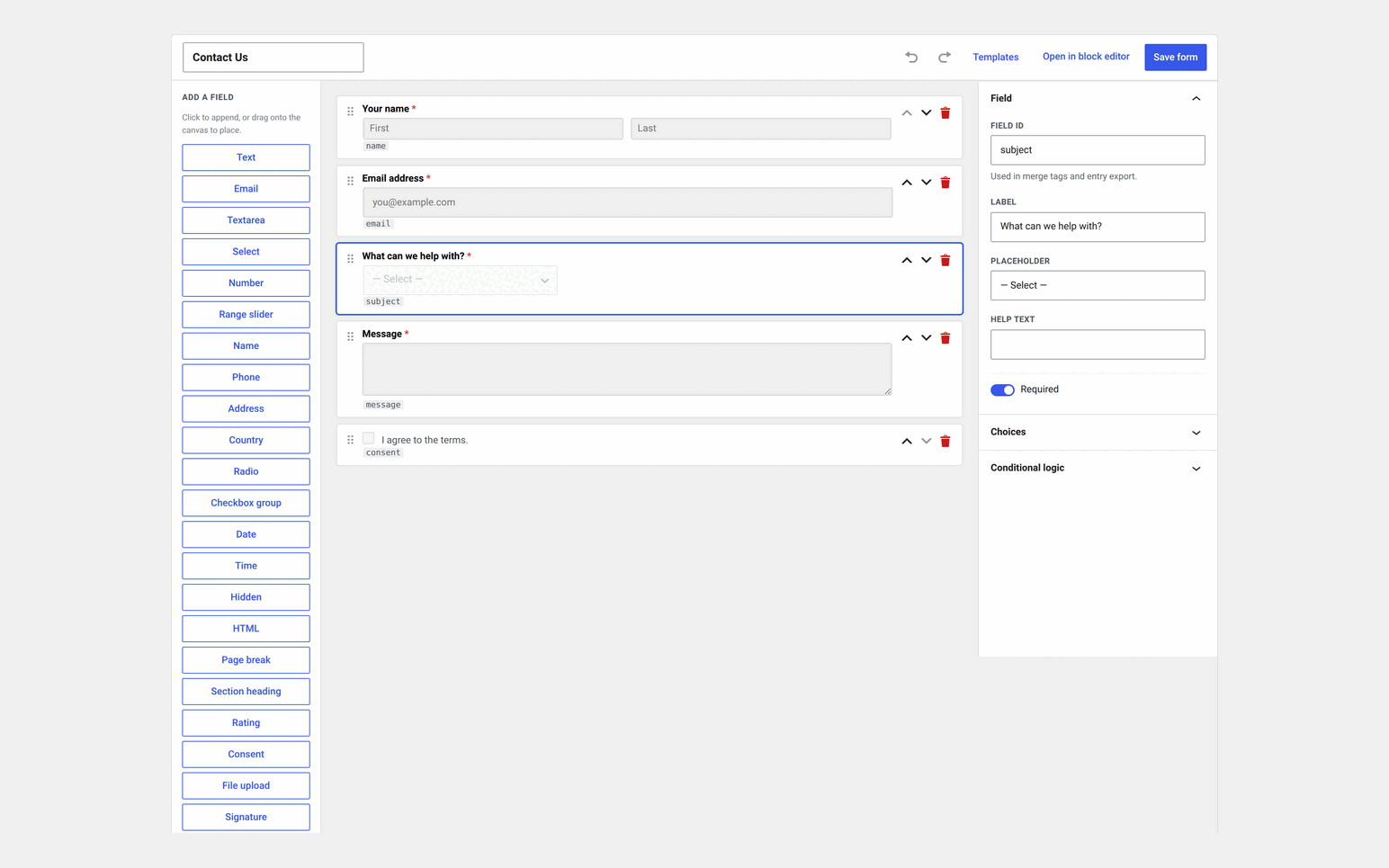
Ease of use: good, and better than it used to be. Since 2.1 new forms open in the dedicated Visual Builder: a drag-and-drop canvas with a field palette, per-field settings, undo and redo, 12 starter templates and, since 2.5, a Draft / Published switch. The block editor is still there if you prefer building forms as blocks, and either editor works on any form. The remaining honest caveat is maturity rather than interface: WPForms’ and Fluent’s builders have had years more polish.
Where it honestly still trails the veterans below it: the integration library is smaller. Fourteen native connectors against the 30 to 100+ that Gravity and Fluent offer, and no native Salesforce, Zoho or Pipedrive, so for those you go through Zapier or a webhook. Its PDF and front-end Views have grown a lot this year, but they’re still younger than Gravity PDF or Formidable Views. And it simply doesn’t have the decade-long track record, review volume, or third-party developer community of the two plugins ranked just below it. If a specific niche integration, a mature Views engine, or an established ecosystem is your priority, Gravity or Formidable is the better buy, and that’s a completely reasonable reason to slot it below them.
4. Gravity Forms — the power user and developer favorite
Best at: complex, mission-critical forms. Gravity Forms has a well-earned reputation for reliability, a deep hooks/filters API, and a bundling philosophy that many prefer: all core features (conditional logic, multi-page, file uploads, spam protection) are included in every license — the tiers differ mainly by site count and add-ons, not by gating basic functionality. Its add-on ecosystem — payments, CRMs, GravityView, Gravity Flow — is one of the deepest in WordPress, which is exactly the maturity Trinity can’t yet match.
Pricing: Basic is around $59/year (1 site), Pro ~$159/year (3 sites, adds payments and advanced add-ons), and Elite ~$259/year (unlimited sites, surveys/quizzes, signatures, webhooks). There’s a 30-day refund window. Be aware that marquee ecosystem add-ons are third-party and priced on top: GravityView is $119/year (checked 8 October 2026), and Gravity Flow is billed separately again.
Ease of use: good, but utilitarian. The builder is a configurator rather than a slick canvas — efficient once you know it, less charming than WPForms or Fluent Forms on day one.
Downside: there is no free version and no trial. You can sign up for a hosted demo on their site, but you can’t install it on your own site without buying a licence (with a 30-day refund window). The interface, while dependable, looks and feels more dated than newer rivals. If you don’t need the ecosystem depth, you’re paying for maturity you may not use.
5. Formidable Forms — for data, calculations, and front-end Views
Best at: forms that are really applications. Formidable goes beyond collecting submissions: it can run calculations, build directories and listings, generate PDFs, and display entry data back on the front end with its Views feature. Its Views engine is more mature than Trinity’s newer front-end display, so if you’re building a heavy data-driven mini-app, it still has the edge on that specific job.
Pricing: a limited free version exists; paid plans start around $79/year (Basic), then Plus (~$199), Business (~$399), and Elite (~$599). The advanced data features — Views, calculations at full strength, many integrations — live in the higher, pricier tiers. That price ladder is precisely why Trinity, which puts calculations, a front-end view, and PDF into a $29/yr or $89-lifetime Pro tier, edges ahead of it on value here.
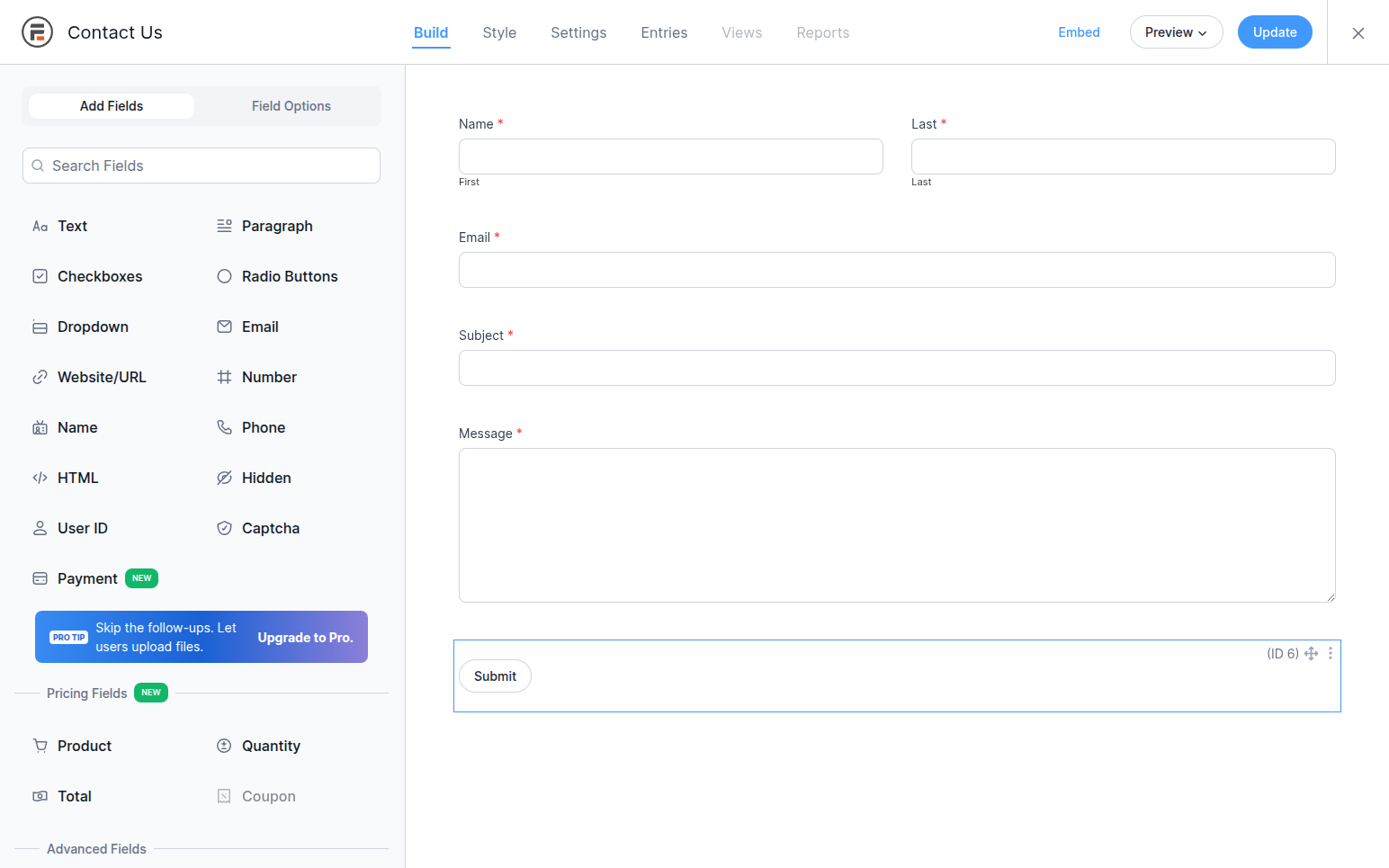
Ease of use: moderate. Basic forms are straightforward, but the features that make Formidable special have a real learning curve.
Downside: it’s overkill (and overpriced) if you just need contact and lead forms, and the top tiers are among the most expensive in this roundup.
Worth a look: Forminator — the most generous free tier
Forminator (by WPMU DEV) doesn’t sit in the ranked five, but it’s genuinely remarkable and worth a mention for one reason: its free version is astonishing. It includes Stripe and PayPal payments, conditional logic, file uploads, quizzes, polls, and integrations with Mailchimp, Google Sheets, and Zapier — features most competitors reserve for paid plans. For nonprofits, side projects, and budget-conscious sites, it’s hard to beat on cost.
The paid side is simpler than it used to be. Forminator Pro (Stripe subscriptions, PDF generation, e-signatures, geolocation and address autocomplete) is $50/year for one site, $75 for three and $100 for ten. For unlimited sites it comes with a WPMU DEV Premium membership, listed at $9.99/month and shown at $4.99/month for the first three months, which also bundles their other plugins (all checked on wpmudev.com, 16 September 2026). If you’ll use the rest of the suite the membership is good value; if you only want forms, the per-site Pro plan is the cleaner buy. That bundling is why we treat it as a strong free option rather than a ranked standalone.
How to choose
There’s no single “best” — there’s a best for you:
- Absolute beginner, simple forms? WPForms. The easiest builder, if you’re okay paying to unlock essentials.
- Best all-round value, dislike renewals? Fluent Forms — strong free tier and a lifetime option.
- Most capability per dollar, a real free tier, and flat or lifetime pricing? Trinity Forms — especially if you want calculations, front-end views, or PDF without paying veteran-tier prices.
- Complex, business-critical forms, a developer on hand, and you value a deep add-on ecosystem? Gravity Forms.
- Heavy calculators, directories, and mature data Views? Formidable Forms.
- Maximum features on a zero budget? Forminator’s free tier.
Whatever you pick, test it against your actual use case before you commit — build the one form you most need, check the entry storage and email notifications, and confirm the renewal price. If you’re specifically looking to move off the classic contact plugin, our guide to a Contact Form 7 alternative walks through what to look for when you outgrow shortcodes.
Disclosure: Trinity Forms is our own plugin, and we’ve ranked it third in this article — above two established competitors. We’ve told you exactly why (features-per-dollar and pricing) and exactly where it loses to them (ecosystem, integrations, maturity), so you can re-order it for your own priorities. Every other plugin here is a genuinely good pick for the right site. Pricing and features change often — verify the current details on each vendor’s website before purchasing.
Frequently asked questions
What is the best WordPress form builder plugin?
There’s no single winner — it depends on your priorities. WPForms is easiest for beginners, Fluent Forms is the best all-round value, Trinity Forms offers the most features per dollar with flat/lifetime pricing, and Gravity or Formidable win on ecosystem and mature data features.
What is the best free WordPress form builder?
Forminator and Fluent Forms have the most generous free tiers (including payments), and Trinity Forms’ free core is unusual for including native entry storage plus surveys and quiz scoring. WPForms Lite is the easiest but notably does not store entries for free.
Which form builder stores entries for free?
Fluent Forms, Formidable, Forminator and Trinity Forms all store submissions in their free tiers. WPForms Lite does not — it relies on email notifications until you upgrade, so factor that in if a stored record matters to you.
Which WordPress form builder has a lifetime licence?
Fluent Forms and Trinity Forms both offer one. Fluent’s starts at roughly $279, and Trinity’s is about three times the yearly price on every tier, from $89 for Solo (3 sites), with updates and support included. WPForms, Gravity Forms and Formidable are annual-renewal only. Prices checked 16 September 2026, so check the vendor’s page before buying.
Does WPForms Lite store form entries?
No. WPForms Lite sends an email notification and saves nothing in your dashboard, so a delivery failure means the lead is simply gone. The entry database is a paid feature. If a stored record matters to you, Fluent Forms, Formidable, Forminator and Trinity Forms all store submissions in their free tiers.
Does Gravity Forms have a free version?
No. Gravity Forms has never shipped a free build and its FAQ says there is no trial version, though you can sign up for a hosted demo on their site. Licences start at $59 a year for a single site, with a 30-day refund window (checked 16 September 2026). Every other plugin in this roundup has a free tier you can install and test first.
Related reading
- Multi-step forms in WordPress — when splitting a long form actually helps, and when it does not
- Fluent Forms vs WPForms — the two closest rivals in this roundup, head to head
- WPForms vs Contact Form 7 — which of the two big free options is genuinely free
- Gravity Forms vs Contact Form 7 — when paying $59/year is actually justified
- Form builders with lifetime deals — the pay-once options from this roundup, compared
- How to choose a WordPress form plugin — what each licence renews at, and which ones take a cut of your payments