EntryVault
FeaturesPricingFAQBlog Get EntryVault →
v1.3.1 · Now live on WordPress.org

Your form submissions deserve a CRM.

EntryVault turns entries from 11 form builders — Contact Form 7, WPForms, Gravity Forms, Fluent Forms, and more — into a unified Kanban pipeline — without leaving WordPress, without sending data to a third-party SaaS.

5-minute install Self-hosted, GDPR-friendly Free forever core 14-day money-back guarantee
portfolio.local / wp-admin / EntryVault

New 3

Annie M.
Contact form · 2m
consult
Pranav K.
Pricing form · 14m
priority
Newsletter · 1h

Qualified 5

Lena R.
Demo request
qualified
Mark D.
Reply received
Pelican Co.
Enterprise
enterprise

Proposal 2

Northgate Ltd.
Proposal sent · 2d
Riya B.
Awaiting reply · 4d

Won 4

Ojas Studio
Closed · 12 Apr
paid
Ahmed F.
Closed · 9 Apr

Works natively with the form plugins you already use

Contact Form 7
WPForms
Gravity Forms
Fluent Forms
Forminator
SureForms
Ninja Forms
Formidable Forms
WS Form
Everest Forms
Trinity Forms
What you get

A spreadsheet replacement
that actually fits the way you work.

Drop EntryVault in. Existing form submissions show up on a board. Drag a card to change stage. Reply to a lead from inside WordPress. That's the whole thing.

Kanban that feels native

Drag cards between stages, search 1000s of entries instantly, see what's new since you last looked. Built with @dnd-kit so it stays smooth past 200 cards per column.

Eleven adapters out of the box

Hooks into your existing form plugin — Contact Form 7, WPForms, Gravity Forms, Fluent Forms, Ninja Forms, and 6 more (plus our own Trinity Forms) — with no shortcode changes or field re-mapping. New entries flow into your pipeline within milliseconds of submission.

Email round-trip

Send replies from inside the lead's card. We inject a reply token, poll IMAP every five minutes, and stitch responses back to the right submission automatically.

Automations that compose

Triggers (new submission, stage change, tag added, reply received) × actions (email, webhook, Mailchimp, MailerLite, set stage, assign owner). Combine with AND/OR conditions.

Owners + per-pipeline access

Assign leads to teammates. Restrict who can view which pipeline. Built on top of WordPress capabilities, so your existing user roles just work.

Public submission table

[entryvault_table] shortcode and matching Gutenberg block. Columns are configurable per-page; access is gated by token or capability.

How it works

Three steps from chaos to pipeline.

1

Install + activate

Drop the plugin into wp-content/plugins. EntryVault auto-detects which form plugins you have active and only loads the matching adapters.

2

Backfill or go live

Click "Backfill" to pull historical entries (Pro), or just wait — every new submission lands on the board with sub-second latency.

3

Work the board

Drag cards, reply to leads, attach notes, fire automations. The whole tool ships with WordPress — no external account, no recurring SaaS bill.

11

Form builders supported

200+

Cards drawn at 60fps

7

Automation actions

100%

Self-hosted & auditable

Why it exists

Built for agencies, freelancers, and one very stubborn developer.

EntryVault was built because moving form leads to a separate CRM kept losing context. The fix turned out to be obvious: keep the data where it was captured, just make it usable.

Browse features →

What you get on day one

  • Existing form entries on a Kanban board — no re-mapping.
  • Eleven form-plugin adapters: Contact Form 7, WPForms, Gravity Forms, Fluent Forms, Forminator, SureForms, Ninja Forms, Formidable Forms, WS Form, Everest Forms — plus our own Trinity Forms.
  • Reply to leads over IMAP from inside WordPress.
  • Your data stays in your own database — no external CRM.

Watch it work

A short, silent walkthrough — real screens, no narration.
Prefer YouTube? Watch it there instead.

See it in action

Real screens from the plugin — not mockups.
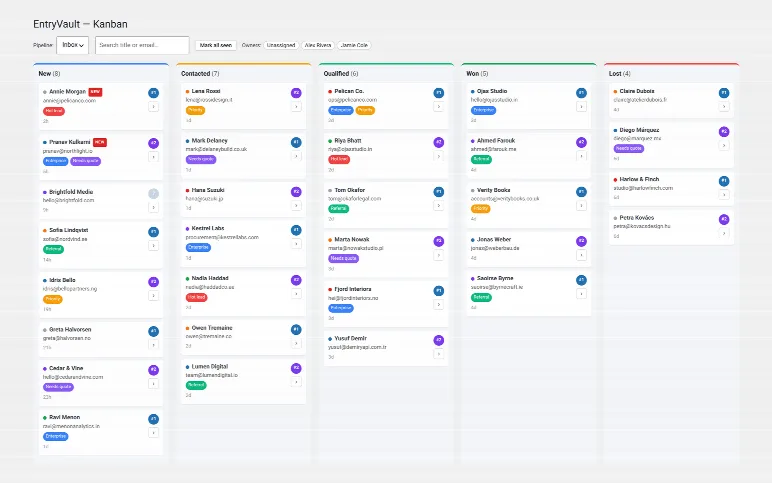
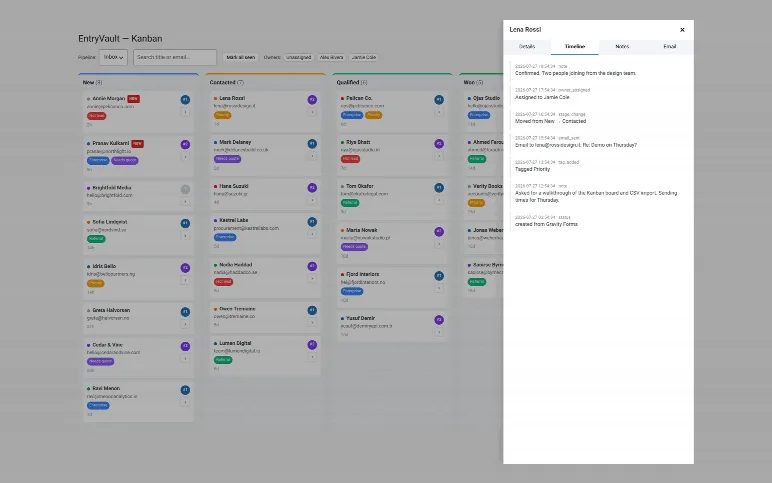
The Kanban board — submissions from every form plugin you use, as cards across New / Contacted / Qualified / Won / Lost, with tags, owners and how long each has been waiting.
A submission's detail panel: the full activity timeline — notes, stage moves, tags, owner changes and email replies — beside the captured fields.
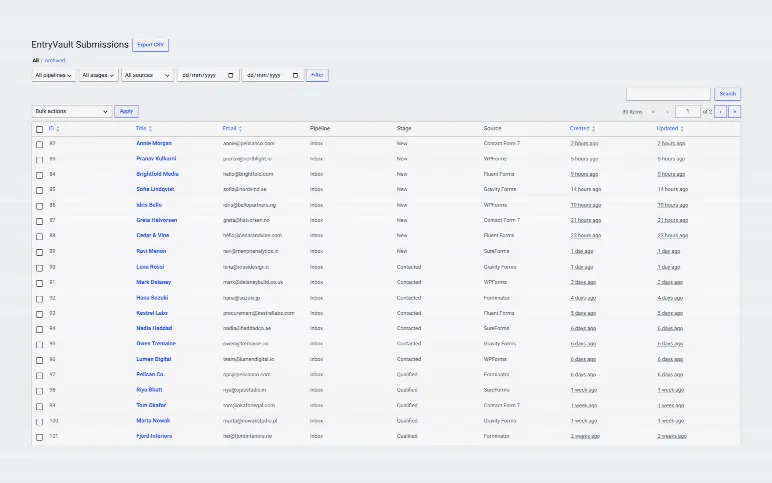
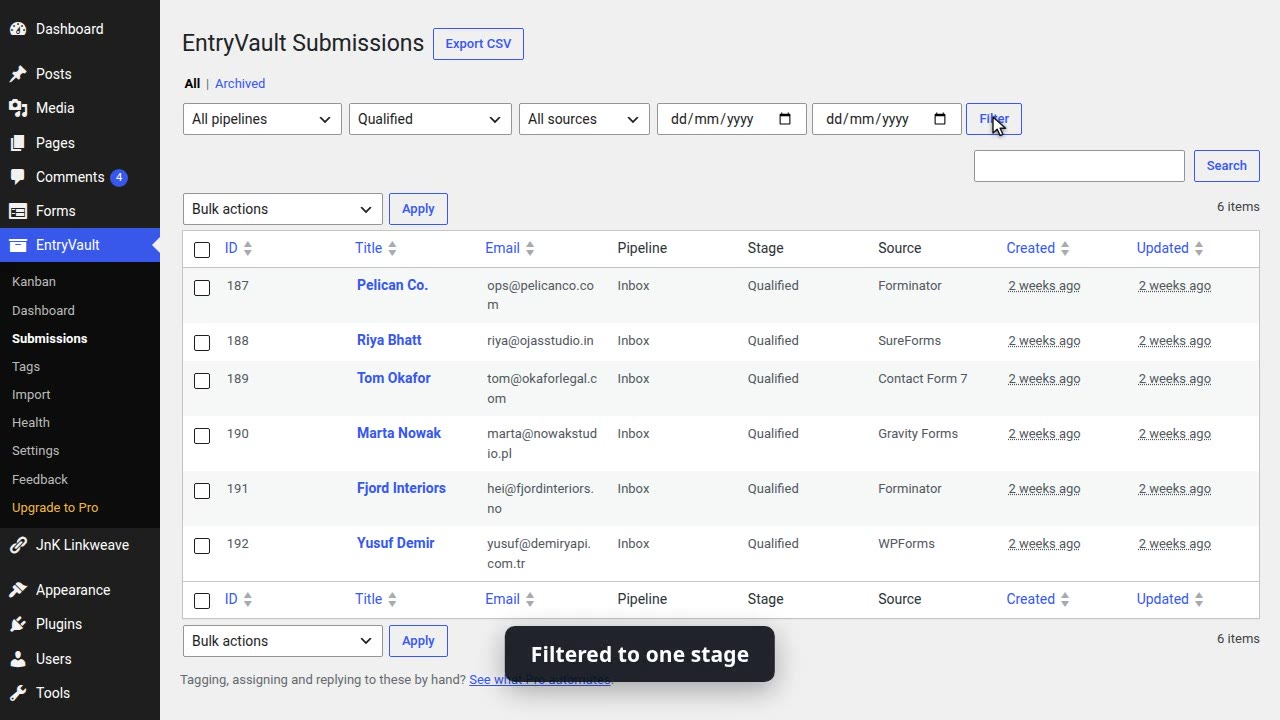
The submissions list, for when you would rather not use the board: filter by pipeline, stage, source or date, and export to CSV.
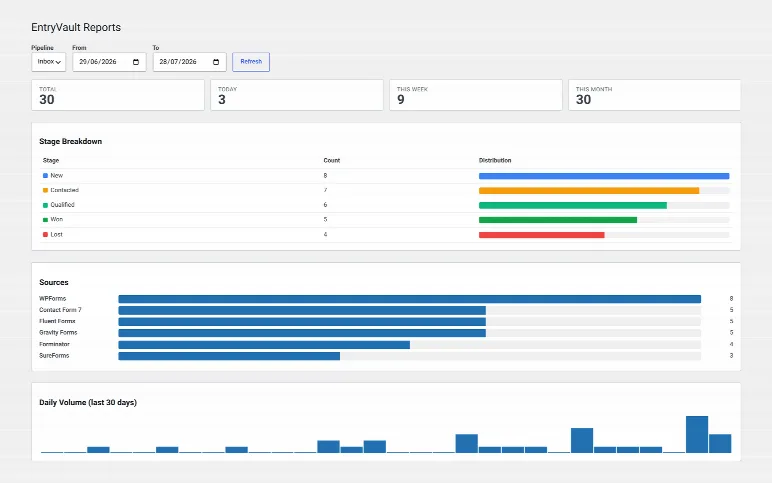
Reports — total and recent volume, the stage breakdown, and which form plugin each submission actually came from.
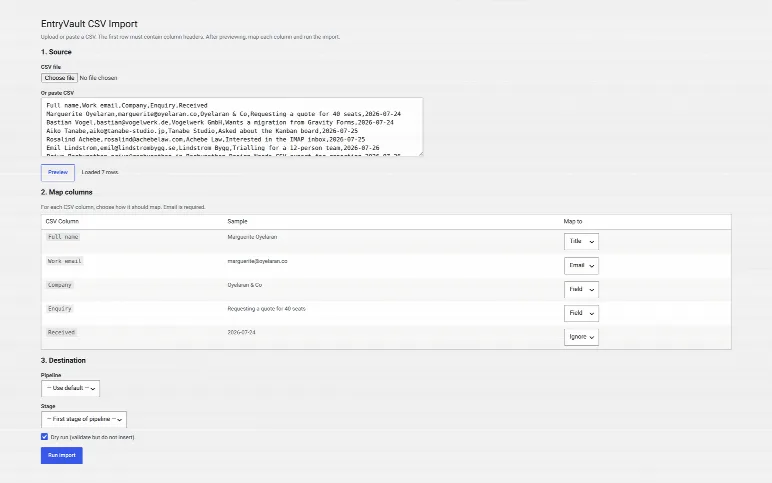
CSV import — map each column and dry-run it before a single row is written.
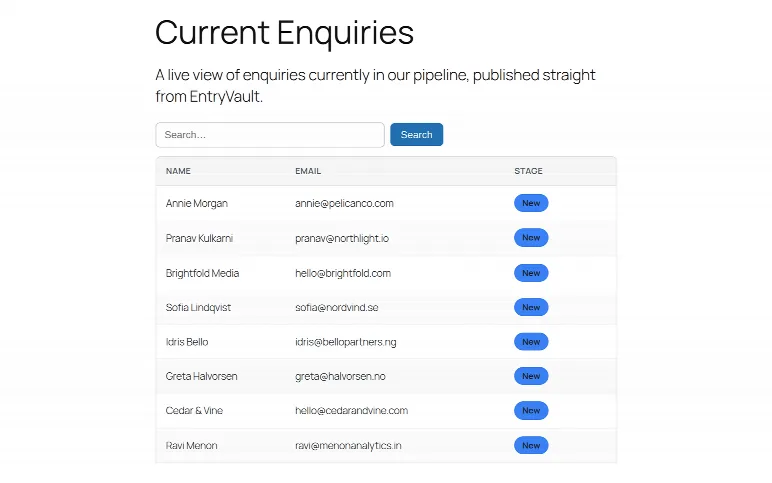
The public submissions table on the front end, via the [entryvault_table] shortcode or its matching block.
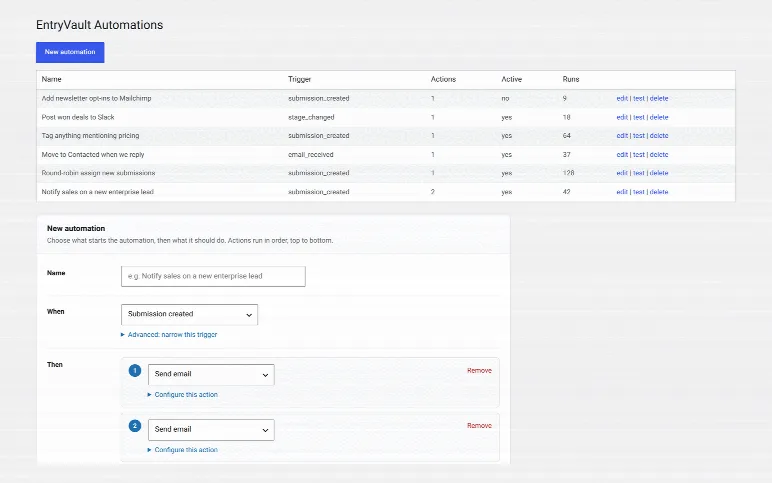
The automation engine: triggers such as a new submission, a stage change or an email reply, wired to actions like tagging, assigning an owner, emailing or calling a webhook.
ProThe automation engine: triggers such as a new submission, a stage change or an email reply, wired to actions like tagging, assigning an owner, emailing or calling a webhook.
Free vs Pro

A real CRM for free. Pro for when it scales.

The free plugin on WordPress.org is a complete single-site CRM — capture, Kanban, owners, email and CSV in/out. Pro adds the automation, integrations, email round-trip and multi-pipeline scale a growing team needs.

Feature Free Pro
Capture & storage
Capture from 11 form adapters (Contact Form 7, WPForms, Gravity Forms, Fluent Forms, and 7 more)
Unlimited entries
Submissions list + filters, CSV import & export
Public submissions table — [entryvault_table]
Historical backfill of past entries
Pipeline & organization
Manual Kanban — single pipeline
Tags + threaded notes & timeline
Owner assignment
Multiple pipelines
Auto-tag rules (form → tag)
Email
Outbound email from a card + thread view
IMAP reply matching + multiple inboxes (5-min cron)
Automation & integrations
Automation engine — triggers × actions
Mailchimp, MailerLite & HMAC-signed webhooks
Reporting & views
Dashboard with core reports (stage, source, funnel, volume)
Advanced / per-owner reporting
Public Kanban board block

Already running the free version? Upgrading installs Pro right over it — same plugin, same database. Your pipelines, entries, tags and settings carry over untouched: no reinstall, no re-import.

Stop losing leads in the inbox.

Free on WordPress.org — capture, single-pipeline Kanban, owners, and CSV in/out. Pro unlocks automations, multi-pipeline, integrations and IMAP reply sync. No card required to start.

Weighing your options? Read our honest, hands-on comparisons: EntryVault vs Flamingo · the best entry management plugins · saving CF7 submissions

Changelog

What's new in EntryVault

Every stable release, newest first.

  1. v1.3.1Aug 3, 2026
    Fixed: filtering submissions by source returned no results for sources whose name contains a capital letter or a space (Gravity Forms, WPForms, Contact Form 7, Fluent Forms, Forminator, SureForms), and the same bug silently produced an empty CSV export. Fixed: the plugin reported its version as 1.2.0 internally.
  2. v1.3.0Jul 30, 2026
    Getting-started card on Reports until the first submission arrives, and an empty submissions list that distinguishes 'no matches' from 'nothing yet'. Pro: licence activation explains how to fix a failure, trims pasted keys, and keeps its success message.
  3. v1.2.0Jul 29, 2026
    Public submissions table is styled properly (its stylesheet never matched the template); activity timeline reads as sentences instead of raw JSON; Daily Volume chart now uses the full panel width.
  4. v1.1.4Jul 20, 2026
    Fixed: the Submissions Table block now registers an editor script and works in the block editor (previously shown as an unsupported block); the [entryvault_table] shortcode was unaffected. Fixed: the public Kanban block registers from its correct path and is configurable. Fixed: email reply tokens are minted as lowercase hex so they reliably match inbound replies.
  5. v1.1.3Jul 16, 2026
    Consistent author branding and new Settings, Upgrade, Docs and Support links on the Plugins screen; Pro adds a license-state link (Manage / Renew / Activate). No functional changes.
  6. v1.1.2Jul 13, 2026
    Bundled SDK sync: fix fatal when multiple JnK Pro plugins are active
Older releases (6)
  1. v1.1.1Jul 12, 2026
    Fixed the Submissions list Created/Updated columns overlapping on narrow screens — they now show relative time with the full timestamp on hover.
  2. v1.1.0Jul 12, 2026
    Add entry capture for Contact Form 7, Ninja Forms, Formidable Forms, WS Form and Everest Forms — now 11 supported form builders. CF7 captures via before-send-mail so leads are stored even when the notification email fails.
  3. v1.0.5Jul 5, 2026
    Fix broken Upgrade/Feedback admin links and restore the Trinity Forms integration (EntryVault).
  4. v1.0.4Jun 30, 2026
    Fixed: notes on a submission can now be deleted from the Kanban board.
  5. v1.0.3Jun 23, 2026
    Maintenance release 1.0.2 — bug fixes & accessibility improvements (QA update-path test).
  6. v1.0.2Jun 23, 2026
    Maintenance release 1.0.2 — bug fixes & accessibility improvements (QA update-path test).

Get the useful ones

Occasional posts on WordPress internal linking, forms and entry management — plus release notes. No sequences, no upsell drip, unsubscribe in one click. We send one email to confirm it is really you.

We store your address ourselves and never sell or share it. Privacy.