JnK Plugins
Flamingo vs EntryVault: Which Saves Contact Form 7 Submissions Better? (2026)
Comparison
Contact Form 7 stores nothing. It emails your submission and keeps no record, which surprises almost everyone the first time a lead goes missing. There are two popular fixes: Flamingo, the free add-on by Contact Form 7’s own author, and EntryVault, which captures Contact Form 7 plus sixteen other builders. For a lot of sites, Flamingo is the right answer — so let us start there.
How we checked this. Both plugins are free, so we installed both: Contact Form 7 6.1.7 with Flamingo, and EntryVault 1.6.0, on our own test site. Claims about Contact Form 7 storing nothing come from its own documentation, read 18 September 2026. Nothing here is from a vendor press kit.
If Contact Form 7 is your only form plugin, install Flamingo and stop reading
We are going to lead with the part most comparison articles bury near the end. Flamingo is free, it is GPL, there is no paid tier and nobody is going to upsell you. It is written by Rock Lobster Inc., the developer behind Contact Form 7 itself, so the integration is as native as it gets, and version 2.6.4 was updated in August 2026 — this is a maintained plugin, not an abandoned one.
It files every Contact Form 7 submission into an Inbound Messages screen in wp-admin, keeps an address book of the people who have contacted you, supports basic tags, and exports to CSV. It is tiny and it barely touches performance.
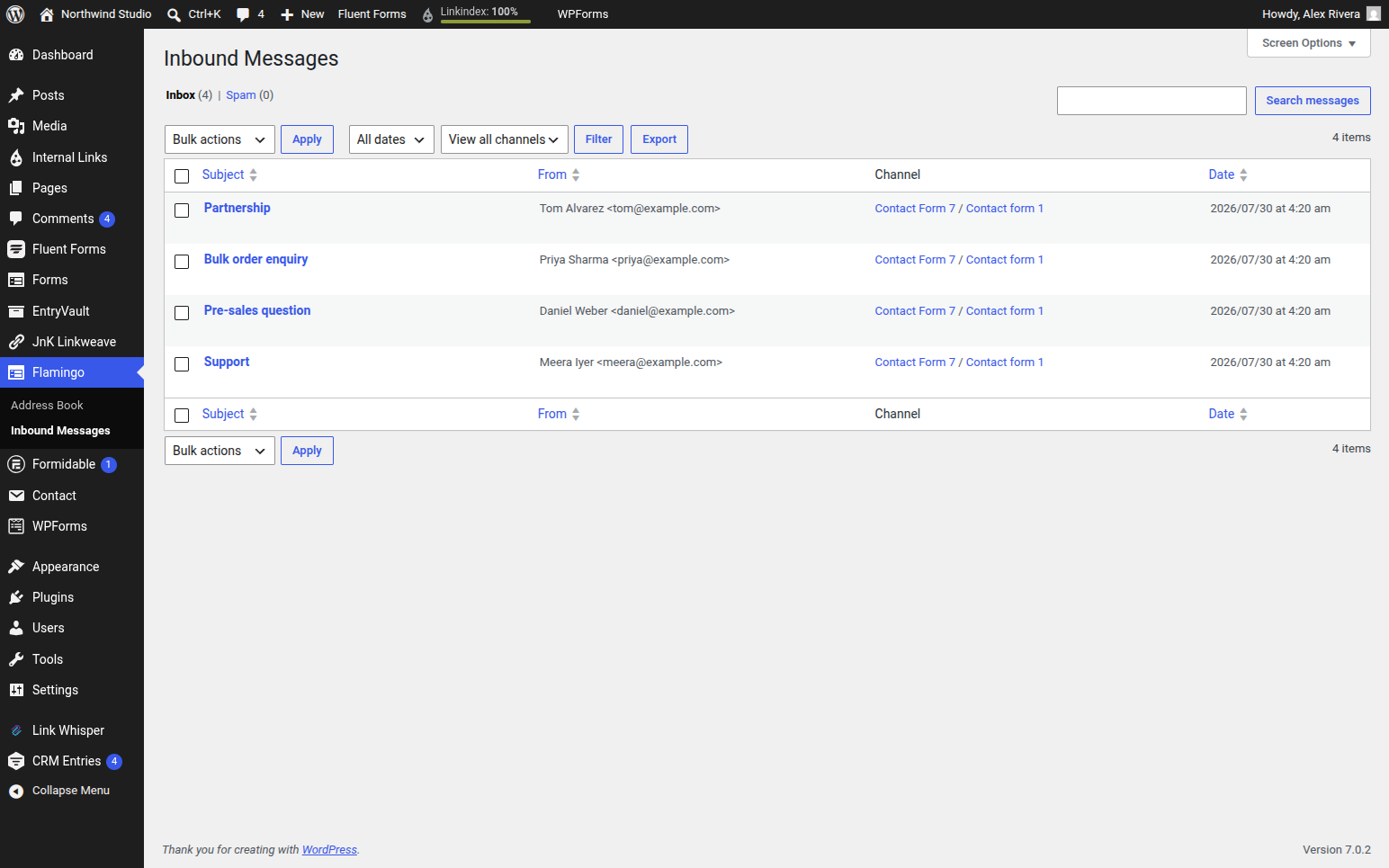
If you use Contact Form 7 and only Contact Form 7, you mainly want a safety net in case an email goes missing, and you handle enquiries yourself without needing to hand them off or track their status — Flamingo is a perfect fit and anything heavier is clutter. Recommending the bigger tool to someone who needs the smaller one is not a favour.
What the Inbound Messages screen can actually do
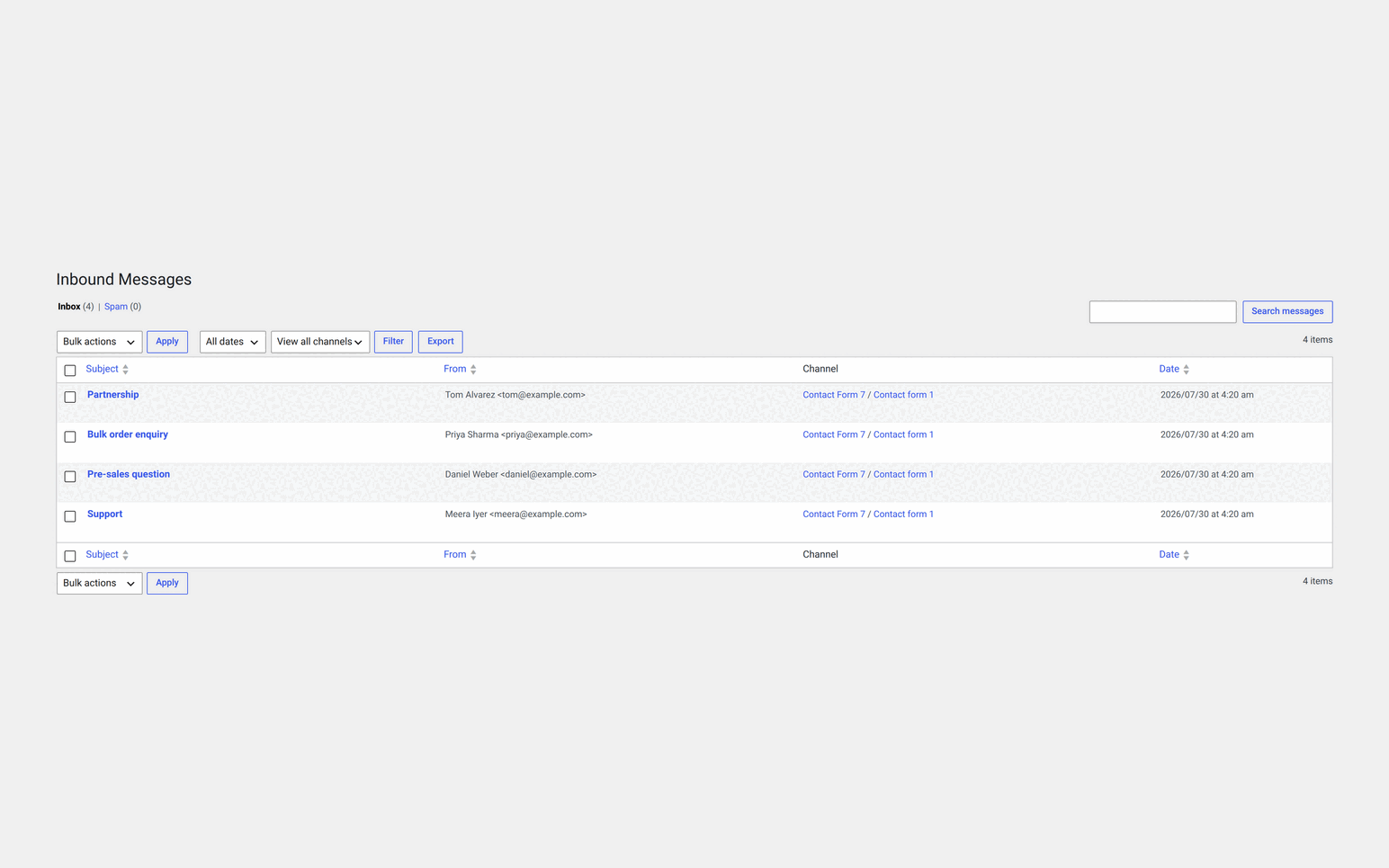
Worth spelling out, because most write-ups treat Flamingo as a dumb log and it is not one. Above the message table are three controls, and the CSV export reads all of them rather than always taking everything:
- Channel — Contact Form 7 creates one channel per form, so this filters to a single form.
- All dates — a month dropdown. Whole months, not an arbitrary range.
- Search — plain text across the messages.
Spam is kept in its own view rather than discarded, so a false positive is recoverable. And the tagging Flamingo offers is on contacts in the address book, not on the messages themselves — a message carries its channel and nothing else. That distinction is the one most comparison tables get wrong, ours included until recently.
The wall you hit is usually the second form plugin
Flamingo’s strength is that it is a tightly scoped Contact Form 7 message log. That scope is also its ceiling, and in practice the ceiling arrives from an unexpected direction: not a missing feature, but a second plugin.
Real sites rarely stay on one builder. Contact Form 7 on the contact page from 2019, Gravity Forms added for an application, a WPForms popup for newsletter signups. Flamingo sees the Contact Form 7 third of that. The other two live behind their own screens, and now checking “what came in today” means visiting three places and remembering all three exist.
EntryVault captures from seventeen form builders into one shared board, so every lead lands in the same place regardless of which plugin produced it.
An archive answers what arrived. A pipeline answers what is stuck
The second wall is about what you do with a submission once you can see it. A list sorted by date tells you what came in. It does not tell you who is handling this one, what stage it is at, which of these nobody has touched in a week, or whether anyone replied.
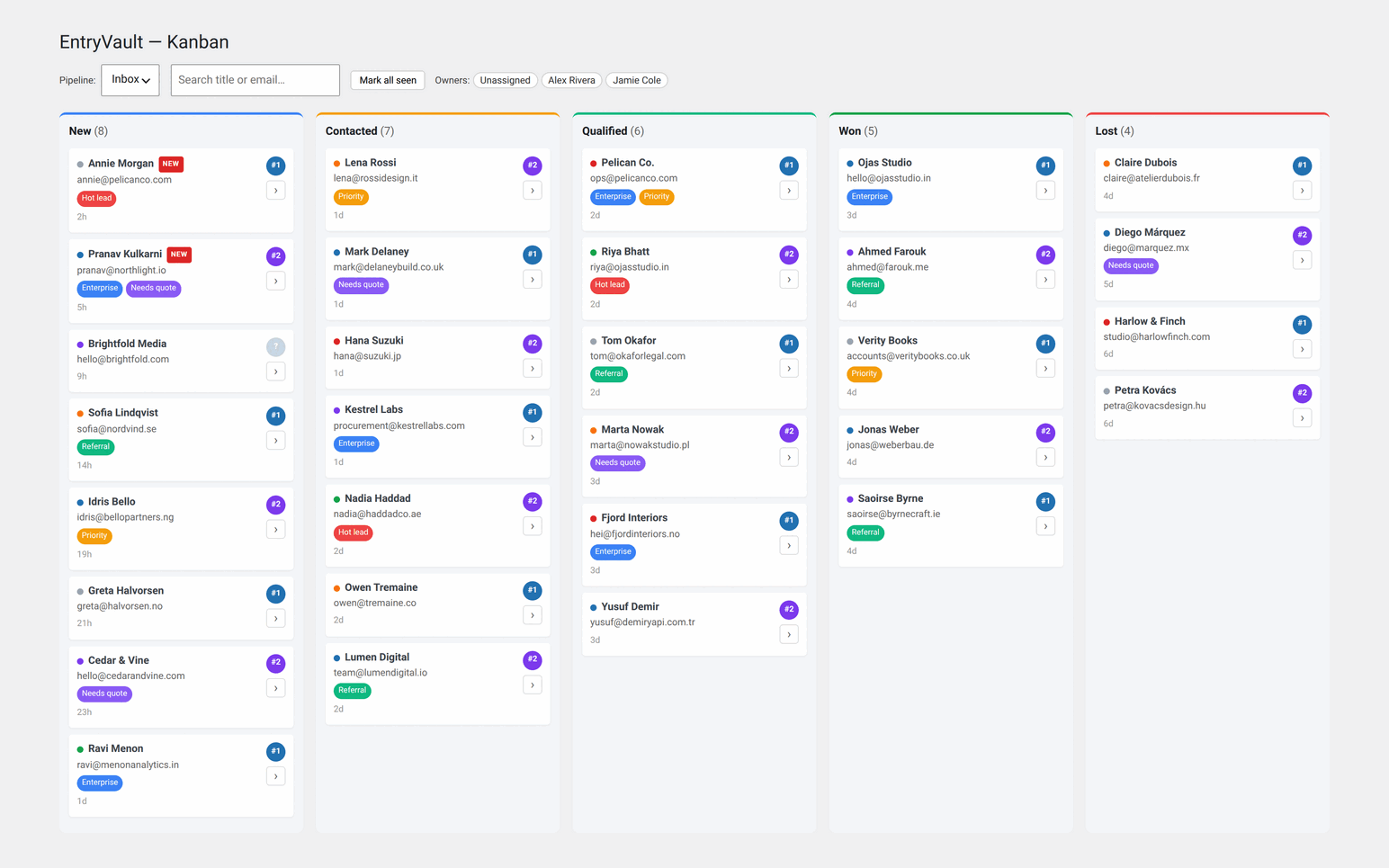
EntryVault treats each submission as work. Entries sit on a Kanban board with stages, so a lead moves from New to Contacted to Won. You can assign an owner, add threaded internal notes, tag and filter, and open a detail view with a timeline of everything that has happened to it. You can send email from the card and read the thread in place. All of that is in the free tier.
Both survive a failed notification email, and that matters more than it sounds
This is a genuine point of agreement worth stating clearly, because it is the whole reason either plugin exists. Both store the submission independently of email delivery, by two different routes worth knowing apart. Flamingo is reached by Contact Form 7 itself — CF7 ships a Flamingo module that fires on the wpcf7_submit hook after the mail attempt, and it is handed an explicit list of statuses to save on: spam, mail_sent and mail_failed. EntryVault hooks wpcf7_before_send_mail instead, writing the entry before the mail is attempted at all. Same outcome, opposite side of the send.
On a lead-generating site that reliability is the entire value proposition. A misconfigured SMTP setting or a bounced address does not cost you a delayed reply, it costs you an enquiry you never knew existed. Either plugin fixes that. Neither leaves you worse off than plain Contact Form 7.
Flamingo vs EntryVault, side by side
Both plugins are free to install, so both columns here are hands-on: Contact Form 7 6.1.7 with Flamingo 2.6.4 and EntryVault 1.6.0 on our own test site, 18 September 2026. Flamingo cells are also backed by its wordpress.org listing; ours are checked against the released 1.6.0 builds.
✓ included✓ Pro+ only from that tier up~ partly (catch noted)✗ not availablenot tested hands-on paid screen we did not buy
What it captures4 rows
| Feature | Flamingo | EntryVault Free | EntryVault Pro |
|---|---|---|---|
| Form plugins it stores entries from | Contact Form 7 | 17 builders, Contact Form 7 included | 17 builders |
| Stored even when the notification email failsFlamingo exists for this: "no longer need to worry about losing important messages due to mail server issues." | ✓ Yes | ✓ Yes | ✓ Yes |
| Import entries from before you installed it | ✗ No | CSV import | + backfill from the builders |
| Where the data lives | Your database, as a custom post type | Your database, in its own tables | Your database, in its own tables |
Reading and searching6 rows
| Feature | Flamingo | EntryVault Free | EntryVault Pro |
|---|---|---|---|
| List of messages with search | ✓ Yes | ✓ Yes | ✓ Yes |
| Filter by date | ✓ Yes | ✓ Yes | ✓ Yes |
| Which form a message came from | A channel column | Source and form columns | Source and form columns |
| Spam separated from real messages | ✓ Yes | not tested hands-on | not tested hands-on |
| CSV export | ✓ Yes | ✓ Yes | + scheduled CSV or Excel by email |
| An address book of senders | ✓ Yes | ✗ No | ✗ No |
Acting on a message7 rows
| Feature | Flamingo | EntryVault Free | EntryVault Pro |
|---|---|---|---|
| Stages, as a Kanban board | ✗ No | ✓ Yes | + multiple pipelines |
| Assign an owner | ✗ No | ✓ Yes | + round-robin |
| Tags and a per-entry timeline | ✗ No | ✓ Yes | ✓ Yes |
| Reply to the sender from the entry | ✗ No | ✓ Yes | + reply tracking over IMAP |
| Reports by stage, source and owner | ✗ No | ✓ Yes | ✓ Yes |
| Automations (triggers and actions) | ✗ No | ✗ No | Email, stage, tag, owner, signed webhook |
| Show entries on the front end | ✗ No | Sortable table, no visitor search | + public Kanban board |
Cost and upkeep3 rows
| Feature | Flamingo | EntryVault Free | EntryVault Pro |
|---|---|---|---|
| Price | Free, no paid tier | $0 | $79/yr or $319 once |
| Active installs | 800,000+ | Direct download; the wp.org listing is closed pending a review | n/a |
| Needs another plugin to be useful | Contact Form 7 | Any of the 17, free ones included | Any of the 17 |
Sources (3)
Only in Flamingo
- Free forever with no tiers, by Contact Form 7's own author, on 800,000+ sites.
- An address book of everyone who has ever written in, and a spam list kept separate.
- Nothing to learn: it is one list, it is searchable, and it is enough for a single contact form.
Only in EntryVault
- Seventeen form builders in one list, so a second form plugin does not mean a second archive.
- Stages, owners, tags, a timeline and replies, so a team can work the entries rather than only read them.
- Reports by stage, source and owner, plus a front-end table, in the free build.
You can run both, and that is often the sensible way to decide
Flamingo and EntryVault do not conflict. Because EntryVault does its own capture, Contact Form 7 submissions flow into both — you are not migrating data so much as adding a second, richer view alongside a familiar one.
So the low-risk path is simply to install EntryVault’s free build next to Flamingo and watch for a fortnight. If the board turns out to be how you actually want to work, deactivate Flamingo. If it turns out you only ever wanted the simple log, remove EntryVault and you have lost nothing. Nobody is holding your data hostage in either direction.
There is no bulk one-click importer from Flamingo, and you mostly do not need one: point EntryVault at your forms and new submissions start collecting immediately. Pro’s historical backfill can pull in past entries where the source data still exists.
Choose Flamingo if
You use Contact Form 7 and nothing else, you want a free and minimal safety net so no message is ever lost, you handle enquiries yourself without handing them off or tracking status, and you would rather have a small plugin than a capable one. It is an excellent tool and for single-form sites it is often all you will ever need.
Choose EntryVault if
Your site runs more than one form plugin and you are tired of checking several screens, submissions have become work that more than one person is doing, you want stages and owners and replies rather than an archive, or you want automations and reply tracking as the volume grows.
The thing that counts against us, said plainly. EntryVault’s free build is not currently installable from the WordPress plugin directory — our listing is closed while an account matter is resolved, and we do not control that timeline. The free version is a direct download from us in the meantime. Flamingo installs in one click and always will. On a page recommending you trial both side by side, that is the honest caveat.
Disclosure: EntryVault is our own plugin, so we are not a neutral party. We have tried to keep this honest — Flamingo is a genuinely good free tool from Contact Form 7’s own author, and for simple single-form sites it may well be the better choice. Verify current pricing and features on each plugin’s own site before deciding, and tell us at [email protected] if anything here is out of date.
Where to go next
Flamingo is rarely the only thing people are weighing. Our buyer’s guide to form entry managers separates the three different problems that all get called “entry management”: storing submissions, publishing them, and moving them through a workflow. Picking the wrong one leaves the actual problem untouched.
For the specific head-to-heads: vs GravityView if your entries need publishing to visitors rather than working internally; vs Formidable Views for the same boundary inside Formidable; and vs WPForms entry management if you already have an entries screen and want to unify several.
Explore EntryVault
Pricing and tiers
Flamingo questions
Is Flamingo free?
Yes, completely, and there is no paid tier above it. Flamingo is a free GPL plugin by Rock Lobster Inc., the developer behind Contact Form 7 itself, so the integration is as native as it gets. Version 2.6.4 was last updated in August 2026, so it is actively maintained rather than merely still present.
Is Flamingo enough for Contact Form 7?
For a single-form site that just needs a readable archive of past messages, yes. Flamingo files every Contact Form 7 submission into an Inbound Messages screen, keeps an address book of the people who contacted you, supports basic tagging and exports to CSV. You outgrow it when you run more than one form plugin, or when submissions become work that has to be assigned, staged and replied to.
What does Flamingo not do?
It has no pipeline or stages, no owner assignment, no automation, and no email-reply tracking. It is a message log rather than a workflow, which is a deliberate scope decision rather than a shortcoming. It also only sees Contact Form 7 submissions, so any other form plugin on the site keeps its entries in its own separate screen.
What is the difference between EntryVault and Flamingo?
Flamingo is a lightweight Contact Form 7 message log. EntryVault is a lightweight CRM for form submissions: it captures from seventeen form builders including Contact Form 7 into one Kanban board, with stages, owner assignment, tags, threaded notes and a per-entry timeline in the free tier, plus automations, multiple pipelines and IMAP reply tracking in Pro.
Can EntryVault capture entries from plugins other than Contact Form 7?
Yes, and that is the main reason to use it. EntryVault reads from seventeen builders: Contact Form 7, WPForms, Gravity Forms, Fluent Forms, Formidable, Forminator, Ninja Forms, WS Form, Everest Forms, SureForms, Trinity Forms, Jetpack Forms, MetForm, Kadence Forms, Otter Forms, Spectra Forms and Elementor Pro forms. All seventeen adapters work in the free tier, so a site running three different form plugins gets one board instead of three screens.
Can I run Flamingo and EntryVault together?
Yes. They do not conflict, and running both for a while is a reasonable way to evaluate. Because EntryVault does its own capture, Contact Form 7 submissions flow into both, so you are adding a second view rather than migrating data. If EntryVault covers everything you need you can deactivate Flamingo later, and if you decide you only ever wanted the simple log you can remove EntryVault and lose nothing.
Related reading
- Does Contact Form 7 store data? — why Contact Form 7 saves nothing on its own
- Storing and exporting WordPress form entries — the general problem, whichever plugin you use
- The best Contact Form 7 alternative — if you are reconsidering the form plugin itself