JnK Plugins
WPForms vs Contact Form 7: Which Is Actually Free? (2026)
Search the WordPress plugin repository for a contact form and two names dominate: WPForms and Contact Form 7. Both are listed as free. Both have millions of installs. And they mean completely different things by “free”.
One is genuinely, permanently free and fairly hard to use. The other is a pleasure to use and locks things you’d assume were basic behind a subscription. Here’s the honest comparison — including where each one will annoy you.
How we compared: we installed WPForms Lite 2.0.0.2 and Contact Form 7 6.1.6 side by side on a WordPress 7.0 / PHP 8.4 test site in July 2026, built the same contact form in both, and submitted real test entries — the screenshots below are from that install. Prices, entry storage and payment details were re-checked on each vendor’s own pages on 16 September 2026 (WPForms Lite is now 2.0.1.1 and Contact Form 7 is 6.1.7).
Contact Form 7: actually free, genuinely barebones
Contact Form 7 has been around since 2007 and has no paid version at all. There is no Pro tier, no upsell banner, no feature waiting behind a licence key.
What’s good:
- No paid tier exists. What you install is the whole product, forever.
- Light. It loads very little on the front end compared to modern builders.
- Enormous ecosystem. Because it’s so widely installed, there’s a third-party add-on for nearly anything.
What’s genuinely painful:
- No visual builder. You compose forms by typing bracket tags into a textarea. It’s not hard once learned, but it’s an unpleasant surprise for anyone expecting drag and drop.
- It doesn’t store submissions. This is the big one. If the notification email fails to send, the submission is gone permanently — there’s no database copy. You must add a plugin such as Flamingo or EntryVault (ours) to save entries. We’ve covered exactly why in does Contact Form 7 store data?
- No conditional logic. Another add-on.
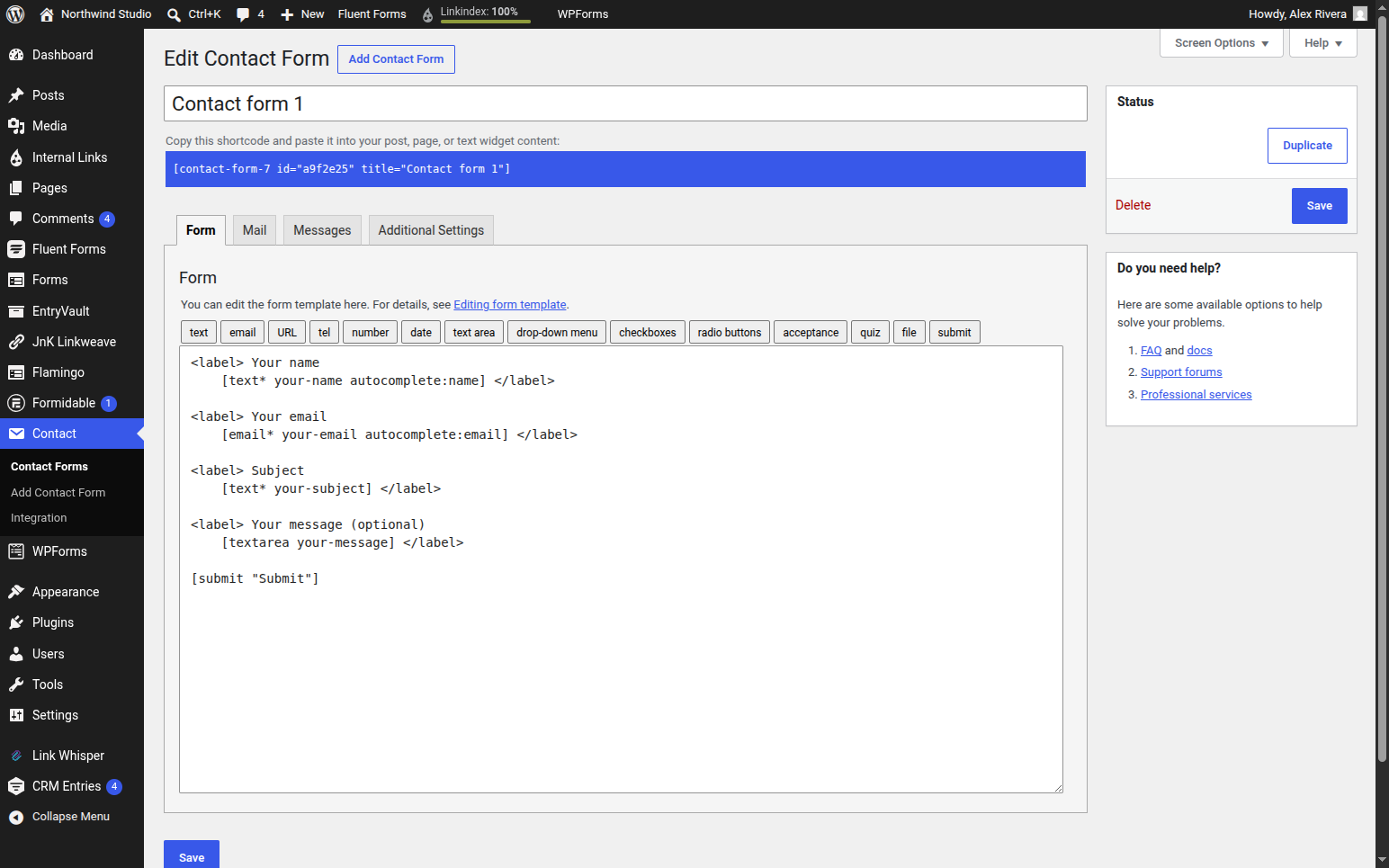
The realistic CF7 setup isn’t one plugin — it’s three or four, each maintained by a different author: Flamingo for storage, Contact Form 7 Conditional Fields for logic, and a captcha add-on for spam.
WPForms Lite: excellent builder, then the wall
WPForms is the most polished form builder in the ecosystem, and the Lite version in the repository is a real product, not a demo.
What’s good:
- The builder is genuinely great. Drag and drop, instant, no learning curve.
- Templates. A standard contact form takes about ten seconds.
What’s frustrating:
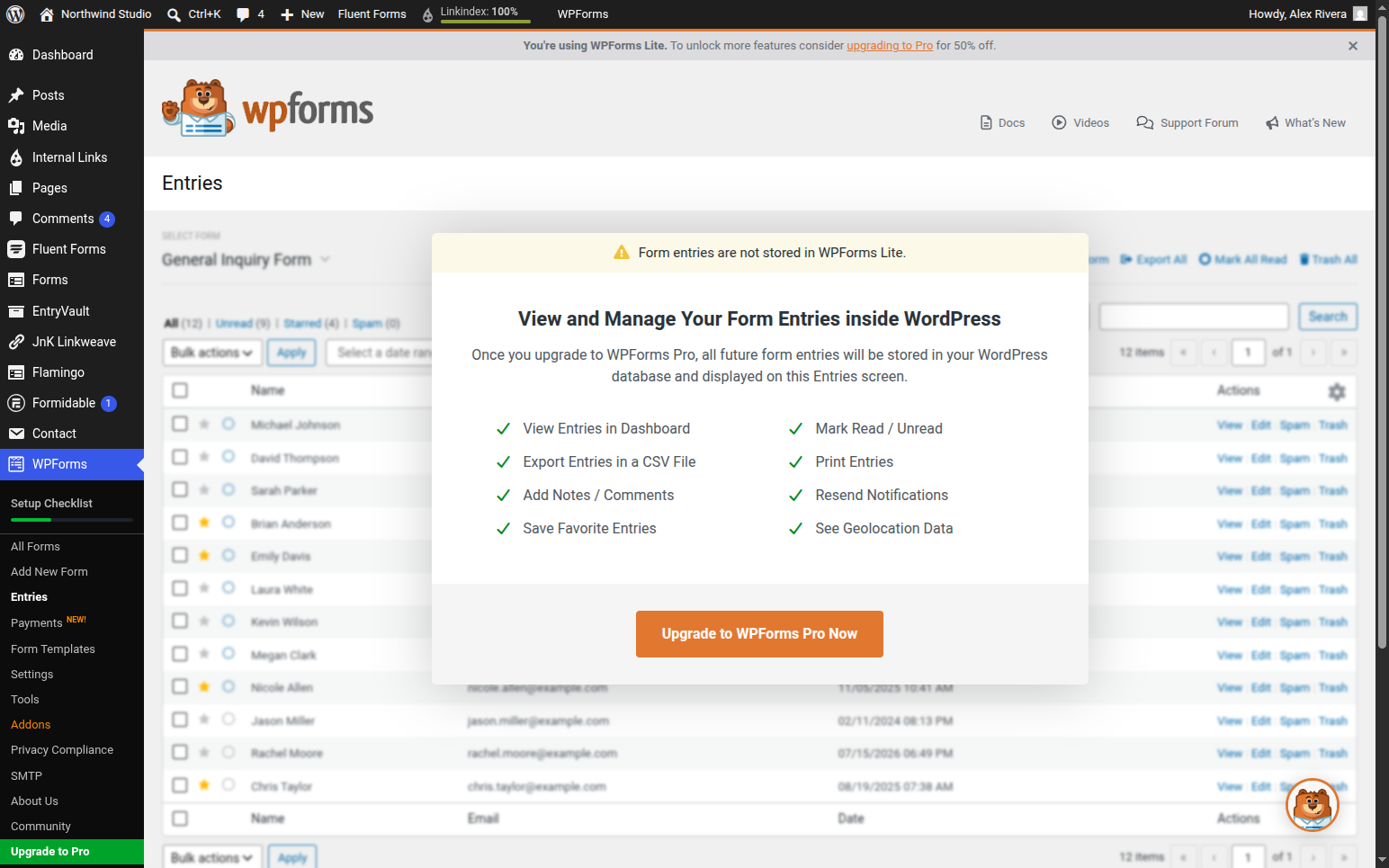
- WPForms Lite doesn’t keep your entries. This is the one that catches people out. WPForms’ own documentation says it “does not store entries without a paid license”: Lite sends the notification email and saves nothing to your WordPress database. There is an optional Lite Connect backup that keeps entries on WPForms’ servers, only from the moment you switch it on and for up to a year, so they can be restored if you upgrade. Paid plans start at $49.50 for the first year and renew at $99 (checked 16 September 2026).
- Locked basics. File uploads, conditional logic and multi-page forms are all paid features.
- Persistent upsells. The builder shows you the fields you can’t use.
So which is “actually free”?
Contact Form 7 is. There’s no paid tier to be upsold to. But “free” costs you the visual builder and a working entry archive, which you’ll rebuild out of add-ons.
WPForms Lite isn’t, if you need entries. It’s an excellent free builder for fire-and-forget contact forms where email is enough. The moment you need to look back at what people submitted, it becomes a paid product.
A third option: Trinity Forms
Disclosure: Trinity Forms is ours. Free to install, so you can check every claim below in ten minutes.
It exists because of exactly this gap — the CF7 tax of five plugins, or the WPForms wall in front of your own data. What’s in the free version:
- Entries are saved and readable. There’s an Entries screen in the free build. No add-on, no upgrade to view your own submissions.
- Conditional logic is included free.
- Built on the block editor. You build forms with the same editor you build pages with, so there’s no separate interface to learn. Since 2.0 there’s also an optional visual builder — off by default, switch it on in settings if you prefer a dedicated canvas.
Being straight about what is paid, since that’s the whole point of this article: signature and payment fields, calculations, repeaters and third-party integrations are Pro (file uploads are free) (from $49/year, with a pay-once lifetime option on every tier). We think that’s a defensible line — advanced fields and integrations cost money to build and support — but you should know where it sits before installing. If you want the setup walkthrough, see building a WordPress form with Trinity Forms.
At a glance: what’s actually free where
Each cell names the cheapest tier that has the feature, with a source behind it. Both free builds were installed on our own test site; WPForms’ paid tiers come from its own pricing table and docs. Read 17 and 18 September 2026.
✓ included✓ Pro+ only from that tier up~ partly (catch noted)✗ not availablenot tested hands-on paid screen we did not buy
Building the form6 rows
| Feature | WPForms Lite (free) | WPForms paid | Contact Form 7 |
|---|---|---|---|
| How you build a form | Drag and drop | Drag and drop | Form-tags and HTML in a textarea |
| Starter templates | ✓ Yes | 2,100+ | One default contact form |
| Conditional logic | ✗ No | Basic | ✗ No |
| Multi-page forms | ✗ No | Basic | ✗ No |
| File uploads | ✗ No | Basic | ✓ Yes |
| Calculations | ✗ No | Pro | ✗ No |
What happens to a submission4 rows
| Feature | WPForms Lite (free) | WPForms paid | Contact Form 7 |
|---|---|---|---|
| Submissions stored on your siteNeither free build keeps your entries: WPForms Lite stores none, and Contact Form 7 stores nothing at all but has the free Flamingo plugin for it. | ✗ No | Basic | No; the free Flamingo plugin adds storage |
| CSV export of submissions | ✗ No | Basic: CSV, Excel, PDF | ✗ No |
| Surveys, polls and quizzes | ✗ No | Pro | ✗ No |
| Partial entries (form abandonment) | ✗ No | Pro | ✗ No |
Payments, spam and integrations5 rows
| Feature | WPForms Lite (free) | WPForms paid | Contact Form 7 |
|---|---|---|---|
| Stripe card paymentsWPForms' Stripe guide: "On WPForms Lite and Basic, WPForms adds a 3% fee." Contact Form 7's Stripe doc: "No additional fee is required to use this module." | 3% platform fee | 3% fee until Pro | Built-in module, no fee |
| reCAPTCHA, Turnstile and Akismet | ✓ Yes | ✓ Yes | ✓ Yes |
| Email marketing integrations | ✗ No | Plus | Brevo and Constant Contact modules |
| Zapier and Google Sheets | ✗ No | Pro | ✗ No |
| Create posts or users from a submission | ✗ No | Pro | ✗ No |
Cost and scale4 rows
| Feature | WPForms Lite (free) | WPForms paid | Contact Form 7 |
|---|---|---|---|
| Price | $0 | $49.50 first year, $99 after | Free, no paid tier |
| Money-back guarantee | n/a | 14 days | n/a |
| Active installs | 5 million+ | n/a | 10+ million |
| Languages | not tested hands-on | not tested hands-on | 69 |
Sources (9)
- WPForms: https://wordpress.org/plugins/wpforms-lite/
- Contact Form 7: https://contactform7.com/editing-form-template/
- WPForms: https://wpforms.com/pricing/
- Contact Form 7: https://wordpress.org/plugins/contact-form-7/
- WPForms: https://wpforms.com/docs/how-to-use-lite-connect-for-wpforms/
- Contact Form 7: https://contactform7.com/save-submitted-messages-with-flamingo/
- WPForms: https://wpforms.com/how-to-accept-payments-with-stripe/
- trinity-forms: https://jnkplugins.com/trinity-forms/pricing.php
- Contact Form 7: https://contactform7.com/stripe-integration/
Picking one
- Contact Form 7 — zero budget, comfortable with bracket syntax, happy managing add-ons. Add Flamingo or EntryVault on day one.
- WPForms Lite — you want the best builder available free and email notifications are genuinely all you need.
- Trinity Forms — you want readable entries and conditional logic without paying, and can live with advanced fields being paid.
For the wider field, see the best WordPress form builder plugins and the best Contact Form 7 alternative.
The bottom line
“Free” is doing different work in each listing. Contact Form 7 is free and asks for your patience; WPForms Lite is easy and asks for your credit card the moment you want to read your own data. If neither trade appeals, Trinity Forms is free with entries and conditional logic included — install all three and delete two.
Frequently asked questions
Is WPForms really free?
WPForms Lite is free and fully functional as a form builder, but several things most people consider basic are paid — most notably viewing your form entries in the dashboard, plus file uploads, conditional logic and multi-page forms. Submissions are stored in the database on the free plan; the screen for reading them requires a paid licence.
Is Contact Form 7 better than WPForms?
Neither is better outright. Contact Form 7 is more genuinely free and lighter, but has no visual builder and doesn’t store submissions without an add-on. WPForms Lite is far easier to use but paywalls entry viewing and basic field types. Choose CF7 if you value zero cost and don’t mind add-ons; choose WPForms Lite if ease of building matters most and email notifications suffice.
Can I view form entries without paying?
Not in WPForms Lite, which doesn’t store entries in WordPress at all without a paid licence (its optional Lite Connect backup keeps them on WPForms’ servers for up to a year). With Contact Form 7 you can, by installing a free storage add-on such as Flamingo or EntryVault. Trinity Forms includes a readable entries screen in its free version with no add-on required.