Comparison
EntryVault vs GravityView
These are not competing products and this page will not pretend they are. GravityView takes form entries and publishes them to your visitors as directories, tables and maps. EntryVault takes form entries and gives your team somewhere to work them — a Kanban board, owners, replies. One faces outward, one faces inward.
Ask what happens to the entry after it arrives
That single question separates the two products cleanly, and it is more useful than any feature grid.
If a submission is a record other people should see — a business in a directory, a property in a listing, an event on a calendar — you need it rendered on the front end with sorting, filtering and search. That is GravityView, it is very good at it, and EntryVault does not do it at all.
If a submission is work for someone on your side — an enquiry to qualify, an application to review, a lead to chase — you need stages, an owner, a note, a reply and a way to see what is stuck. That is EntryVault, and GravityView does not do that.
GravityView needs Gravity Forms. EntryVault reads seventeen builders
GravityKit describe their product as a way to display, edit, export, import and analyse Gravity Forms content. That dependency is not a criticism — it is what lets them go as deep as they do into one data model. But it does mean two purchases, because Gravity Forms itself starts at $59 a year and has no free tier at all.
EntryVault takes the opposite approach and reads from seventeen form builders: Contact Form 7, WPForms, Gravity Forms, Fluent Forms, Formidable, Forminator, Ninja Forms, WS Form, Everest Forms, SureForms, Trinity Forms, Jetpack Forms, MetForm, Kadence Forms, Otter Forms, Spectra Forms and Elementor Pro forms. Most older sites have picked up three form plugins over five years, and on a site like that it is the difference between one inbox and three.
Feature by feature
Four columns, because both products have a free-or-entry edition and a Pro edition, and most of the interesting differences sit between them. GravityView rows come from GravityKit's own product pages; our rows are checked against the EntryVault 1.5.0 build you download, not our marketing copy.
✓ included✓ Pro+ only from that tier up~ partly (catch noted)✗ not available
Capturing entries3 rows
| Feature | GravityView | GravityView Pro | EntryVault Free | EntryVault Pro |
|---|---|---|---|---|
| Form plugins it works with | Gravity Forms | Gravity Forms | 17 builders | 17 builders |
| Needs another paid plugin firstGravity Forms has no free version; Basic is $59 a year | Gravity Forms | Gravity Forms | ✗ No | ✗ No |
| Import past entries from before install | Already in Gravity Forms | Already in Gravity Forms | CSV import | Backfill from builders |
Working entries inside wp-admin9 rows
| Feature | GravityView | GravityView Pro | EntryVault Free | EntryVault Pro |
|---|---|---|---|---|
| Kanban board with stagesGravityKit sells Kanban separately as GravityBoard | ✗ No | ✗ No | ✓ Yes | ✓ Yes |
| Owner assignment | ✗ No | ✗ No | ✓ Yes | + round-robin |
| Notes on an entry | In Gravity Forms' own entry screen | In Gravity Forms' own entry screen | ✓ Yes | ✓ Yes |
| Tags and an activity timeline | ✗ No | ✗ No | ✓ Yes | ✓ Yes |
| Reply to the person from the entry | ✗ No | ✗ No | ✓ Yes | + reply tracking (IMAP) |
| Approval workflow | ✓ Yes | ✓ Yes | ✗ No | ✓ Yes |
| Edit a captured valueGravityView edits on the front end; EntryVault edits its own copy in wp-admin | Front-end editing | Front-end editing | ✗ No | Inline quick-edit |
| Dashboard reports (stage, source, funnel, owner) | ✗ No | ✗ No | ✓ Yes | ✓ Yes |
| Multiple pipelines | ✗ No | ✗ No | ✗ No | ✓ Yes |
Publishing entries to visitors5 rows
| Feature | GravityView | GravityView Pro | EntryVault Free | EntryVault Pro |
|---|---|---|---|---|
| Front-end table of entries | ✓ Yes | ✓ Yes | Sortable table, no visitor search | + public Kanban board |
| Directory, profile and custom layouts | ✓ Yes | ✓ Yes | ✗ No | ✗ No |
| Visitor search and filters | ✓ Yes | + Advanced Filters | ✗ No | ✗ No |
| DataTables and Google Maps layouts | ✗ No | ✓ Yes | ✗ No | ✗ No |
| Submitters edit their own entry | ✓ Yes | + Magic Links, no login | ✗ No | ✗ No |
Automation and export4 rows
| Feature | GravityView | GravityView Pro | EntryVault Free | EntryVault Pro |
|---|---|---|---|---|
| Automations (triggers and actions) | ✗ No | ✗ No | ✗ No | ✓ Yes |
| Signed webhooks, Mailchimp, MailerLite | ✗ No | ✗ No | ✗ No | Yes; webhooks send the whole entry, for Zapier, Make or n8n |
| CSV export | ✓ Yes | ✓ Yes | ✓ Yes | ✓ Yes |
| Scheduled CSV or Excel exports | ✗ No | ✗ No | ✗ No | ✓ Yes |
Price and licence3 rows
| Feature | GravityView | GravityView Pro | EntryVault Free | EntryVault Pro |
|---|---|---|---|---|
| Free version | ✗ No | ✗ No | ✓ Yes | n/a |
| Cheapest licenceGravityView prices as listed on 8 October 2026, with no first-year discount showing | $119/yr, 1 site | $199/yr, 1 site | $0 | Solo, 3 sites: $29/yr or $89 once |
| Money-back guarantee | 30 days | 30 days | n/a | 14 days |
Sources (6)
- GravityView: https://www.gravitykit.com/products/gravityview/
- GravityView: https://www.gravityforms.com/pricing/
- GravityView: https://www.gravitykit.com/products/gravityboard/
- GravityView: https://docs.gravityforms.com/gform_notes_avatar/
- GravityView: https://docs.gravityforms.com/gform_print_entry_notes/
- EntryVault: https://jnkplugins.com/entryvault/pricing.php
What only one of them does
Only in GravityView
- Publishes entries to visitors as directories, profiles, tables and custom layouts, which EntryVault does not attempt.
- Visitor-facing search and filters, and submitters editing their own entries (without a login via Magic Links in Pro).
- DataTables and Google Maps layouts in Pro, plus an Elementor widget.
- A wider family of add-ons sold separately: GravityBoard (Kanban), GravityEdit, GravityCalendar, GravityImport.
- A 30-day money-back guarantee and a hosted demo you can try.
Only in EntryVault
- Works with 17 form builders, including Gravity Forms, so it does not need Gravity Forms at all.
- A Kanban pipeline, owners, tags, notes and replies in the free version, where GravityKit sells Kanban as a separate plugin.
- Dashboard reports on stages, sources, the funnel and owners.
- Automations with signed webhooks, Mailchimp and MailerLite, reply tracking over IMAP, and scheduled Excel exports in Pro.
- A free version, and a lifetime licence from $89.
What working an entry looks like in EntryVault
These are screens from EntryVault Pro 1.5.0 on our own test site, with made-up leads. Nothing here is a mock-up.
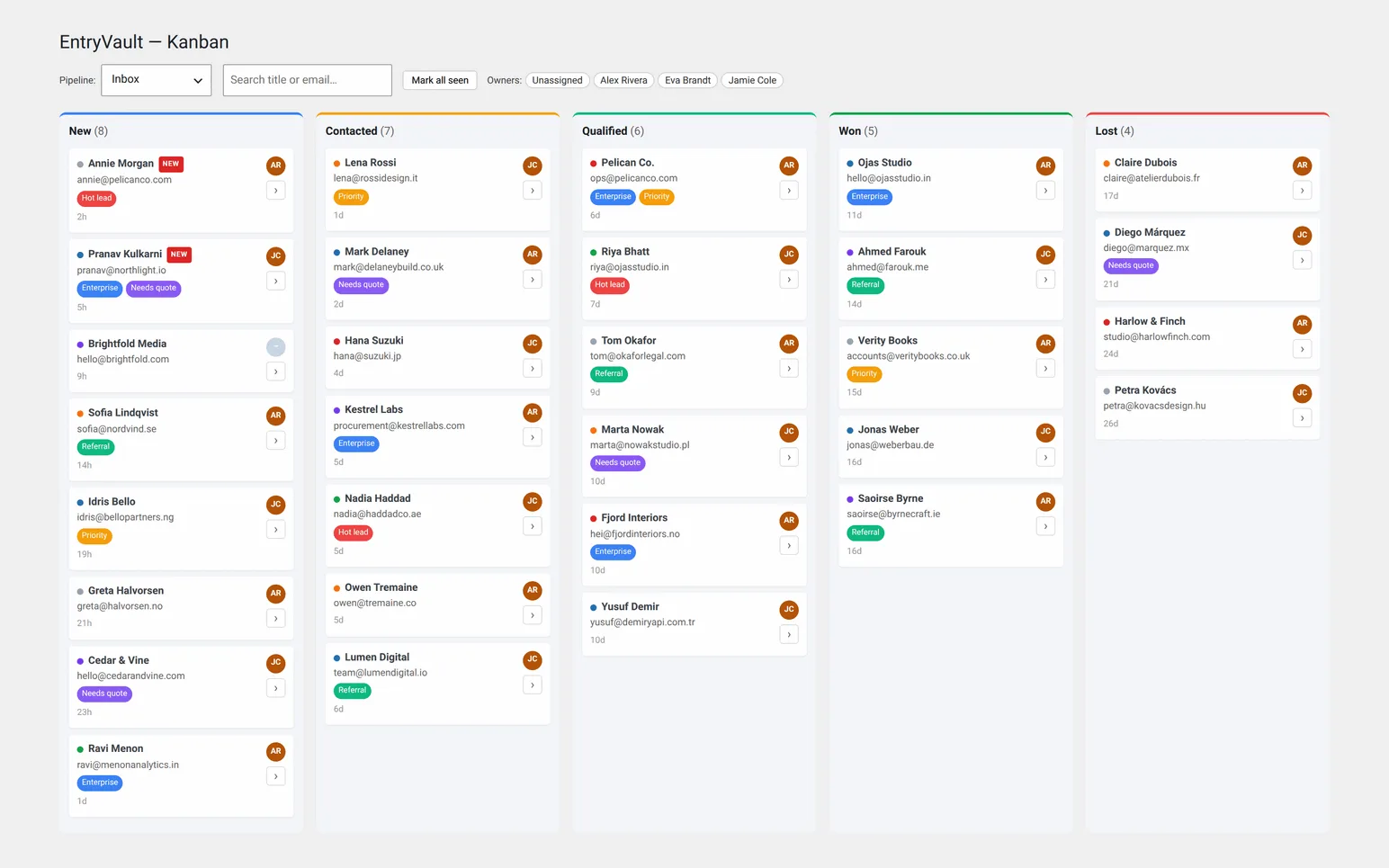
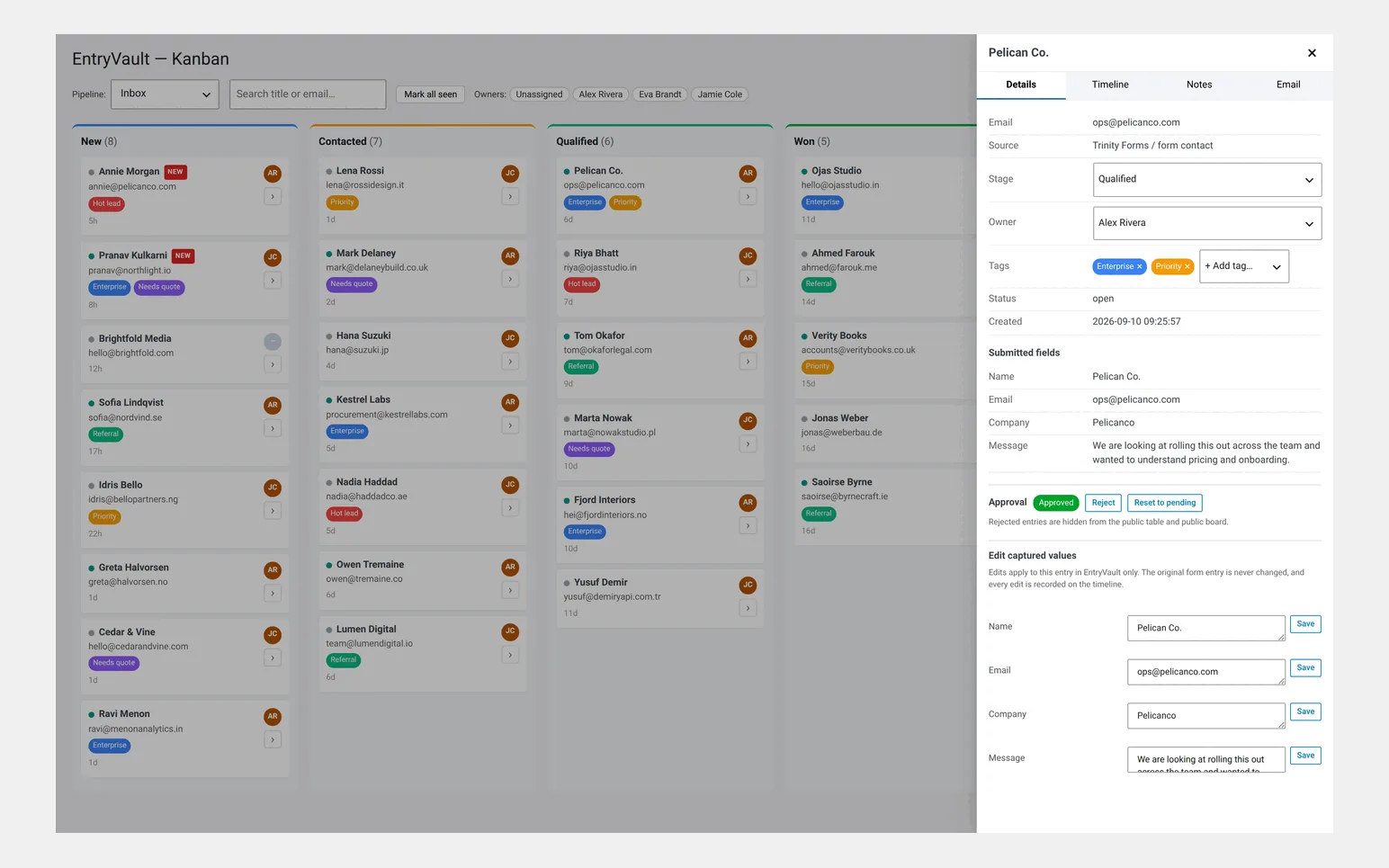
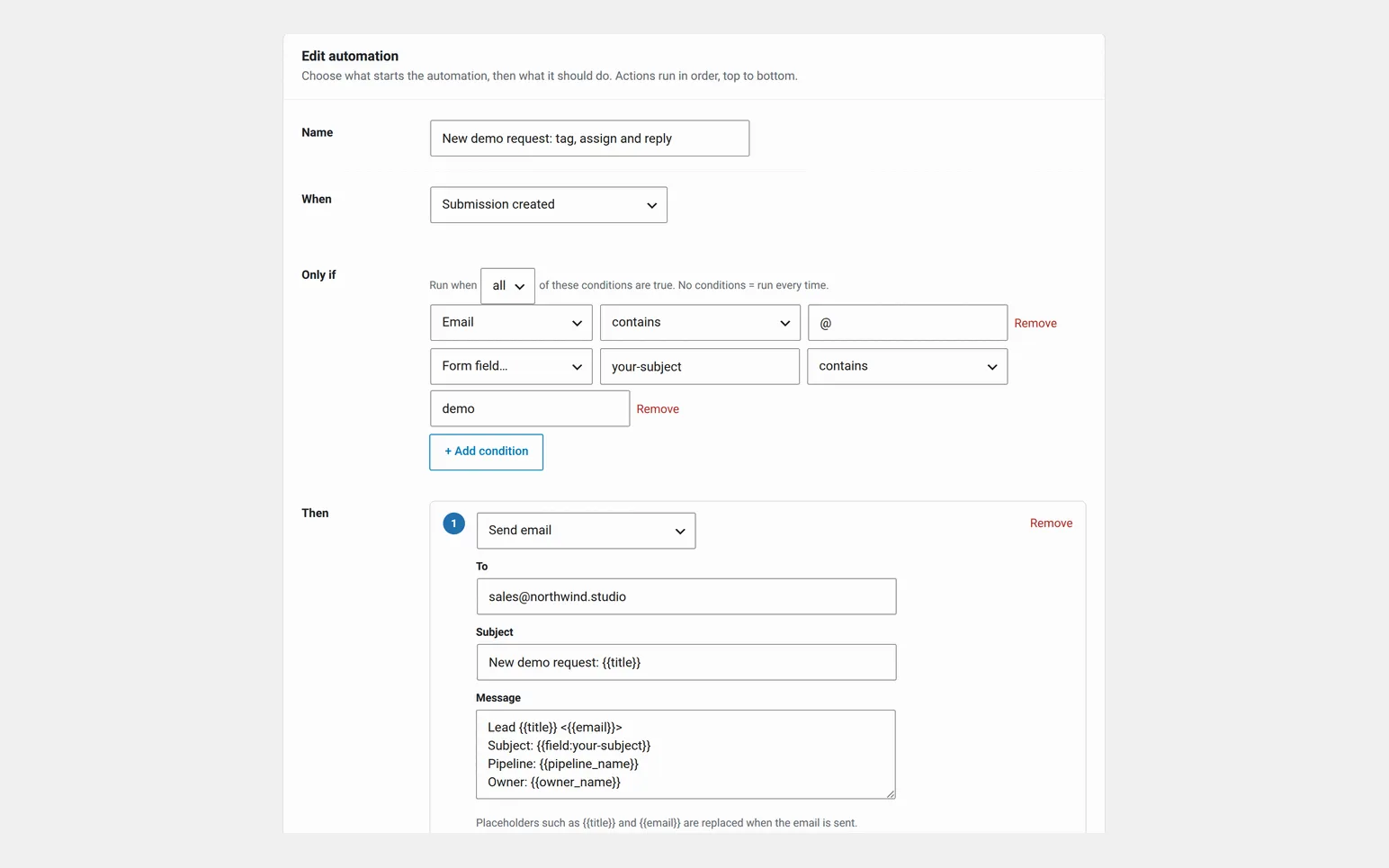
GravityView, for fairness: we have not bought GravityView, so we have no screenshots of it and every GravityView row above comes from GravityKit's own pages. They offer a hosted demo linked from their product page, which is the honest way to see their layout builder before buying.
What three years costs on the cheapest plans
| Setup | Year 1 | Years 2 and 3 | 3-year total |
|---|---|---|---|
| GravityView + Gravity Forms Basic (1 site) | $119 + $59 | $119 + $59 each year | $534 |
| GravityView Pro + Gravity Forms Basic (1 site) | $199 + $59 | $199 + $59 each year | $774 |
| EntryVault Free (with any of its 17 form plugins) | $0 | $0 | $0 |
| EntryVault Pro Solo (3 sites), yearly | $29 | $29 each year | $87 |
| EntryVault Pro Solo (3 sites), lifetime | $89 once | $0 | $89 |
How we compared. EntryVault rows were checked against the released 1.5.0 free and Pro builds, and the screenshots were taken from Pro 1.5.0 on WordPress 7.0.2 with demo data. GravityView rows, prices and the 30-day refund come from GravityKit's product page, and the Gravity Forms price and entry notes from gravityforms.com and its documentation, all read on 16 and 17 September 2026. We did not install GravityView; where the table says it lacks something, that means GravityKit does not list it for GravityView.
They coexist, and quite often should
Nothing here is either-or. A site can publish an approved directory with GravityView while the team triages incoming applications in EntryVault, because the two touch entries at different points in their life: one after the decision, one before it.
If you are already a Gravity Forms shop and your only problem is showing entries to visitors, buy GravityView and ignore us. If your problem is that submissions arrive and nobody is sure who is dealing with them, front-end display will not help however good it is.
Running both on one site, step by step
- Keep Gravity Forms as the form. EntryVault reads Gravity Forms submissions as they are saved, so nothing about the form changes.
- Work the lead in EntryVault. New submissions land in the board's first stage. Assign an owner, add notes, reply from the card, and move it along as it progresses.
- Decide in EntryVault, publish with GravityView. When a record is ready to go public (an approved directory listing, a confirmed speaker), approve it in GravityView so it appears in the View. EntryVault Pro has its own approval state too, which controls its own public table and board, not GravityView's.
- Export from whichever side the report is for. CSV from GravityView for what visitors see; CSV, or scheduled CSV and Excel in EntryVault Pro, for pipeline reporting.
The one thing to avoid is maintaining the same status in two places by hand. Pick where the decision is made, and let the other tool follow it.
Choose GravityView if
Your entries need to be seen by visitors — directories, listings, maps, tables, calendars — or submitters need to edit their own records. You are already on Gravity Forms, so the dependency costs you nothing extra, and front-end display is the actual requirement.
Choose EntryVault if
Entries are work rather than content. You want stages, owners, notes and replies, you have more than one form plugin on the site, you would rather not buy a form plugin to get an entry manager, or you want to try the whole workflow free first.
What counts against us. EntryVault is not in the WordPress plugin directory at the moment: the listing is temporarily closed, pending a review. The free version is a direct download from us and updates itself from your WordPress dashboard. GravityKit products install normally.
See EntryVault pricing Compare every option →
Found something wrong on this page? GravityKit run rolling promotions and restructure their bundles, so these figures have a shelf life. Tell us and we will fix it — [email protected].