Comparison
EntryVault vs WPForms entry management
EntryVault doesn't replace WPForms. It reads the entries WPForms saves, alongside sixteen other form plugins, and puts them on a Kanban board. So this page is about where a WPForms entries list is enough, and where you want something closer to a pipeline.
First, the WPForms Lite question
WPForms' documentation says “WPForms does not store entries without a paid license.” On Lite, each submission is emailed to you, and the optional Lite Connect service keeps a backup on WPForms' servers for one year, restored only if you upgrade.
Since version 1.6.0, EntryVault fills that gap for free. Lite doesn't create an entry, so EntryVault gives each WPForms Lite submission its own ID and stores it on your site, on the Kanban board and in CSV exports. We tested it with WPForms Lite 2.0.1.1 on a clean site, submitting as a logged-out visitor. It keeps submissions from the day you install it; it can't recover ones that were never saved.
Feature by feature
WPForms rows come from its own pricing table and documentation; cells marked not tested are ones those pages don't settle. Our rows are checked against the EntryVault 1.6.0 builds you download.
✓ included✓ Pro+ only from that tier up~ partly (catch noted)✗ not availablenot tested hands-on paid screen we did not buy
Storing entries4 rows
| Feature | WPForms Lite | WPForms paid entries | EntryVault Free | EntryVault Pro |
|---|---|---|---|---|
| Entries saved in WordPressWPForms Lite can back entries up to WPForms' servers (Lite Connect) for 1 year, restored if you upgrade | ✗ No | Basic | Yes, WPForms Lite included | Yes, WPForms Lite included |
| Captures WPForms Lite submissionsSince EntryVault 1.6.0. Lite saves no entry, so EntryVault gives each submission its own id | n/a | n/a | ✓ Yes | ✓ Yes |
| Form plugins it covers | WPForms | WPForms | 17 builders | 17 builders |
| Import past entries | ✗ No | Basic: CSV, Gravity Forms, Ninja Forms, CF7 | CSV | + backfill from WPForms and others |
Working entries7 rows
| Feature | WPForms Lite | WPForms paid entries | EntryVault Free | EntryVault Pro |
|---|---|---|---|---|
| Entry list with search and filters | ✗ No | Basic | ✓ Yes | ✓ Yes |
| Kanban board with stages | ✗ No | ✗ No | ✓ Yes | + multiple pipelines |
| Owner assignment | ✗ No | ✗ No | ✓ Yes | + round-robin |
| Tags, notes and a timeline | ✗ No | not tested hands-on | ✓ Yes | ✓ Yes |
| Email the person from the entry | ✗ No | not tested hands-on | ✓ Yes | + reply tracking (IMAP) |
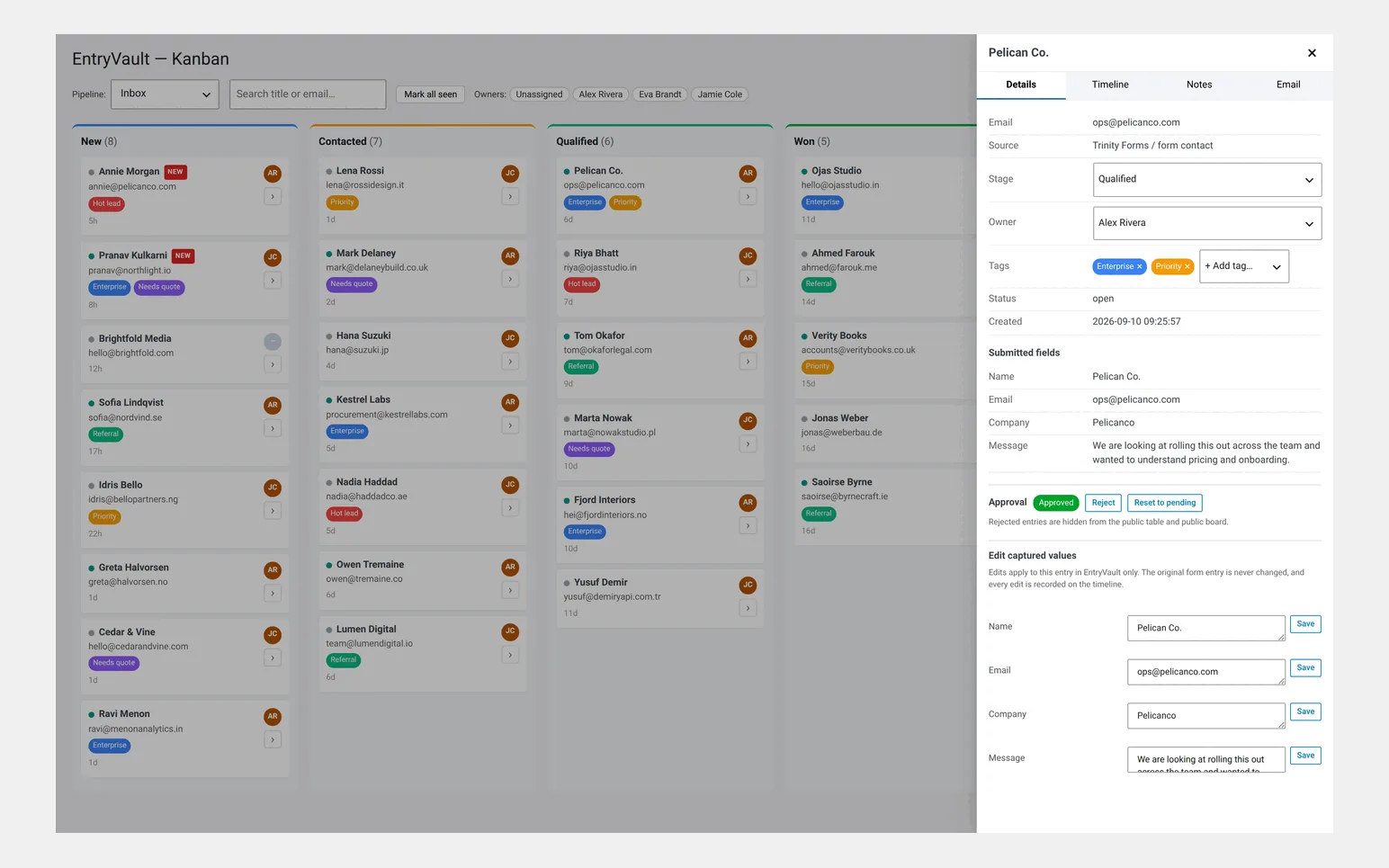
| Approval and inline editing | ✗ No | not tested hands-on | ✗ No | ✓ Yes |
| Reports | ✗ No | Basic: form views; Pro: user journey | Stage, source, owner | Stage, source, owner |
Getting data out3 rows
| Feature | WPForms Lite | WPForms paid entries | EntryVault Free | EntryVault Pro |
|---|---|---|---|---|
| Export entries | ✗ No | Basic: CSV, Excel, PDF | CSV | + scheduled CSV or Excel by email |
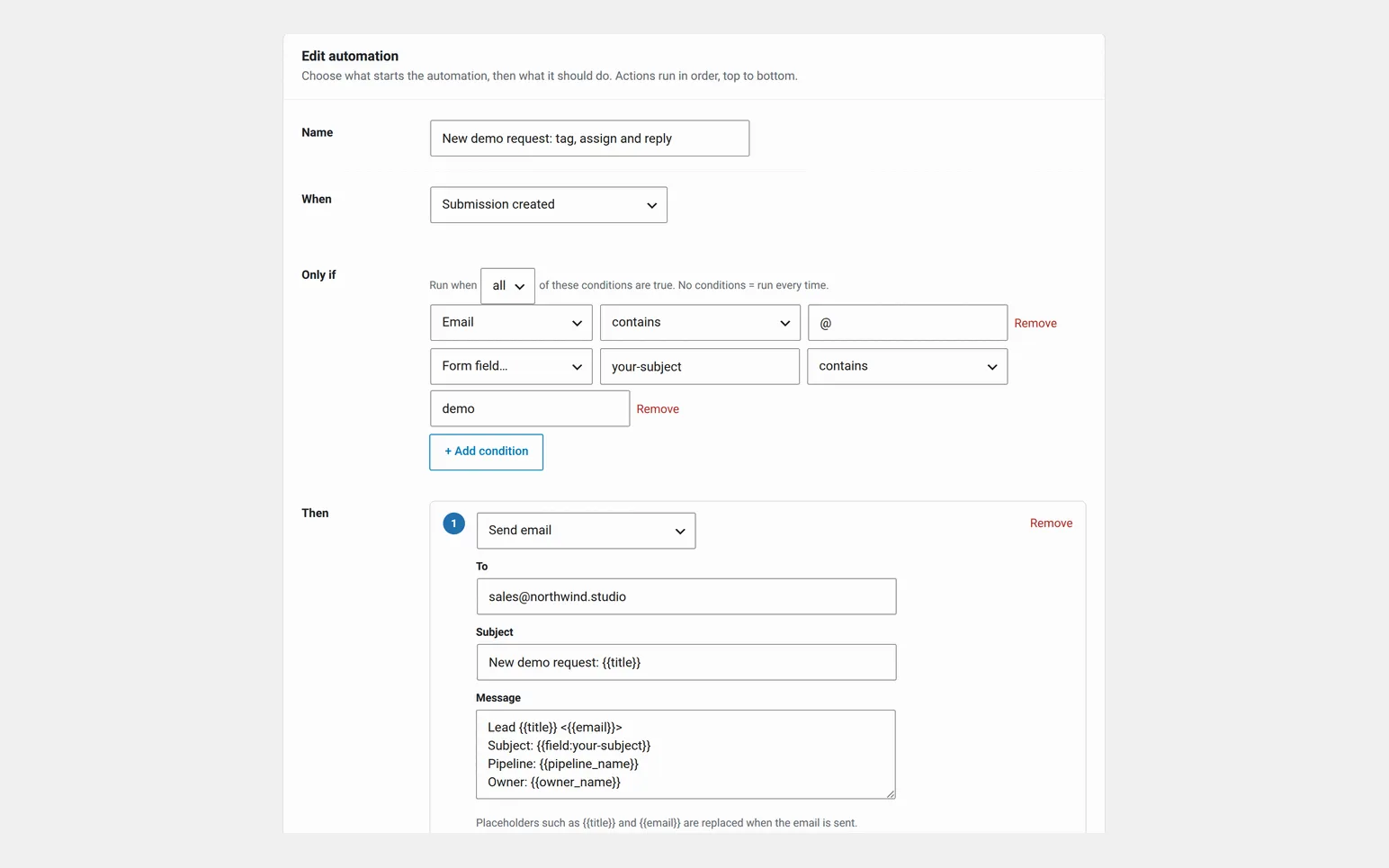
| Automations | ✗ No | Plus: smart workflows; Elite: entry automation | ✗ No | Email, stage, tag, owner, signed webhook |
| Front-end table of entries | ✗ No | not tested hands-on | ✓ Yes | + public Kanban board |
Price2 rows
| Feature | WPForms Lite | WPForms paid entries | EntryVault Free | EntryVault Pro |
|---|---|---|---|---|
| Cheapest way to get entries | n/a | Basic (1 site): $49.50 first year, $99 after | $0, works with WPForms Lite | Solo (3 sites): $29/yr or $89 once |
| Money-back guarantee | n/a | 14 days | n/a | 14 days |
Sources (3)
What only one of them does
Only in WPForms
- It builds the forms. EntryVault is not a form builder.
- Entry export to PDF and Excel on demand, and an importer that migrates entries from Gravity Forms, Ninja Forms and Contact Form 7.
- Everything in one plugin from one vendor, with 2,100+ templates and a large integration catalogue.
Only in EntryVault
- Keeps WPForms Lite submissions on your own site for free, which Lite itself does not.
- One board for entries from 17 form plugins.
- A Kanban pipeline, owners, tags, notes, a timeline and email from the entry, in the free version.
- IMAP reply tracking, automations with signed webhooks, round-robin assignment and scheduled Excel exports in Pro.
A list tells you what arrived. A pipeline tells you what's stuck
WPForms' entries screen answers “what came in?” well, with search, filters and export to CSV, Excel or PDF. It doesn't answer the questions that matter once more than one person is involved: who has this one, what stage is it at, which ones has nobody touched in a week, did anyone reply?
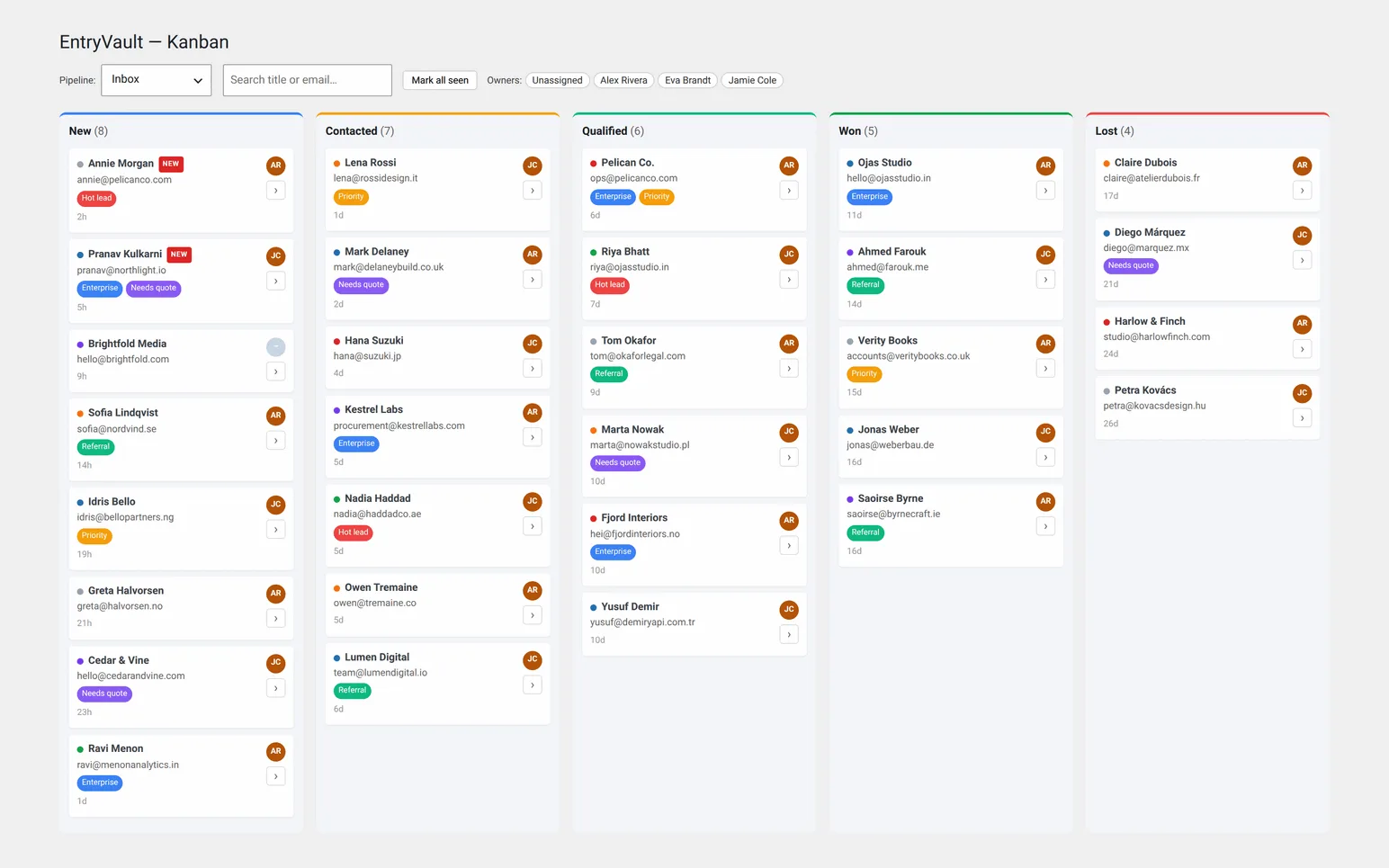
EntryVault gives each entry a stage on a Kanban board, an owner, tags, notes and a timeline, all free. You can email the person from the entry. Pro adds IMAP reply tracking so replies come back onto the entry, plus automations, multiple pipelines, round-robin assignment and scheduled Excel exports.
What it looks like in EntryVault
Screens from EntryVault Pro 1.5.0 on our own test site, with made-up leads.
What it costs, one site, three years
| Setup | Year 1 | Years 2 and 3 | 3-year total |
|---|---|---|---|
| WPForms Lite + EntryVault Free | $0 | $0 | $0 |
| WPForms Basic (entries list) | $49.50 | $99 each year | $247.50 |
| WPForms Basic + EntryVault Free | $49.50 | $99 each year | $247.50 |
| WPForms Basic + EntryVault Pro Solo (3 sites), yearly | $78.50 | $128 each year | $334.50 |
| WPForms Basic + EntryVault Pro Solo (3 sites), lifetime | $138.50 | $99 each year | $336.50 |
How we compared. EntryVault rows were checked against the released 1.6.0 free and Pro builds (Lite capture tested end to end with WPForms Lite 2.0.1.1); screenshots are from Pro 1.5.0 on WordPress 7.0.2 with demo data. WPForms rows come from its pricing table and Lite Connect documentation, read 17 September 2026. We did not install WPForms' paid plugin.
Stick with WPForms entries if
WPForms is your only form plugin, you already pay for it, and reading, searching and exporting submissions is the whole job. Adding a plugin to duplicate something you own isn't an improvement.
Add EntryVault if
You're on WPForms Lite and want submissions kept on your site, your site runs more than one form plugin, entries have become work that needs owners and stages, you want replies tracked back to the entry, or you want automations without moving up to WPForms Elite.
What counts against us. EntryVault doesn't export to PDF, can't recover WPForms Lite submissions sent before it was installed, and is not in the WordPress plugin directory at the moment: the listing is temporarily closed, pending a review. The free version is a direct download from us and updates itself from your dashboard.
See EntryVault pricing Compare every option →
Found something wrong on this page? WPForms moves features between tiers. Tell us and we will fix it: [email protected].