Trinity Forms
FeaturesPricingCompareFAQBlogAll pluginsOffers (offer running) Get Trinity Forms →
For WordPress · v2.9.0

A form builder that's genuinely free.

Trinity Forms is a drag-and-drop WordPress form builder with conditional logic, native entry storage, CSV export, email notifications, and spam protection — free, with no submission caps. Pro adds Stripe & PayPal payments, integrations, and more when you need them.

✓ Free version, no account needed ✓ No submission caps ✓ No transaction fees on Pro payments ✓ 14-day money-back guarantee
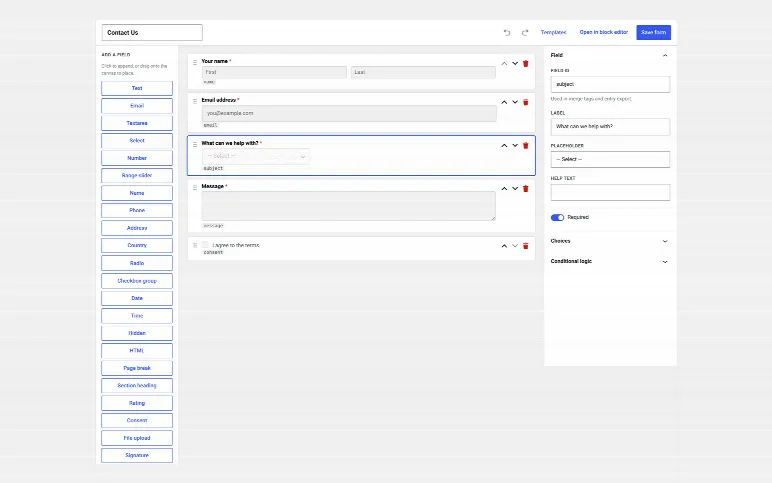
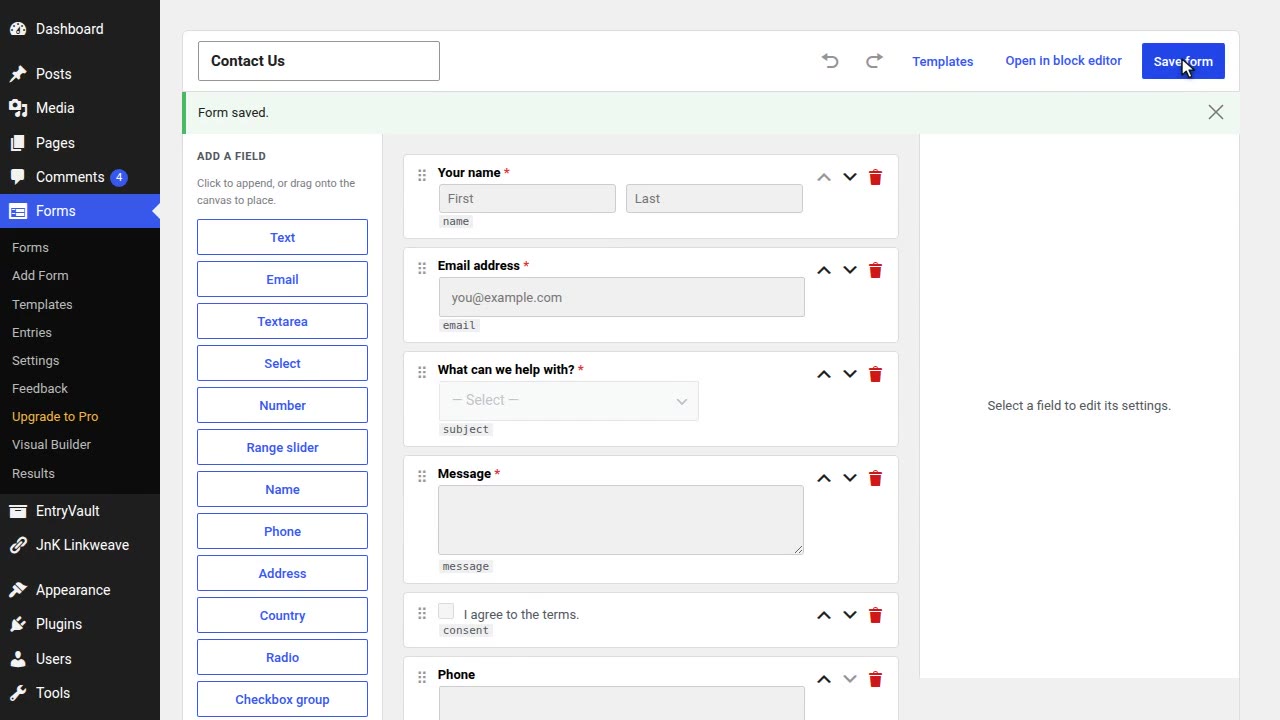
The Visual Builder: add fields from the left, set them up on the right, and see the form as visitors will.
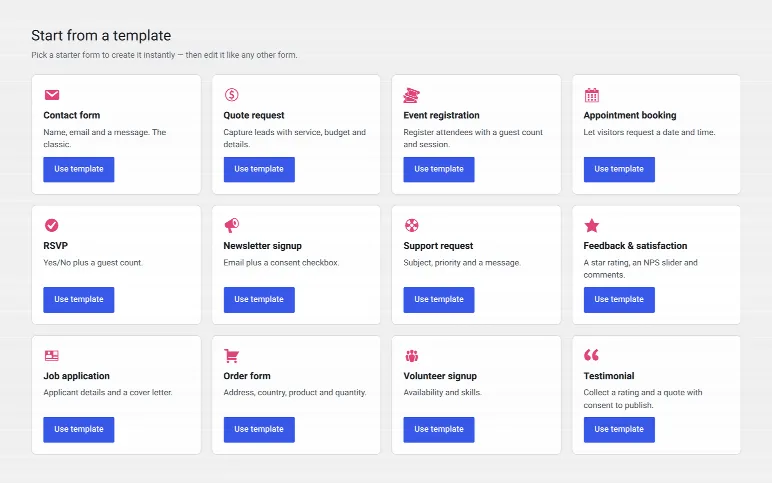
Twelve ready-made templates: contact, quote, booking, RSVP, job application, order form and more.
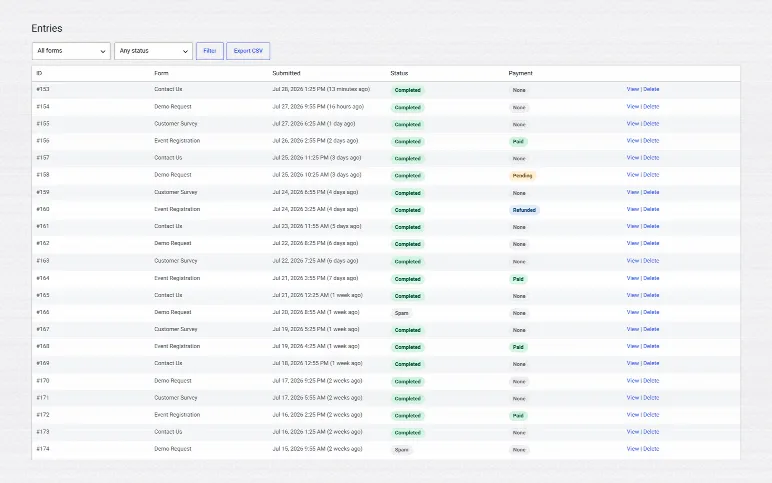
Entries: everything people send, kept in your own database, easy to filter, search and export.
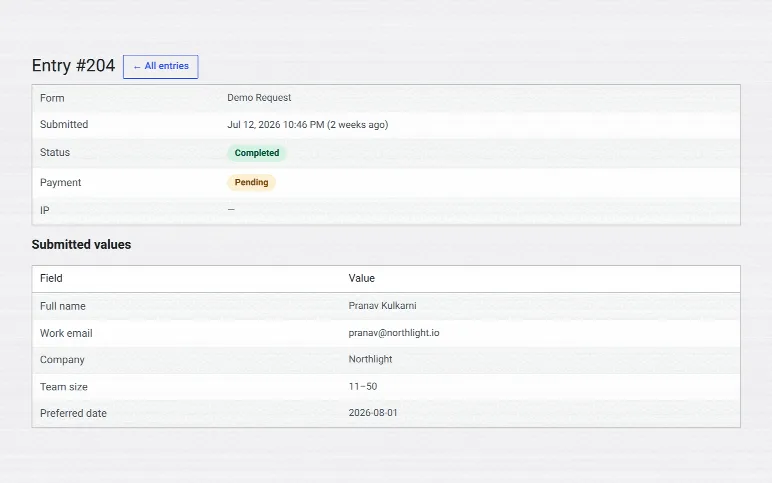
One entry: every answer, private team notes, the details of where it came from, and what happened to it.

Real screens from the plugin, on a demo site.

50% off · limited offer

Founders price: half off, and it stays that way

Be one of our first 100 customers and pay 50% less on any yearly plan or bundle. Not just year one: your renewals stay at half price for as long as you keep the plan. Ends Dec 31, or sooner if the spots run out.

Every plugin, yearly plans and bundles · first 100 customers · stays on renewals · ends Dec 31
FOUNDERS50
Pick a plan →

Built for the WordPress shops that ship things

Agencies Freelancers Membership sites Donation pages Course creators Local businesses
What's inside

A complete form builder, free. Payments when you're ready.

32 field types, a 12-form template library, a full entry workflow, an importer for your Gravity Forms data, survey results & quiz scoring, conditional logic, native entry storage with CSV export, email notifications, and spam protection — all free. Stripe + PayPal payments and integrations live in Pro.

Drag-and-drop builder Free New in 2.0

Build in the Gutenberg editor you already know, or switch on the new visual builder — a dedicated drag-and-drop canvas where you drop fields into place, reorder, undo/redo, and start from 12 ready-made templates. 32 field types, per-field validation, and merge-tag preview — no submission caps, ever.

Conditional logic Free

Show, hide, and skip fields based on prior answers. All-of / any-of matching with eight operators — part of the free builder.

Entry storage + CSV export Free

Every submission stored in your own database, with a searchable admin entries view and CSV export (injection-guarded). Optional per-form retention policies keep things lean.

Stripe + PayPal payments Pro

Hosted Checkout means PCI is out of scope. Webhook-verified and signature-checked. If your license lapses, existing payment forms keep taking payments, with no time limit.

CRM & marketing integrations Pro

Mailchimp, MailerLite, Brevo, ConvertKit, Zapier/Make, Google Sheets, plus a generic HMAC-signed webhook out. Run async via Action Scheduler so submissions never block.

Spam without the friction Free

Honeypot, time-trap, and your pick of Cloudflare Turnstile, Google reCAPTCHA, or hCaptcha — all free. No checkbox CAPTCHAs in front of your visitors unless you want one.

The wedge

Forms keep submitting if your license lapses.

Most plugins quietly disable submissions when payment lapses. We do the opposite. The free builder, entry storage, notifications, and CSV export are always on. If your Pro license lapses, Pro keeps working as normal for 30 days. After that, adding new Pro fields and features locks, but your forms keep every Pro field they already have, and Stripe and PayPal forms keep taking payments. Submissions, notifications, and entries never stop.

  • Existing payment forms keep taking payments, no time limit
  • Email notifications keep firing on lapsed installs
  • Entry storage and CSV export never break
  • One-click reactivation when you renew
Donation form · live preview
Full name
Email
Amount
$25$50$100Custom
Built into Gutenberg

Use the editor you already know.

Trinity Forms registers as a restricted block palette — no learning a custom React builder, no separate UI to maintain. Drop in any of the 31 free field blocks, set required, validation, conditional rules, and ship.

  • 31 free field blocks, plus signature, payment and repeater in Pro
  • Per-field validation, masking, and merge-tag preview
  • Block-level conditional logic with all-of / any-of matching
  • Multi-step via the Page Break block
Block palette · Text Email Select Payment +16
Subject
Message
Conditional rules:
If country = US show State
What you get

A real free tier. Honest Pro pricing.

A builder that's actually free

Conditional logic, entry storage, CSV export, and notifications ship in the free version — not locked behind a $200+ "Pro" upgrade like the big form plugins.

A lapse never breaks a live form

If a Pro license lapses, your payment forms keep taking payments and your Pro fields keep working, so a live campaign never breaks mid-flight.

Entry retention built in

Automatic cleanup policies keep your submissions table — and your GDPR obligations — under control, free, with no add-on required.

Watch it work

A short, silent walkthrough — real screens, no narration.

Demo video: Trinity Forms — build a WordPress form with conditional logic

Prefer YouTube? Watch it there instead.

See it in action

Real screens from the plugin — not mockups.

The Visual Builder: add fields from the left, set them up on the right, and see the form as visitors will.
Entries: everything people send, kept in your own database, easy to filter, search and export.
Twelve ready-made templates: contact, quote, booking, RSVP, job application, order form and more.
One entry: every answer, private team notes, the details of where it came from, and what happened to it.
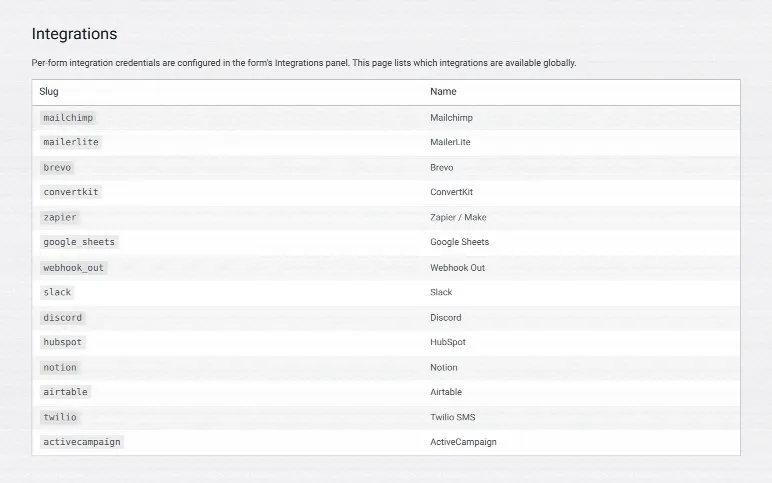
Integrations: send entries on to your email tool, CRM, team chat, spreadsheet or automation service.
ProIntegrations: send entries on to your email tool, CRM, team chat, spreadsheet or automation service.
Free vs Pro

What's free, what's Pro.

The free builder is a complete form tool: it stores and shows your entries, with no submission caps. Pro adds payments, advanced fields, and integrations — the parts you only need once you're collecting money or scaling up.

Feature Free
Direct download
Pro
from $49 $24.50/yr
Build & fields
Drag-and-drop builder✓✓
32 field types (text, email, select, date, name, phone, address, country, rating, product, quantity, total…)✓✓
12-form starter template library✓✓
Unlimited forms, fields & entries✓✓
Logic & entries
Conditional logic (uncapped — no condition or step limit)✓✓
Native entry storage in your WordPress database✓✓
Admin Entries view to read submissions✓✓
CSV export✓✓
Survey results report & quiz scoring✓✓
Notifications & spam
Email notifications✓✓
Spam protection (Turnstile, reCAPTCHA, hCaptcha + honeypot)✓✓
Payments & integrations
Payments — Stripe & PayPal—✓
CRM / marketing integrations—✓
Zapier / Make + Google Sheets—✓
Advanced fields & flow
Multi-step forms (page-break field)✓✓
File upload (kept private, only admins can download)✓✓
Signature, repeater & calculation fields—✓
Save & resume (partial submissions)—✓
PDF export of submissions—✓
Frontend public submissions table ([trinity_forms_submissions])—✓

✓ Upgrading keeps everything: install Pro over the free version — same plugin, same database — and all your forms and entries carry over. No reinstall, no data loss.

Build your first form this afternoon.

The free version is a direct download from us — the full builder, conditional logic, entry storage, and notifications. Pro starts at $49/year and adds payments and integrations. No transaction fees, no aggressive lapse behavior.

Comparing builders? Read our honest, hands-on write-ups: Contact Form 7 alternative · WPForms vs CF7 · Gravity Forms vs CF7 · the best form builder plugins

Changelog

What's new in Trinity Forms

Every stable release, newest first.

  1. v2.9.0Oct 12, 2026
    • New: the File upload field is free. Visitors can send a CV, a photo or a document with any form. Files are kept in a private folder outside the public web, and only people who can manage forms can download them. You choose the allowed file types, a size limit, and whether more than one file is allowed.
    • New: Spanish and Korean translations ship with the plugin. If your site language is Español or 한국어, the admin screens, the form builder and the editor blocks now show in your language. Nothing to set up.
  2. v2.8.1Oct 9, 2026
    * Fixed: the star icon on the Star button sat below its label on a single entry.
  3. v2.8.0Oct 9, 2026
    • New: a cleaner admin. Every screen has a clear header, the forms list shows live forms, entries and unread at a glance, and the entries list is compact and easy to scan.
    • Improved: the form builder shows every field the same way, full width and the same height, on one clean page. Fields set to half or a third of the width now sit side by side in the builder, as they will on your site.
    • Improved: forms look better out of the box. Every box has the same height and border, first and last name sit side by side, the address is laid out in rows, dropdowns are no longer grey, and the slider uses the full width.
    • Improved: the Rating field shows stars instead of numbered buttons.
    • Fixed: "Mark unread" on an entry did nothing.
    • Fixed: the forms list showed "0% completion" for forms whose entries came in before views were counted.
  4. v2.7.0Oct 9, 2026
    • Fixed: a field whose type isn't recognised (for example from an add-on you switched off) is now saved as plain text instead of exactly as it was posted.
    • Changed: what happens when a Pro licence ends. Pro now checks the licence once a day. After it expires, Pro keeps working as normal for 30 days and your dashboard shows when that ends. After those 30 days the Pro tools in your dashboard lock, but everything you already set up keeps working for your visitors. A refunded or cancelled licence locks the dashboard tools straight away. Updates, including security fixes, need an active licence. With Trinity Forms, forms keep every Pro field they already have, payments keep taking money, and save and continue later keeps working. You can still edit those forms; only adding new Pro fields and features is locked. This replaces the old 15-day grace for payment forms.
    • Fixed: saving a form while Pro was inactive switched off "Save and continue later" without asking.
  5. v2.6.0Oct 5, 2026
    • New: the Visual Builder now shows the form's shortcode with a Copy button. Creating a form from a template used to drop you into the builder with no way to find out how to put it on a page.
    • New: deactivating the plugin asks one optional question about what went wrong. Answering is optional, skipping deactivates straight away, and nothing from your site content is sent.
  6. v2.5.0Sep 15, 2026
    • Fixed: the Signature field could not be signed. It now draws with a mouse, pen or finger and has a Clear button.
    • Fixed: Chained Selects set up in the Visual Builder lost their line breaks, so visitors saw "No data configured for this field yet".
    • Fixed: repeater answers were saved but showed empty on the entry screen, in the PDF, in the CSV and in emails.
    • Fixed: abandoned partial entries appeared on public Views, in All and in exports, stayed behind as a second entry after the visitor submitted, and could be reused by the next person on the same device. Views now show only completed and approved entries.
    • Changed: a new View is visible to logged-in users by default, and name, email, phone and address fields start unticked.
    • Fixed: an emailed edit link kept working after it had been used. It now stops working once the entry is edited through it. The single-entry page confirms the save.
    • Fixed: {entry_edit_url} gave no hint that it needs a published View with editing on. Saving a notification that uses it without one now warns you, and the merge-tag list explains it. The View block counts as that page too.
    • New: Pending review tab and bulk Approve / Reject on the Entries screen, with a notice after approving. Results and the forms list count approved entries.
    • Fixed: with the licence inactive, pages showed the raw [trinity_forms_view] shortcode, Views and Integrations gave errors, and nothing said why. A notice now explains, Views hide quietly and Integrations shows a locked screen.
    • Fixed: "Test connection" blamed the credentials even when a token box was empty or the server could not reach the service. It now says which.
    • Fixed: a Stripe secret key with the right prefix but wrong value was accepted and only failed when a customer paid. New keys are checked with Stripe on save. If a payment cannot start, the visitor is told nothing was charged and the site admin gets an email (once an hour).
    • Fixed: Webhook Out saved a URL it would refuse to call without saying so. Currency is now a list, and payment and account pickers only offer fields that fit. The Visual Builder links to the AI assistant. The PDF header shows the date, and account creation is in the activity log.
    • Fixed: the Stripe key check on save let every key through, and it no longer calls Stripe when settings are updated by code. The Webhook Out card now says when its URL will not send, right in the form editor.
    • Also includes every free-build fix in this release.
Older releases (19)
  1. v2.4.2Sep 14, 2026
    • Fixed: with another JnK plugin active, the whole site could stop loading. The bundled licensing client is now safe to load twice (SDK 1.5.1). A refused activation explains itself instead of "Internal server error", and activating clears the key prompt without a reload.
    • Fixed: "Hold for review" and "Capture partial entries" could not be switched on, so the approval workflow and abandoned-form capture were unusable. Both save now.
    • Fixed: editing an entry from a front-end View never saved, and emailed magic edit links landed on the home page. Both work.
    • Security: uploaded files were stored in the public uploads folder under their original names and could be downloaded by anyone with the address. New uploads are kept outside the web root and served only through signed links for logged-in admins. Files uploaded before this release stay where they are.
    • Fixed: signed webhooks sent the header "X-Trinity Forms-Signature", which is not a valid header name, so receivers could not verify them. It is now X-TrinityForms-Signature. Update any receiver that checks the old name.
    • Fixed: premium fields (formula, file types, repeater sub-fields, chained selects, payment amount) could only be configured in the block editor. They have settings in the Visual Builder too.
    • Fixed: payment and integration keys were saved without checking them, and some were shown back as ciphertext. Bad Stripe and Mollie keys are refused with a clear message.
    • Fixed: the payment summary showed 0.00 for a fixed charge (and appeared with payments off); rich text showed raw HTML in emails, the PDF and Views; entry and file rows showed server paths; a skipped integration was logged as "ran"; "Test connection" gave no reason; the AI assistant hid the reason it could not run.
    • Improved: Save & continue asks for the email in the page instead of a browser prompt and says when answers were restored; the repeater has a working default row; the landing page shows its address and loads only what it needs; conversational mode explains a required question; duplicate field labels are numbered; an unlicensed install shows locked Pro fields instead of looking like the free build.
    • Also includes every free-build fix in 2.4.2.
  2. v2.4.1Sep 11, 2026
    * Security: licence responses are now signature-verified in the plugin. A tampered or unsigned verdict is rejected instead of trusted.
  3. v2.4.0Aug 29, 2026
    Rich Text field and form landing pages (Pro)
  4. v2.3.0Aug 28, 2026
    Entries become a workflow: All/Unread/Starred/Spam/Trash tabs, search, bulk actions, private notes, an activity log, editable entries and a print view. Import forms, fields, logic, notifications and entries from Gravity Forms with original dates, after a dry run. Ten more field types including a server-computed pricing set. Conditional logic gains seven operators, real date comparison and nested groups. Form scheduling, entry limits, login requirement and several conditional confirmations. Pro adds Views, partial entries, user registration, geolocation and moderation.
  5. v2.2.4Aug 12, 2026
    Results report charts option labels; merge-tag wording no longer suggests {field_id}
  6. v2.2.3Aug 12, 2026
    Reply-To on notifications, who-sent-it in the entries list, readable field ids and menu naming
  7. v2.2.2Aug 11, 2026
    Notifications panel now lists the form's real merge tags, click to copy
  8. v2.2.1Aug 11, 2026
    Fixes block-editor form settings being discarded; new forms ship with an admin notification; choice-field alignment
  9. v2.2.0Jul 30, 2026
    Getting-started card on a fresh install, empty states that name the next step, and one plain line in the form editor describing what Pro adds. Pro: licence activation now explains how to fix a failure, trims pasted keys, and keeps its success message.
  10. v2.1.0Jul 29, 2026
    New forms open in the drag-and-drop Visual Builder (existing forms are untouched); colour-coded Status/Payment columns on the entries list; field-settings panel spacing fixed.
  11. v2.0.1Jul 26, 2026
    * Fixed: the "Allow save & continue later" option no longer appears in the form editor on the free plan — it required Trinity Forms Pro and had no effect without it.
  12. v2.0.0Jul 20, 2026
    2.0.0 — opt-in Visual Builder (drag-and-drop canvas), retention & merge-tag fixes, feedback page
  13. v1.5.3Jul 16, 2026
    Consistent author branding and new Settings, Upgrade, Docs and Support links on the Plugins screen; Pro adds a license-state link (Manage / Renew / Activate). No functional changes.
  14. v1.5.2Jul 13, 2026
    Bundled SDK sync: fix fatal when multiple JnK Pro plugins are active
  15. v1.0.7Jul 5, 2026
    Fix broken Upgrade/Feedback admin links and restore the Trinity Forms integration (EntryVault).
  16. v1.0.6Jul 5, 2026
    Point bundled SDK at api.jnkplugins.com (platform domain migration).
  17. v1.0.5Jul 2, 2026
    Rebranded to Trinity Forms. Hardened for the WordPress.org review: enqueued the form-editor CSS/JS, tightened input and file-upload sanitization, and restricted management endpoints to administrators.
  18. v1.0.4Jun 30, 2026
    Fixed: entries CSV export now downloads a valid CSV file (was an unusable, double-encoded download).
  19. v1.0.3Jun 23, 2026
    Maintenance release 1.0.2 — bug fixes & accessibility improvements (QA update-path test).

Get the useful ones

Occasional posts on WordPress internal linking, forms and entry management — plus release notes. No sequences, no upsell drip, unsubscribe in one click. We send one email to confirm it is really you.

We store your address ourselves and never sell or share it. Privacy.